
Measuring how fast and how accurately you type
Typing speed is one of those skills people assume they know but have never actually measured. This page puts a passage on screen, starts a timer when you press the first key, and tells you your speed in words per minute along with your accuracy. Characters turn green or red as you go, so you can see mistakes the moment they happen. Nothing you type is sent anywhere, and the only thing saved is your best score, stored in your own browser.
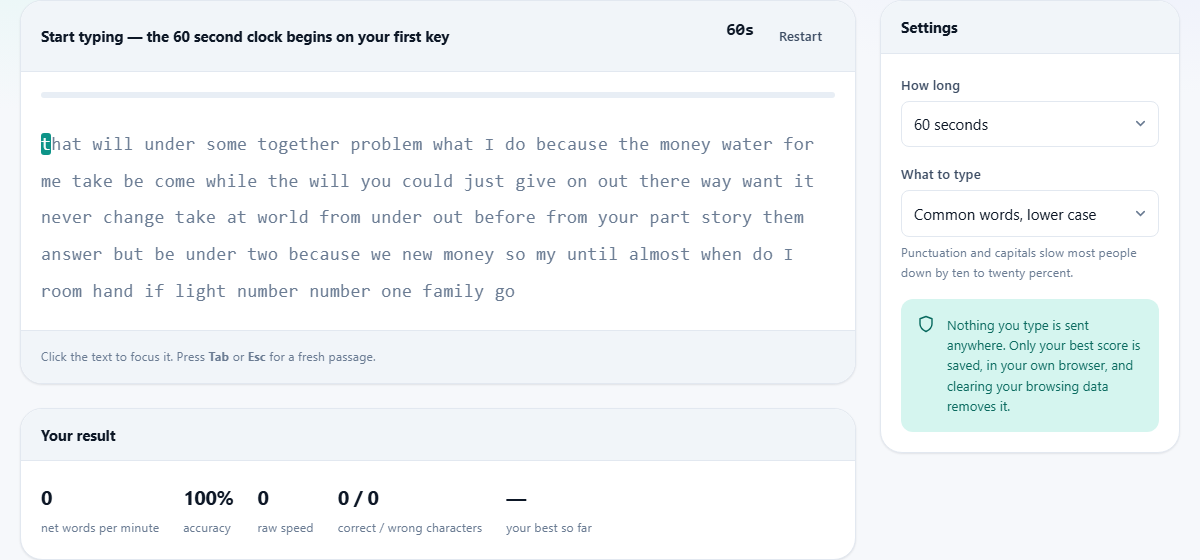
What the test measures
The test produces two numbers. The first is your net speed in words per minute, which counts only the characters you typed correctly. The second is your accuracy, shown as a percentage. Together they give a fair picture of how useful your typing is in practice, because raw speed without accuracy means a lot of time spent fixing mistakes.
There is also a raw speed figure that counts everything you typed, right or wrong, before corrections are subtracted. Comparing the raw and net numbers tells you how much of your effort is being wasted on errors. If the two are close together, your accuracy is good. If the raw number is much higher than the net, slowing down slightly will usually raise the net score because fewer mistakes means less waste.
Who benefits from a typing test
Students and job seekers are the most common visitors. Many employers ask for a typing speed on an application, and having an honest number ready is better than guessing. Data entry roles, transcription work and customer support jobs often have a minimum speed requirement, typically around 40 to 60 words per minute with high accuracy.
People who already type for a living use a test like this to track improvement over time. Switching to a new keyboard layout, learning to touch-type after years of looking at the keys, or recovering from an injury all change your speed, and regular testing shows whether the new habit is paying off. Writers and programmers who spend hours at a keyboard each day sometimes take a test once a month just to keep a baseline.
How words per minute is calculated
Typing speed has used a fixed definition for over a century. One word equals five characters, including the space after it. The word the counts as less than one standard word, while the word photography counts as more than two. This rule exists because a test that counted actual words would give wildly different scores depending on how long the words in the passage happened to be.
Your net speed takes the number of correctly typed characters, divides by five to get standard words, then divides by the number of minutes that elapsed. The result is directly comparable with any other typing test that follows the same rule, which is nearly all of them. A score of 60 here means the same thing as a score of 60 anywhere else.
Every setting on the page
The How long dropdown sets the test duration. The options are 15 seconds, 30 seconds, 60 seconds, 2 minutes, and no limit, which runs until the text runs out. The default is 60 seconds, which is the most widely used duration for comparing scores. Shorter tests tend to produce higher figures because you have not had time to tire, so keep the duration consistent if you want to track progress.
The What to type dropdown controls the difficulty of the passage. Common words, lower case presents random everyday words with no capitals or punctuation. Words with capitals and punctuation adds both, which slows most people down by ten to twenty percent. A full sentence gives you a complete piece of prose, which feels more natural but is harder because you must match the exact capitalization and punctuation of the original.
Reading the results
The results panel shows five figures. Net words per minute is the headline score, the number most people care about. Accuracy is the percentage of characters you got right. Raw speed is everything you typed before errors are subtracted. Correct and wrong characters gives you the exact counts. Your best so far records the highest net speed you have achieved in any test on this device, saved in the browser.
The best score persists across visits but stays on this device only. Clearing your browsing data will remove it. There is no account and no leaderboard. The number is there for your own reference, so you can see whether today's test improved on last week's.
How the live feedback works
As you type, each character in the passage turns green if you got it right or red if you got it wrong. The cursor moves forward with every keypress. You can press backspace to go back and fix a mistake, which costs you time but saves your accuracy. Leaving a mistake costs you both time and accuracy, because the wrong character stays red and does not count toward your net score.
The speed and accuracy numbers update in real time while you type. Watching them is a useful feedback loop: you can see the moment your accuracy starts to drop, which usually happens when you push past your comfortable speed. Easing off by a few words per minute often raises the net score because the accuracy jumps back up and more characters count.
A walkthrough of a typical test
Leave the settings at their defaults: 60 seconds and common words, lower case. Click anywhere on the passage text to focus the input. The status bar reads Start typing and the clock shows 60 seconds. Begin typing the first word. The clock starts the moment you press the first key, so there is no rush to get ready.
Type steadily through the passage. If you make a mistake, decide quickly whether to backspace and fix it or push on. When 60 seconds are up, the test stops automatically and the final results appear. Check the net speed and accuracy. If you want another go, press Restart or tap Tab to get a fresh passage. Try a few rounds and notice whether your score goes up as you warm up.
Tips for getting a higher score
The single biggest improvement for most people is to stop looking at the keyboard. It feels slower at first and takes about a week to feel normal, but it removes the constant up-and-down eye movement that slows everything down. Your fingers already know where the keys are from years of use; your eyes just need to trust them.
Accuracy matters more than raw speed. A score of 70 words per minute at 99 percent accuracy is a better net result than 90 words per minute at 85 percent accuracy, because the second typist is wasting a large share of their effort on characters that will not count. If your two numbers are far apart, slowing down by five to ten percent usually produces a higher net score immediately.
Privacy and data storage
Nothing you type is sent to any server. The passage is generated inside the browser, the timer runs inside the browser, and the results are calculated inside the browser. The only thing stored is your best score, which is saved in your browser's local storage on this device. Clearing your browsing data removes it. There is no account, no login, and no way for anyone else to see your results.
The page works entirely offline once it has loaded. You can disconnect from the internet, run the test, and the results will be exactly the same. This makes it suitable for use in classrooms or exam settings where internet access is restricted.
When another tool is the better choice
This page measures how fast you type on a physical or phone keyboard. If the question is about your display rather than your input speed, the screen info page reports resolution, refresh rate and pixel density. If you want to test whether a touchscreen responds across its full surface, the touchscreen test has a coverage grid designed for that. The speaker test covers audio output, and the sensor test checks the accelerometer and gyroscope on a phone.
For learning to type rather than measuring your current speed, a dedicated typing tutor with lessons and drills is a better starting point. This page tells you where you stand today. Improving from there takes practice, and the most efficient practice targets the specific keys or patterns you struggle with rather than repeating a general speed test.