
Understanding what frequencies your ears can pick up
How the sweep works, what the numbers mean at different ages, why your speakers might be the real limit, and how to get a result that tells you something genuine about your hearing rather than your hardware.
What a frequency is, in plain terms
Sound is vibration in the air. The number of times it vibrates each second is its frequency, measured in hertz. One hertz means one vibration per second. A thousand hertz is written 1 kHz.
Low frequencies sound deep. A bass drum sits around 60 Hz. High frequencies sound sharp and thin. A whistle might reach 4 kHz. The textbook range for human hearing runs from 20 Hz at the bottom to 20,000 Hz at the top, though almost nobody hears the full spread.
Speech sits between roughly 250 Hz and 6 kHz. That is the range evolution cared about most. Losing the very top of the range, above 10 or 12 kHz, rarely changes how well you follow a conversation. Losing the middle does.
How the sweep finds your ceiling
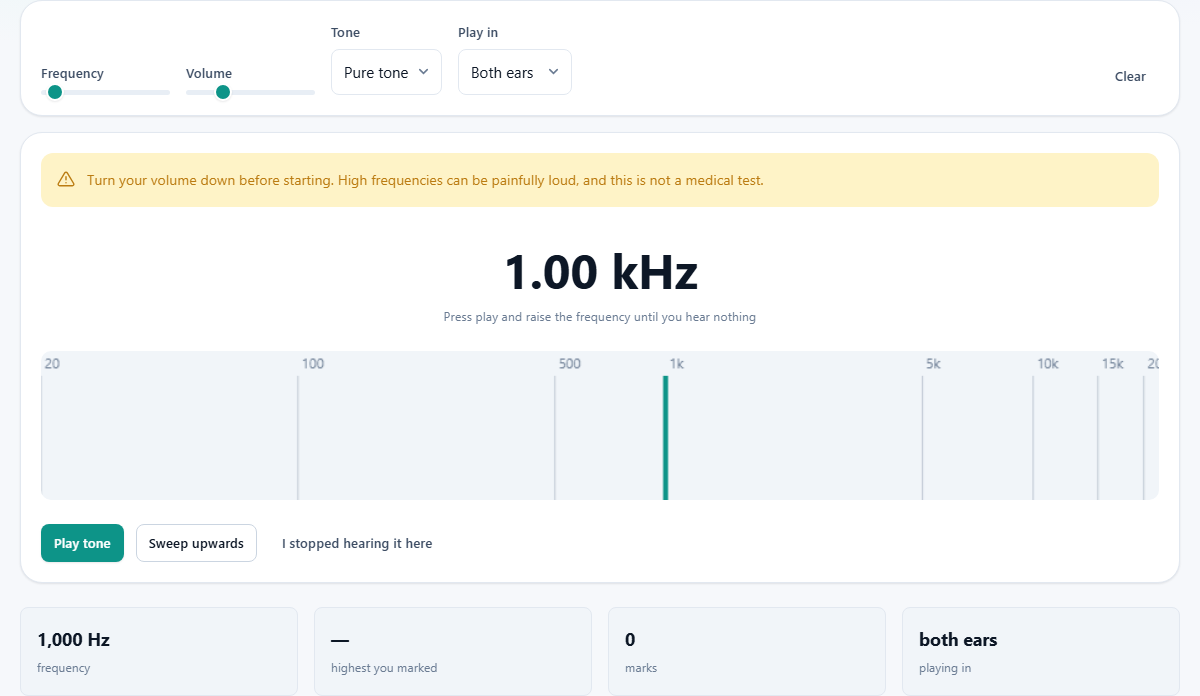
The page generates a pure tone using your browser's built-in audio engine. You control the frequency with a slider that runs from 20 Hz up to 22,000 Hz in steps of ten. A second slider sets the volume, starting at 25 percent.
There are two ways to use it. You can drag the frequency slider upward by hand, listening for the point where the sound fades out. Or you can press Sweep upwards and let it climb automatically. When the tone vanishes, press I stopped hearing it here and the figure is recorded.
A small canvas below the controls draws what the speaker is actually putting out, so you can see that the tone is still playing even after you can no longer hear it. That visual check matters. If the canvas goes flat before you lose the sound, the problem is not your ears.
The controls and what each one does
Frequency sets the pitch. The number beside the slider updates as you drag. Play tone starts the sound at whatever frequency and volume you have chosen. Stop silences it.
Volume starts low for a good reason. A 15 kHz tone at full volume is painful. There is no benefit to a loud test. If you cannot hear it quietly, turning it up will not change where your hearing ends. It will just hurt getting there.
Tone offers three shapes. Pure tone is a clean sine wave and the right choice for a hearing check. Triangle adds a few overtones. Square adds many. The extras can make a frequency seem audible when only its harmonics are reaching you, so stick with pure tone for an honest result.
Play in lets you test both ears together or each one alone. Left only sends the signal to the left channel, right only to the right. This is the most useful part of the test: a big gap between ears is far more telling than a low overall number.
What to expect at different ages
A child under ten might hear past 19 kHz. A twenty-year-old typically reaches about 17 kHz. By thirty, that has often dropped to 15 or 16 kHz. At fifty, 12 kHz is common. At seventy, many people stop around 8 or 9 kHz.
This steady decline is called presbycusis. It is not damage. It happens because the tiny hair cells in the inner ear that detect the highest pitches wear out first and do not grow back. Noise exposure speeds it up, but even a quiet life does not stop it entirely.
The numbers above are rough guides. Genetics, diet, medication and cumulative noise all shift the curve. Two people the same age can differ by several thousand hertz, and neither result is necessarily a concern.
Your hardware sets a ceiling too
A laptop speaker typically rolls off above 12 to 15 kHz. Some stop well below that. If you test with built-in speakers and get a low result, you might just be measuring the speaker.
Bluetooth earphones introduce a second problem. Common codecs like SBC and AAC compress audio by discarding the highest frequencies. That saves bandwidth but it means the sound above 16 kHz may never reach your ears at all, regardless of how well you hear.
For a result that reflects your hearing rather than your gear, use wired headphones in a quiet room. Over-ear models tend to reproduce the high range more faithfully than small earbuds, but any decent wired pair is better than any wireless one for this purpose.
You can verify the setup by watching the spectrum canvas. If the line goes flat at a frequency you can still hear through other means, your output chain is cutting it off.
Testing each ear and what a difference means
Switch Play in to Left only and sweep up until the sound disappears. Press I stopped hearing it here. Then switch to Right only and repeat. Clear resets the recorded marks if you want to start fresh.
Ageing affects both ears at roughly the same rate. A gap of a few hundred hertz between them is normal. A gap of several thousand is not, and is worth mentioning to a doctor at your next visit.
One common false alarm: earwax. A blocked ear canal muffles high frequencies the way a blanket muffles a speaker. If one ear tests noticeably worse, cleaning it out and testing again sometimes closes the gap completely.
A worked example
A thirty-five-year-old opens the page on a laptop, plugs in wired headphones, and sets the volume to 30 percent. She presses Sweep upwards with Play in set to Both ears. The tone climbs steadily. At about 14,800 Hz she is not sure whether she still hears it or just thinks she does. At 15,200 Hz there is clearly nothing. She presses I stopped hearing it here.
She then switches to Left only and sweeps again. This time the cutoff is around 15,100 Hz. With Right only it is 14,600 Hz. The gap is about 500 Hz, which is small and unremarkable for everyday life.
She tries once more with Tone set to Square. Now she seems to hear something up past 17 kHz, but that is the harmonic content of the square wave, not her hearing extending. Switching back to Pure tone confirms the original reading.
Common mistakes that skew the result
- Testing with the volume too high. A loud tone is uncomfortable and does not extend the range you can hear. Keep the slider at 25 to 40 percent.
- Using laptop speakers and treating the number as gospel. The speaker gave up before your ears did. Switch to wired headphones and test again.
- Running the sweep in a noisy room. Background noise masks high frequencies. A quiet room with the door shut makes a real difference.
- Using a square or triangle wave instead of pure tone. The extra harmonics trick you into thinking you hear a higher frequency than you really do.
- Comparing today's result to one you took on different hardware. A different pair of headphones can shift the apparent ceiling by a kilohertz or more.
- Panicking over a low number. A healthy fifty-year-old who gets 12 kHz is perfectly normal. Check the age table before worrying.
What this is not
A clinical hearing test, called an audiogram, measures something different. It finds the quietest volume you can detect at each of several frequencies, not merely whether you can hear a loud tone at all. It uses calibrated equipment in a soundproof booth, and it covers the whole range from low to high, not just the top end.
This page cannot replace that. It has no way to calibrate the volume reaching your ears, no way to block ambient noise, and no way to test how quietly you hear at 500 Hz or 2 kHz. What it can do is give you a rough sense of where your high-frequency hearing drops off, and whether the two ears agree.
If the result surprises you, or if one ear is clearly worse than the other, see an audiologist. They have the equipment and the training to tell you what is going on.
All of it stays on your device
The tone is generated inside your browser using its built-in audio oscillator. No audio is recorded. No results are sent anywhere. There is no account, no server receiving your data, and nothing stored after you close the tab.
You can prove this yourself: load the page, disconnect from the internet, and run the sweep. Everything works exactly the same, because there was never a remote server involved. For something as personal as a hearing check, that matters.