
Turning a screen into a reliable eye chart
Why most online eye charts are useless, how calibrating with a bank card fixes the problem, what the different shape types and scoring systems mean, and how to get a reading you can actually compare over time.
The problem with every uncalibrated chart
An eye chart works because each line is drawn at a precise physical size. The rule is simple. The shapes on the line you can just read should cover five minutes of arc at your eye. Five minutes is one twelfth of a degree. That depends on two real-world numbers: how big the shapes are in millimetres and how far away you sit.
A web page knows neither. The same CSS pixel measures one size on a phone held at arm's length and a completely different size on a 27 inch monitor across the room. Without both measurements the chart is just a picture. It might as well be a photograph taped to the wall. Any result it gives you is a guess dressed up as a score.
Calibrating with a bank card
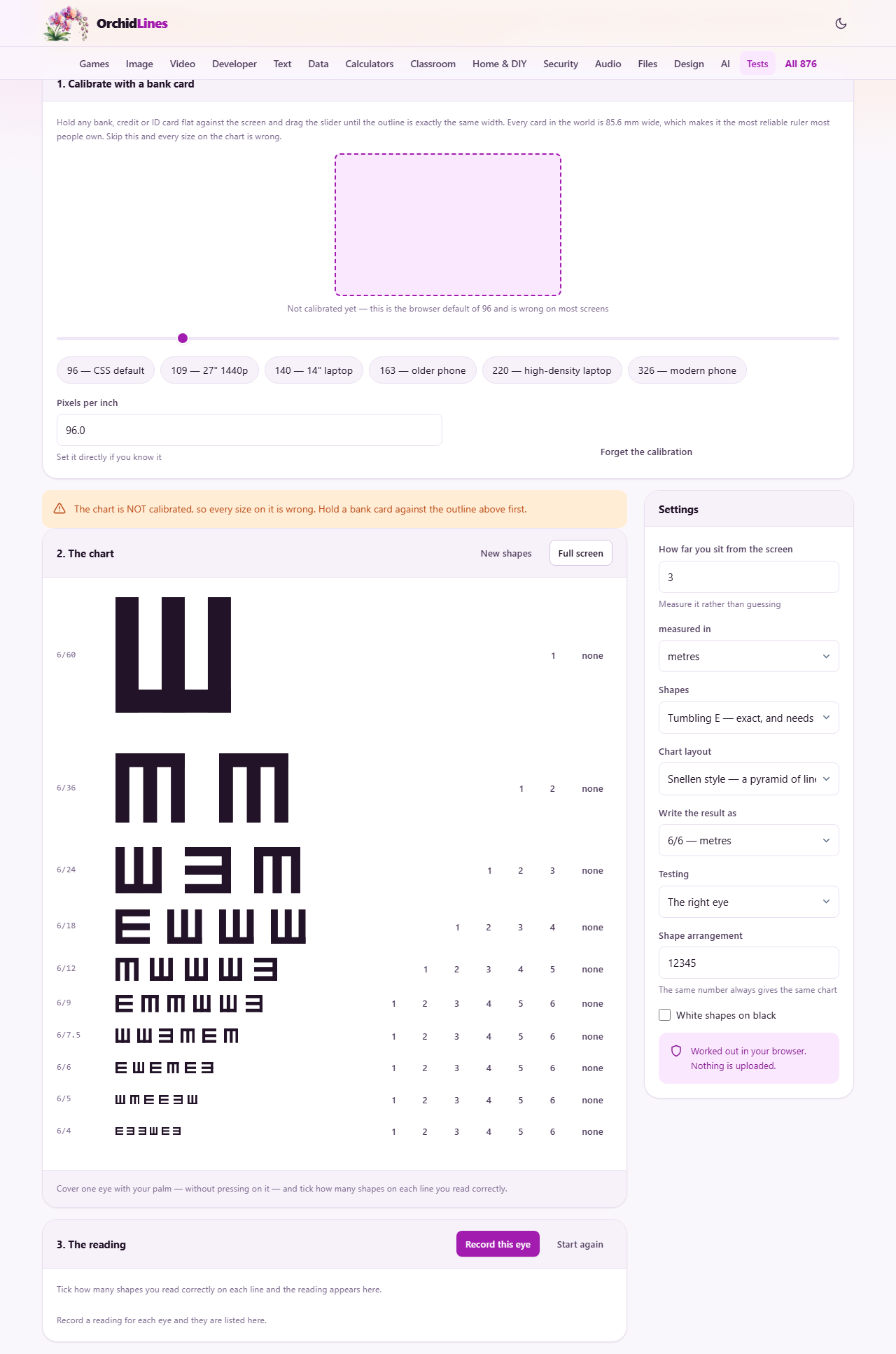
Every bank card, credit card and national ID card in the world is 85.6 mm wide. That makes it the most reliable ruler most people own. Hold it flat against the outline on screen and drag the slider until the outline matches the card exactly.
What you are really doing is telling the page how many pixels fit into a known physical distance. From that it works out the true size of one pixel on your display, and from there it can draw every line on the chart at the exact size the clinical standard requires.
If you know your display's pixels per inch already, type it into the field directly. The preset buttons offer common values for popular screen types: 96 for a standard desktop, 109 for a 27 inch 1440p panel, 140 for a 14 inch laptop, and so on. The card method is more trustworthy than any of these because it measures your actual screen rather than guessing from a spec sheet.
Measuring the distance
Type the distance between your eyes and the screen into the settings panel. Use a tape measure. Three metres is comfortable for a laptop or a desktop monitor. Getting this number wrong shifts the result by exactly as much as getting the calibration wrong.
The unit dropdown accepts metres, centimetres, feet and inches. Pick whichever your tape measure shows. Converting in your head adds one more place for errors to creep in, and the chart does the conversion for you anyway.
Sitting too close packs more detail into a smaller area and makes the chart easier. Sitting too far means the smallest lines may need finer pixels than your display can produce. Two to four metres is the range the tool is designed for.
Choosing the shapes
Four shape types are available in the Shapes dropdown. Tumbling E is the default and the most trustworthy. It is a block letter E pointing one of four directions: up, down, left or right. It needs no reading ability at all, which makes it suitable for children and for anyone who does not read the Latin alphabet. It is also drawn as pure geometry rather than typeset from a font, so it avoids the hinting and smoothing a font engine adds.
Landolt C is a ring with a gap, used in laboratory settings. The gap points in one of four or eight directions and you report which. Letters are the familiar chart you see on a wall in an optometrist's office. Numbers are an alternative for people who find letters easier to read at a distance.
For a comparison you can trust, use the same shape type every time. Switching shapes between readings adds a variable that has nothing to do with your sight.
Snellen and logMAR layouts
The Chart layout dropdown offers two styles. Snellen is the traditional pyramid. The top line has one large shape. Each line below adds more shapes and makes them smaller. It is the chart people picture when they think of an eye test.
LogMAR puts exactly five shapes on every line and steps the sizes in equal jumps. Because each line has the same number of items, the score can count individual shapes rather than whole lines. That makes it more precise. Clinical research tends to use logMAR for this reason.
For a quick home check, either layout works. If you want to track a small change over months, logMAR gives you a finer scale to compare against.
Taking the reading
Cover one eye gently with your palm. Do not press on the eyeball. Pressing distorts the cornea and temporarily blurs the vision in that eye, which will give you a false result when you switch sides. Work down the chart and tick how many shapes you read correctly on each line. When you reach a line where you can only guess, stop.
Press Record this eye to save the reading, then switch to the other eye in the Testing dropdown and repeat. The history panel keeps both results side by side so you can compare left and right. Press Start again to wipe the history and begin a fresh session.
The result is written in whichever notation you chose. The options are 6/6 in metres, 20/20 in feet, logMAR, or a plain decimal. All four say the same thing in different units. Pick the one your optometrist uses so that comparing is straightforward.
What the numbers mean
In the 6/6 system the top number is the distance you sat from the chart. The bottom number is the distance at which a typical healthy eye could read that same line. So 6/12 means you needed to be at six metres to read what most people manage from twelve. That sounds alarming, but it is a mild result that many people walk around with and never notice.
20/20 is the same idea in feet. Neither is a maximum. Plenty of healthy young eyes read 6/5 or 6/4, which is sharper than the supposed normal. A chart that stops at the 6/6 line tells you nothing about people who can see past it.
LogMAR runs in the opposite direction. Zero is the baseline, negative numbers are better than average, and positive numbers are worse. A decimal of 1.0 corresponds to 6/6. Researchers and clinics favour logMAR because the step between each line is the same, making it easier to track small changes.
Faded lines and screen limits
Below a certain size the shapes need finer detail than your display can produce. Those lines appear faded on the chart. Reading one proves nothing about your eyes, because the shape is already blurred by the pixel grid before it reaches you.
A higher resolution display pushes that limit further down. On a phone with 326 pixels per inch the chart can reach smaller lines than on a 96 pixel per inch desktop monitor. But at some point every screen runs out of pixels, and no calibration can fix that.
If most of the chart is faded, sit further back. A greater distance means the same angular size needs a larger physical shape, and larger shapes need fewer pixels.
Practical tips for a useful check
- Keep your usual glasses or contacts on unless you specifically want to know how things are without them.
- Good, even lighting on the screen helps. Glare and reflections make shapes harder to read for reasons that have nothing to do with your sight.
- Press New shapes between left and right eye so you cannot recite the chart from memory.
- The seed field controls which shapes appear. Using the same seed every time gives you the same chart, which is useful if you want to track changes over months.
- Treat a difference of one line between readings as noise. Brightness, fatigue and screen quality all shift the result by that much.
- Do not use this as a reason to skip a real eye examination. A screen check cannot find disease, cannot measure astigmatism and cannot give you a prescription.
Your readings stay on your machine
Nothing about your vision or your calibration is sent anywhere. The readings live on the page for this visit only and vanish when you close the tab. The one thing kept between visits is the screen calibration itself, stored in your browser so you do not have to hold up the card again next time. Press Forget the calibration to clear even that. There is no account and no server storing your results.