
Every name that could be mistaken for yours
Typosquatting is the practice of registering domain names close enough to a real one that visitors arrive by mistake or by following a link they did not inspect carefully. This page builds the full list of candidates for any domain you own, labels each one by the trick it uses, and can score a suspicious name you have already spotted. This article explains every family of candidate, walks through the controls, and covers what to do with the results.
The families of lookalike names
Not all impersonation names are created the same way, and knowing the family tells you how the name would reach a visitor. The tool groups its output into labelled categories.
A letter missing produces names like examle.com from example.com. These are the ones people reach by sloppy typing. A letter doubled gives exampple.com. Two letters swapped gives exmaple.com. All three of these are genuine accidents that happen at the keyboard, and the people who register them are counting on real traffic that was meant for you.
A key next door replaces a letter with the one beside it on a keyboard layout. Typing f instead of g, or s instead of a, lands on a different name entirely. An extra key is the same idea but with an additional character inserted between two correct ones. These too are typing mistakes, and they happen most often on phones where the keys are small.
A different ending puts your exact name under another top-level domain. If you own example.com, then example.net, example.io, and example.co are all candidates. Nothing about the name itself is wrong, which is precisely why this family is so effective. A customer who half-remembers the ending will type the common one rather than the unusual one you actually use.
Characters from other alphabets
Several writing systems contain letters that are drawn identically to Latin ones. The Cyrillic letter that looks like a is a different character with a different code point, and a domain name that uses it is a different name. On screen, the two are impossible to tell apart without inspecting the raw bytes.
When the Characters from other alphabets checkbox is ticked, the tool generates candidates with these substitutions. Each one is shown alongside its punycode form, the ASCII string beginning with xn-- that the domain actually resolves to under the hood. A certificate log, a firewall rule, and a mail header will all show the xn-- version, not the pretty one, so the tool gives you both.
These names are never typed by accident. Nobody sits down at a keyboard and accidentally presses a Cyrillic a instead of a Latin one. They only ever arrive in a link, in a message or on a page, and that tells you exactly what they were created for.
Words bolted on and bit flips
The Words bolted on checkbox generates names like login-example.com, example-support.com, and examplepay.com. These are the names that appear in phishing messages pretending to be from your service. A customer who sees secure-example.com in a link may not think twice about it.
The One bit flipped checkbox is less obvious. It produces names where a single binary digit in one character has been inverted, turning one ASCII letter into a different one. This happens in nature when a cosmic ray or a memory error corrupts a single bit during a network transfer. The resulting domain name is valid and registrable, and a small number of people have been known to register the most likely bit-flip variants of popular sites and wait for traffic to arrive. Most users leave this checkbox off because the candidates are rarely convincing to a human reader, but they are worth knowing about for completeness.
The controls in detail
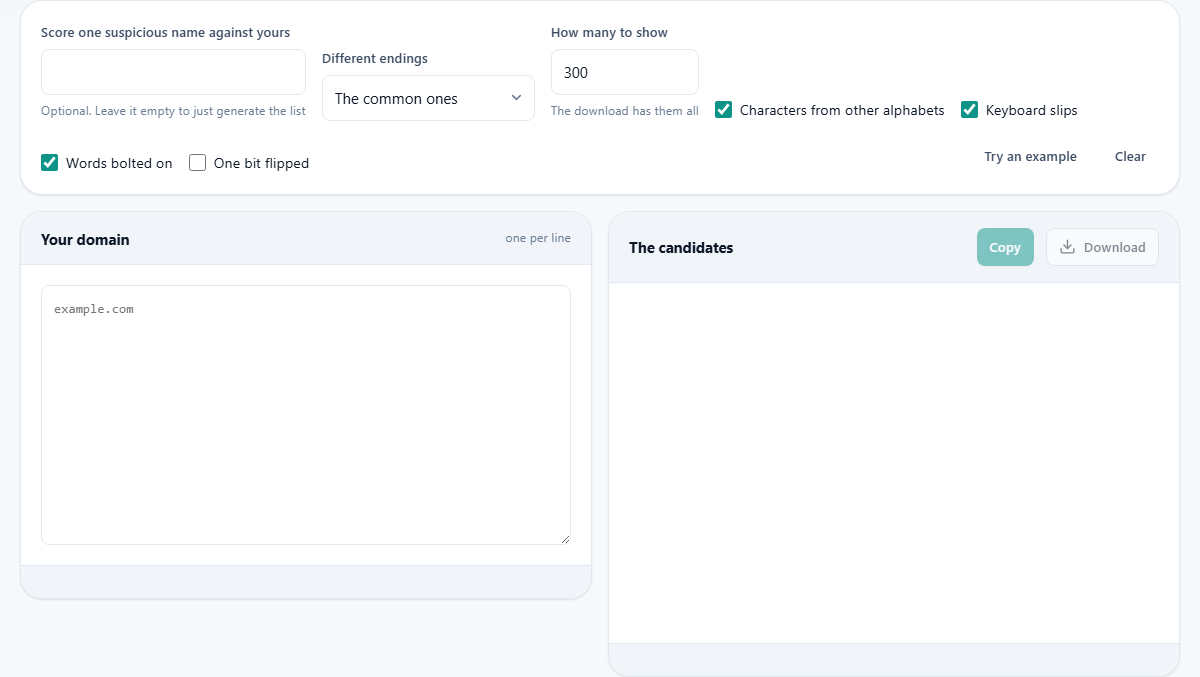
Type your domain into the left panel, including the ending. A full web address works too: the page strips the protocol, path, query, and www prefix automatically. You can enter up to ten domains at once, separated by lines, commas, or semicolons.
The Different endings dropdown has three settings. The common ones generates your name under the most widely used top-level domains. A much longer list adds country codes and newer endings. None keeps only your current ending and skips this family entirely.
How many to show is a number field with a default of 300. The page shows up to this many candidates grouped by family. The full set, which can run to several thousand, is always available in the download regardless of this limit.
The Score one suspicious name against yours field is optional. Type a domain you have already noticed and the page produces a detailed comparison at the top of the output. It reports the distance in characters, which alphabets the name uses, whether the two names share the same skeleton, and a risk score out of a hundred with written reasons for the rating.
Understanding the skeleton test
The skeleton of a name is what remains after every character that could be mistaken for another is folded down to the letter it imitates. The Cyrillic a becomes a Latin a. The digit 0 becomes the letter o. The pair rn becomes m, because at normal text sizes those two characters side by side are drawn the same as a single m.
When two different domain names have the same skeleton, they are visually identical. There is nothing on screen for even a careful reader to notice. This is the strongest signal the scoring system uses, and it drives the risk score higher than any other single factor. A name that passes the skeleton test against yours is one that cannot be spotted by inspection alone.
What to do with the output
The results appear on screen grouped by family, with a chip for each candidate. Names that use characters from other alphabets show their xn-- form next to the display form. The Copy button places the visible list on the clipboard, and the download saves a CSV file containing every candidate regardless of the display limit.
The page itself cannot tell you which names are registered. It has no network access and makes no lookups. The CSV is meant to be taken somewhere that can: a domain registrar's bulk search, a certificate transparency log viewer, or a monitoring service that watches for new registrations matching a pattern. The alert at the bottom of each result group says this plainly, and it is worth repeating because the most common mistake people make is to assume that a name on the list is a name that exists.
A walkthrough with a real domain
Click Try an example to load a sample domain. The tool generates several hundred candidates and groups them by family. Scroll through and notice the patterns. The a letter missing group is short, just the length of the name minus one. The keyboard slips group is much larger because each position has several neighbours. The other alphabet group, if enabled, is often the longest because each letter can map to several lookalikes from different scripts.
Now try the scoring feature. Type a slightly altered version of the sample domain into the suspicious-name field. The comparison panel appears at the top of the output with the risk score, the character distance, and a list of reasons. Try one that swaps a Latin letter for a Cyrillic one and the score will be high, with the skeleton match reported as the main reason.
Which names are worth buying
Nobody registers three thousand defensive domains. The practical approach is to buy the handful that a real customer would actually type by mistake. The most valuable is almost always your name under the most common global ending, because that is the one people default to when they cannot remember which ending you use. After that, the one or two single-character typos closest to a natural keystroke are worth owning.
For the rest, monitoring is the better answer. Set up alerts through a domain monitoring service or a certificate transparency watcher, and you will hear about a registration as it happens rather than discovering it when a customer complains.
When the tool is the wrong choice
This page builds candidates and scores names. It does not look anything up. If you need to know whether a specific domain is registered, who owns it, or what it serves, you need a WHOIS lookup or a DNS query. If you need ongoing protection, you need a monitoring service that watches for new registrations in real time. This tool is the first step, the one that tells you what to watch for, not the last.
Nothing is sent, nothing is stored
The domain you type, the candidates it generates, and the scoring results all stay inside your browser. No name is looked up, resolved, or transmitted. You can verify this in the network tab, and you can run the page offline after it loads. The CSV download is built in memory and saved directly to your device.