
Why a capital letter and a symbol are not enough
Most strength meters reward the wrong things. They count character types and call it a day, so a password built from a dictionary word with obvious swaps scores well even though every cracking tool on earth tries it in the first few seconds. This page looks at the patterns instead. This article explains what it checks, what the numbers mean, and what to do when the verdict is bad.
How attackers actually guess passwords
A real attack does not try random letters one at a time. It starts with a list of common passwords, runs through dictionary words, applies known substitution rules, appends years and short digit strings, and then tries keyboard walks. All of that happens before brute force, the exhaustive try-everything approach, even begins.
This means that the order in which a password would be found matters far more than the set of characters it contains. A twelve-character string of genuine random letters is harder to guess than a twenty-character phrase built from two common words and a year, even though the phrase is longer and technically draws from a bigger set. The checker on this page tries to think the way an attacker does, and that is why its verdicts sometimes disagree sharply with the green tick on a sign-up form.
What the page shows you
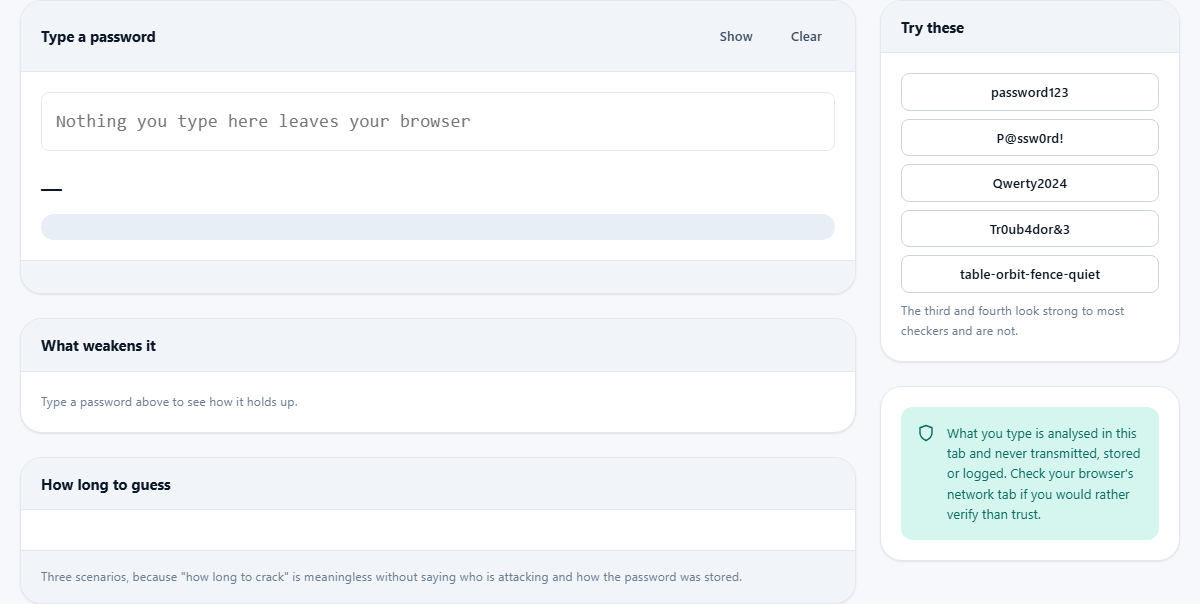
Type or paste a password into the field at the top. The analysis runs instantly, letter by letter, and the results appear in three panels below.
The first panel holds the verdict. It is a single word or short phrase, from Very weak through Weak and Reasonable to Strong and Very strong. A coloured meter bar fills in proportion. Below the bar, a row of small chips reports the raw numbers: the length in characters, the entropy in bits, the size of the character pool, and the total pattern penalty if any patterns were found.
The second panel, labelled What weakens it, lists every pattern the tool found and explains why each one helps an attacker. When no known weakness is detected, a green banner appears instead, noting that the strength comes from length and lack of patterns.
The third panel, How long to guess, shows three time estimates for three different attack speeds, because a crack-time number is meaningless without knowing who is doing the cracking and how the password was stored.
Entropy and why it matters
Entropy is a measure of how hard something is to predict. It is counted in bits. Each extra bit doubles the number of guesses needed to find the password by brute force. A password with 40 bits of entropy requires about a trillion guesses. One with 80 bits needs a trillion trillion, a number so large that even a fast computer cannot get through it in any practical time.
The page calculates a raw entropy score from the length and the character pool, then subtracts a penalty for every known pattern. A common word costs heavily because an attacker does not guess it letter by letter. A year on the end costs less but still matters. The final figure is the adjusted entropy, and it is the one that feeds the crack-time estimates and the verdict.
The three attack scenarios explained
The first scenario is an online attack against a login form that limits how fast you can guess. At around a hundred tries per second, even a weak password survives for days. This is the number most people think of when they imagine someone guessing their password, and it is the most forgiving.
The second scenario is an offline attack against a stolen database that used a slow hash function like bcrypt. The attacker has the file and can guess on their own hardware, but each check takes real work. The rate is roughly a hundred thousand attempts per second.
The third is the worst case. The database used a fast hash, and the attacker has a set of modern graphics cards. At ten billion guesses per second, a password that seemed safe online is cracked before lunch. This is not a made-up number. Published benchmarks from real hardware show exactly these speeds, and it is why the offline fast-hash column is the one that really matters.
Patterns the checker looks for
The tool scans for several families of weakness and reports each one it finds.
- Common passwords. A built-in list of the words that appear at the top of every breach compilation. If the password matches one, the verdict drops to the floor immediately.
- Dictionary fragments. Even a longer password that contains a well-known word inside it gets a penalty, because attackers try those words with prefixes and suffixes.
- Keyboard runs. Sequences like qwerty, asdf or 1234 are typed without thinking, and every cracking dictionary includes them.
- Repeated characters or repeated chunks. Three of the same letter in a row, or a short string that appears twice, both shrink the search space.
- A year at the end. Appending 2024 or 1990 is the most common way people try to strengthen a word, and attackers know it.
- The capital-word-number shape. Starting with an upper-case letter, continuing with lower case, and ending with a digit or symbol is the pattern almost everyone produces when forced to mix character types.
- Leet-speak substitutions. Swapping 0 for o, @ for a, or $ for s adds almost nothing, because cracking tools apply these rules automatically.
A worked example with the built-in samples
The sidebar offers five sample passwords you can load with one click. The third one, Qwerty2024, looks reasonable at first glance. It has a capital letter, lower-case letters, and digits. A simple character-type checker would call it acceptable.
Load it and the verdict here is Very weak. The details panel reports a keyboard run and a year at the end. The entropy after penalties is in the twenties, and the offline fast-hash scenario says it would be found in under a second. Every component is something an attacker tries early in any dictionary-based run.
Now try the fifth sample, table-orbit-fence-quiet. It uses only lower-case letters and hyphens. No capitals, no digits, no symbols. The verdict is Very strong. The reason is length and randomness. Four unrelated words chosen at random create a search space so large that no brute-force run will reach it, even without the tricks that complexity rules demand.
What the checker cannot see
The tool catches general patterns, but it does not know anything about you. A password made from your pet's name, your street, and your birth year will score well here and be guessed instantly by someone who has spent five minutes on your social media. Personal information is invisible to a pattern scanner because it is not on any public list.
Likewise, a very long random string will always score well, even if you wrote it on a sticky note and left it on your desk. The checker measures the password itself, not the system around it. Strength is a property of the whole setup: the password, where it is stored, whether it is reused, and how the service handles it on their end.
What to do when the result is bad
Do not try to fix a weak password by adding a symbol to the end. That changes the character pool without touching the underlying pattern, and the improvement is small. The better move is to generate a fresh password from scratch, ideally a random string or a random set of four or five words, and store it in a password manager so you never need to remember it.
A password manager solves the problem at the root. Each site gets its own long random credential, you only remember one master password, and the strength of every individual password depends on the generator, not on your creativity. The one password you do need to remember, the master, is the one worth testing here.
Show and Hide, and the habit of testing safely
The password field starts masked, showing dots instead of letters. The Show button on the right reveals the text so you can see what was typed, and pressing it again hides the text once more. The Clear button empties the field and resets every panel.
Although nothing on this page is transmitted or stored, it is a good practice not to type a password you actually use into any website. Test a variation instead. Change a word or a digit so the structure is the same but the exact password remains only in your head and your password manager. That habit removes even the theoretical risk of shoulder surfing while you check.
Everything stays on your device
The analysis happens entirely in your browser tab. No password, no keystroke, and no result is ever sent to a server. You can open the browser's network inspector and type anything you like without seeing a single outbound request. This also means the page works fully offline once it has loaded, which is worth trying if trust matters more than convenience.