
Reading What Is Really Inside an SSH Public Key
This article explains what an SSH public key line contains, how to use this inspector to decode it, what the fingerprint means, how line restrictions work, and which key types and sizes still hold up today.
What an SSH key line actually carries
An SSH public key looks like one long line of random characters with a label at the end. There is more structure than it appears. The line has three parts: an algorithm name such as ssh-ed25519 or ssh-rsa, a block of base64-encoded data, and an optional comment that is usually the email or hostname of whoever created the key. The base64 block decodes into a wire format where each piece is prefixed with its length. Inside that block sits the algorithm name again, followed by the numbers or points that make up the key itself.
Everything the inspector reports comes from reading that structure. The algorithm, the size, the fingerprint and any mismatch between the type written on the outside and the type packed inside are all derived from the same block of characters you paste in.
How to use the inspector
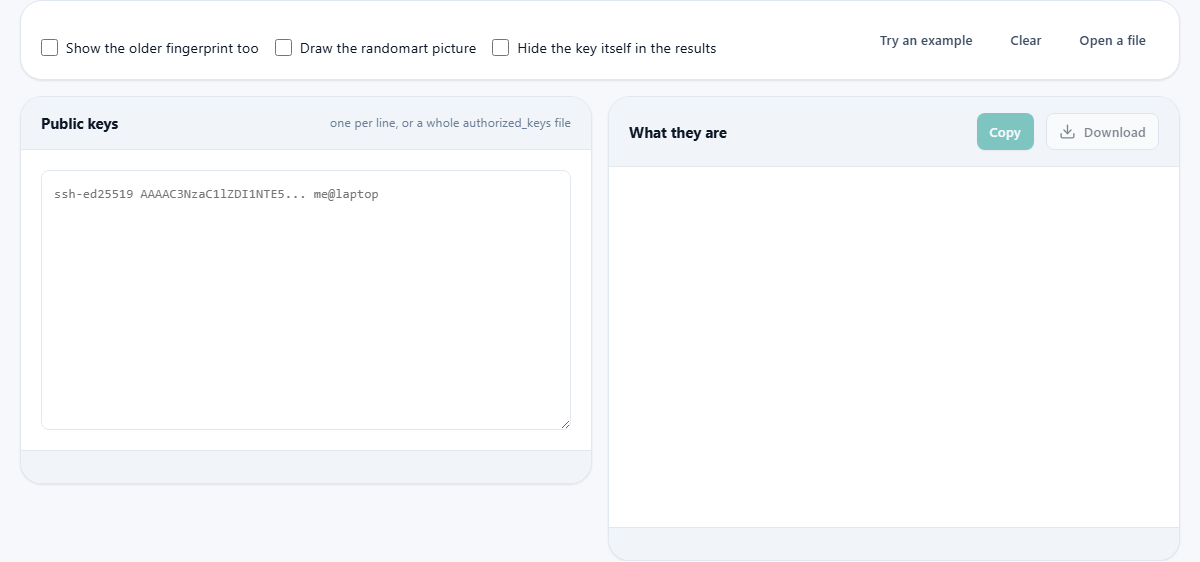
Paste the contents of a .pub file, or the whole authorized_keys file from a server, into the left text area labelled Public keys. Each key should be on its own line. You can paste dozens at once. The results appear in the right panel, one card per key, showing the algorithm, the size in bits, the fingerprint and any notes about strength or restrictions.
If you paste a private key by mistake, the tool refuses to read it and asks you to close the tab. Never paste a private key into any web page. Everything here works from the public half only. Press Try an example to load a sample file with several key types, line restrictions and a duplicate, so you can see what the output looks like.
The fingerprint and why it matters
A fingerprint is a short fixed-length digest computed from the key data itself, not from the text of the line and not from the comment. Two keys with different comments but the same key data have the same fingerprint. The modern format shown by default is SHA-256, which looks like SHA256: followed by a string of base64 characters. This is the same value your command line prints and the same value a server shows when you connect.
The older MD5 format, a colon-separated string of hex pairs, can be shown by ticking Show the older fingerprint too. Some older systems still display MD5 fingerprints, so having both lets you compare regardless of which format the other side uses. The fingerprint is how you confirm that the key you have is the key you think you have. If you are given a key by one channel and a fingerprint by another, they must match.
Key types and sizes today
Ed25519 is the current sensible default. It has one fixed size, produces a short line and has no parameters to choose wrongly. Unless you need to work with very old software, it is the type to generate. ECDSA on the P-256 or P-384 curves is sound but depends on perfect random numbers every time it signs. A flaw in the random number generator during signing can leak the private key, which is a risk Ed25519 removes by design.
RSA remains widely supported. A 2048-bit RSA key is still accepted everywhere and is not broken, but 3072 bits is the size to choose for anything new. Below 2048 bits, many servers now refuse the connection outright. DSA keys are fixed at 1024 bits and were disabled by default years ago. The inspector marks them as needing replacement. A common confusion is that a change in signing methods switched off an old signature algorithm whose name happens to match the key type. People read the note and delete perfectly good RSA keys. The key is fine; it was the old signature method that had to change, and modern software handles that on its own.
Line restrictions and what they mean
An authorized_keys file can put restrictions before a key on the same line. These control what somebody can do once they log in with that key. The inspector reads them and explains each one. A forced command means the key can only run one specific program, no matter what the client requests. A from restriction limits which addresses the key is accepted from. The no-pty option blocks an interactive terminal, and no-port-forwarding blocks port forwarding.
The restrict keyword is a catch-all that blocks everything at once. Anything listed after it, such as pty or port-forwarding, is added back as an exception. The cert-authority marker is the most important one to notice. It means the line does not grant access to one person. It marks the key as a certificate authority, so every certificate that key has ever signed, and every one it signs in future, is accepted. The inspector highlights this with a warning.
Duplicates and the randomart picture
When you paste a whole authorized_keys file, the inspector checks for duplicate keys. The same key appearing twice in a file grants nothing extra, but it means deleting one copy does not remove that person's access. That is exactly the moment it matters, and the inspector points it out.
Ticking Draw the randomart picture produces the visual pattern you may have seen on the command line. It is a grid where a point walks one step per pair of bits in the fingerprint, and each square records how often the point landed there. The picture exists because people are better at noticing that a shape changed than at comparing forty-three characters. It carries no information the fingerprint does not. Two different keys can draw patterns that look similar at a glance. Use the picture to spot that something is different, and use the fingerprint text to decide what to do about it.
A worked example with an authorized_keys file
You have a server and you want to audit who has access. You copy the contents of the authorized_keys file and paste it into the inspector. The output shows four keys. The first is an Ed25519 key with the comment ada@laptop, marked as fine. The second is an Ed25519 key with a forced command and a from restriction, used only for automated backups. The third is a 1024-bit RSA key marked as too small. The fourth is a duplicate of the first with a different comment.
You now know that the third key should be replaced and that removing one copy of the first key will not actually revoke access. You also have the fingerprints to compare against what each team member claims their key should be.
The comment is only a comment
Everything after the key data is a label for humans. You can change it, remove it or translate it. The key and its fingerprint are completely untouched by the comment. That also means the comment tells you nothing reliable about whose key it is. A comment that says admin@prod could be on a key that belongs to anyone. The fingerprint is the only trustworthy identifier.
Hardware keys and certificates
Some key types carry a marker that says they live on a hardware security device rather than in a file. An Ed25519 key generated on a hardware token shows up with the algorithm name sk-ssh-ed25519, where the sk stands for security key. The inspector recognises this and notes that the key cannot be copied off the device. The same applies to ECDSA keys created on hardware.
A certificate is a key that has been signed by a certificate authority. The algorithm name ends with -cert-v01. The inspector reads through the certificate wrapper to find the actual key inside and reports both the key type and the fact that it is a certificate. If you see a cert-authority line in an authorized_keys file, pay close attention. That line does not grant access to one user. It tells the server to accept every certificate ever issued by that authority key.
Privacy and what to do with the results
The key is decoded and the fingerprints are computed entirely on your own device. Nothing is sent anywhere. You can tick Hide the key itself in the results if you want to share the output without exposing the raw key data. The tool cannot tell you whether a key is actually installed on any server. It reads the text you paste and reports what it finds. For a complete access audit, compare the fingerprints here against what each person and each automated process claims their key should be.