
Splitting a Secret So That Losing a Piece Does Not Lose the Whole Thing
This article explains what secret sharing is, how it differs from simply cutting a password in half, how to split and rebuild a secret with this tool, and what to think about when choosing how many shares to create and how many should be needed.
The problem with cutting a secret into pieces
Suppose you have a passphrase that protects something important and you want to store it in more than one place so that no single loss destroys it. The obvious idea is to cut it in half and put each half somewhere different. The trouble is that each half gives an attacker a massive head start. If the passphrase is twenty characters long and you hold the first ten, you already know half the answer. Worse, losing either half loses the whole secret. You have made the problem harder to solve without making it safer.
Secret sharing solves both problems at once. You choose a total number of shares and a threshold. Any group of shares at or above the threshold rebuilds the original secret exactly. Any group below the threshold reveals nothing at all. That last part is not a vague claim about difficulty. It is a mathematical property: every possible secret remains equally likely given fewer than the threshold number of shares.
How the tool is laid out
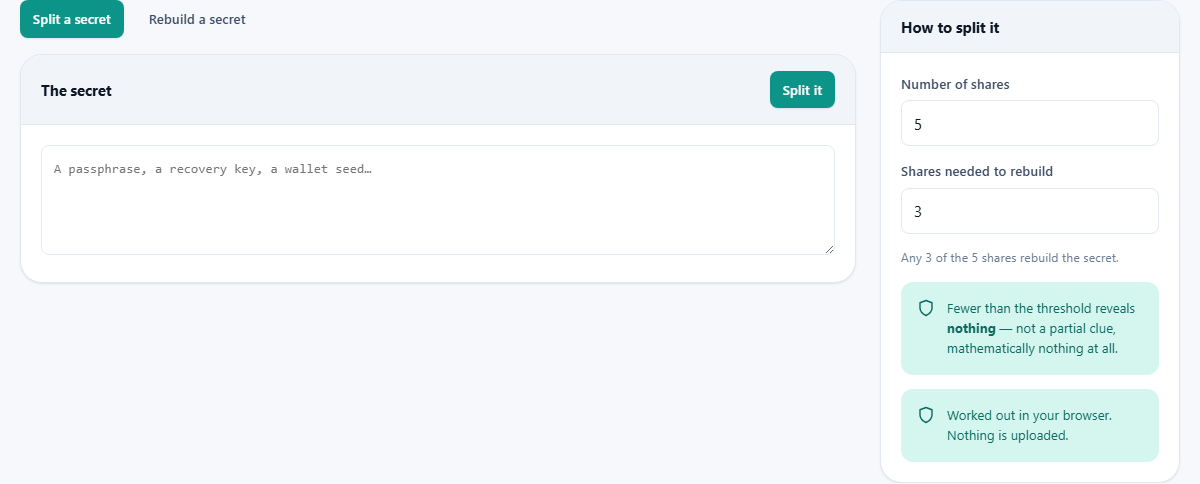
The page has two tabs at the top. The first, Split a secret, is selected by default. The second, Rebuild a secret, is for the recovery step. On the right side, two number fields control the split. Number of shares sets how many pieces you want. Shares needed to rebuild sets the threshold. The default is five shares with a threshold of three, which means you can lose any two and still recover, and any two that fall into the wrong hands are useless.
Splitting a secret step by step
Type or paste the secret into the text area labelled The secret. It can be a passphrase, a recovery key or a wallet seed phrase. Set the number of shares and the threshold. Press Split it. The tool produces a numbered list of shares, each starting with orchid-share followed by a share number, the threshold and a long string of hex characters. Each share carries its own number and the threshold so that whoever holds it later can tell how many others are needed.
A warning banner reminds you to store the shares in different places. All of them in one drawer is the same as not splitting the secret at all. You can copy each share individually with the button beside it, or press Download all to save a text file containing every share with a header that states how many are needed.
Rebuilding the secret
Switch to the Rebuild a secret tab. Paste the shares into the text area, one per line. You need at least the threshold number of shares. Press Rebuild. If the shares are valid and enough of them are present, the original secret appears in a read-only text area below. You can copy it from there.
If you supply fewer shares than the threshold, the tool tells you how many are needed and refuses to show a result. This is a safety measure. With too few shares, the maths would produce an answer, but it would be wrong. Showing a wrong answer and letting you act on it would be worse than showing nothing. If the rebuilt data is not readable text, the tool reports that one of the shares is likely wrong or from a different secret.
Choosing the right numbers
Three of five is the most common choice for personal use. It gives you a comfortable margin for losing two shares while still needing a majority to rebuild. Two of three is simpler but leaves less room for loss. For something shared among a group, consider who holds each share and how likely each holder is to lose it or be compromised. A very low threshold, such as two of ten, means any pair of leaked shares exposes everything. A very high threshold, such as nine of ten, means losing two shares makes recovery impossible.
The tool accepts anywhere from two to two hundred and fifty-five shares. The threshold must be at least two, because a threshold of one would mean every single share is the secret, which defeats the purpose. It must not exceed the total number of shares, because you cannot need more shares than you created.
What the maths actually does
For each byte of the secret, the tool picks a random polynomial of a certain degree. The degree is one less than the threshold. The constant term of that polynomial is the byte from your secret. Each share gets the value of that polynomial at a different point. Because a polynomial of degree K minus one is fully determined by K points, any K shares pin down the polynomial and recover the constant term. Fewer than K points leave every possible constant term equally likely. That is the guarantee.
The random numbers come from your operating system, not from a predictable formula. The arithmetic is done in a finite field with 256 elements, which means each byte stays a byte and there is no rounding or overflow to worry about. This is the same field used in certain widely deployed encryption standards.
A worked recovery scenario
You split a wallet recovery phrase into five shares with a threshold of three. You give one share to a family member, lock one in a safe deposit box, store one in a fireproof safe at home, tape one under a desk drawer at work and keep one on a USB stick in your bag. Two years later your bag is stolen and a pipe burst ruins the safe at home. You have lost two shares. You visit the family member, open the safe deposit box and retrieve the one from work. Three shares, which is the threshold. You paste them into the rebuild tab and your recovery phrase appears.
If the thief who took your bag and the flood that ruined your safe were somehow the same attacker, they would hold two shares. Two is less than three. Those two shares tell them absolutely nothing about the secret.
Mistakes to avoid
Do not store all the shares together. The whole point is separation. Do not skip the recovery test. Rebuild the secret from a subset of shares now, while you still have the original, so you know the process works. Write down what the shares are for. A share is an anonymous string of characters. Whoever finds it in five years needs to know what it unlocks, how many shares are needed and where the others might be.
Do not try to split a large document. The tool limits secrets to a few kilobytes. It is meant for a passphrase or a key, not a file. For a file, encrypt the file with a strong passphrase and then split the passphrase.
How the share format works
Each share is a self-describing string that looks like orchid-share-1-3-a1b2c3 followed by more hex characters. The first number is the share index, starting at one. The second number is the threshold, so anyone holding a single share can read how many are needed. The rest is the share data in hex. This format means the shares can be stored as plain text in a note, a document or a printed slip without losing any information.
The tool also accepts a simpler format where you write the index, a colon or space, and the hex data. This lets you type shares back in by hand if the formatting was lost. When rebuilding, the tool checks that no share index is given twice and that all shares are the same length. A mismatch in length means they come from different secrets, and the tool says so rather than producing garbage.
Privacy and the limits of a browser tool
The splitting and rebuilding happen entirely on your own device. The random numbers come from your operating system. Nothing is sent anywhere. You can disconnect from the network after loading the page and the tool will still work. That said, a browser tab is not long-term secure storage. Once you have your shares, close the tab. The secret and the shares exist only in memory while the page is open and are gone when you close it. There is no recovery service and no back door. If you lose too many shares, the secret is gone permanently.