
Building and Checking the File Every Site Should Have
This article walks through the security.txt standard, what each field does, why the expiry date matters more than anything else in the file, and how to use this builder and checker to get every detail right before you publish.
What security.txt is and why it exists
Every organisation has a way to report a billing mistake or a broken link, but most have no clear way to report a security problem. A researcher who finds a flaw on your site has to guess: try the contact page, try a generic address, try social media, or give up. Many give up. The security.txt standard solves this by putting one small text file at a fixed location on your domain. Any researcher who knows the standard knows exactly where to look and what to expect.
The standard is published as RFC 9116. It defines a list of fields, each written as a name, a colon and a value on its own line. Two of those fields are required: at least one Contact and exactly one Expires. Everything else is optional but useful. The file lives at /.well-known/security.txt, served over an encrypted connection as plain text.
The two modes
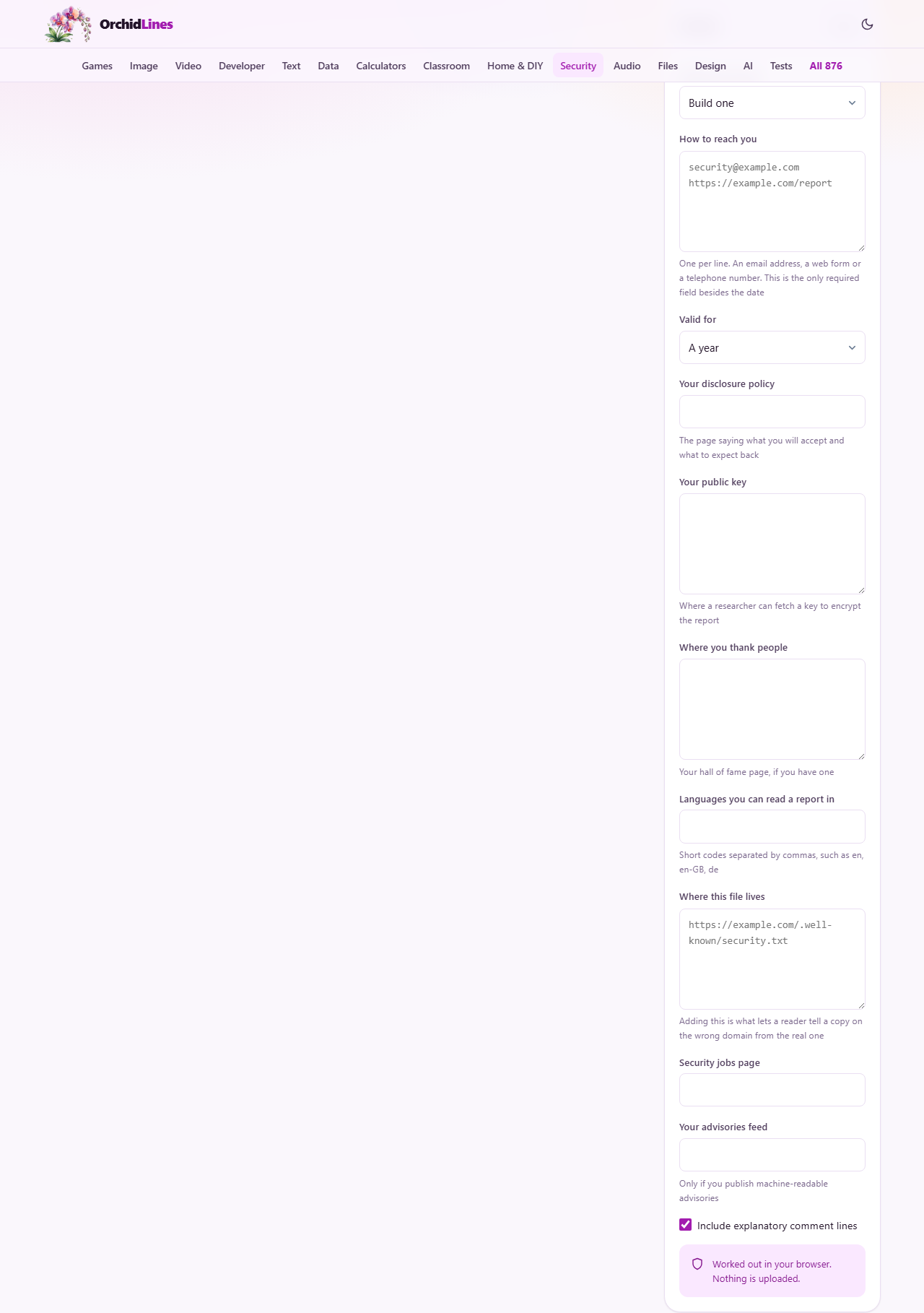
The tool has two jobs, and you pick the one you need from the dropdown labelled What do you want. The first is Build one. You fill in your contact details, choose how long the file should stay valid, and add optional fields. The tool writes a complete, correctly formatted security.txt that you can copy and publish. The second is Check one I already publish. You paste the text of an existing file, and the tool reads every field, checks it against the standard, and lists what needs fixing.
The contact field and its most common mistake
In the builder, the text area labelled How to reach you is where you put the addresses a researcher should write to. You can enter more than one, each on its own line. An email address, a web form and a telephone number are all valid. The single most common mistake in real security.txt files is writing a bare email address. The standard requires every value to be a full address, so an email must start with mailto: and a web page must start with https:. The builder catches this and fixes it for you. If you type alice@example.com, the file will contain mailto:alice@example.com, and a note explains what happened.
A telephone number needs the tel: prefix. Again, the builder adds it if you leave it off. A reporting form needs https: in front. If you paste a plain domain name, the builder will prepend https:// and tell you.
The expiry date and why it is the whole point
The dropdown labelled Valid for lets you pick six months, a year or two years, or choose a specific date. A year is the default and the usual choice. The standard recommends less than one year. The reason is not red tape. The expiry date is the only evidence anyone has that a real person still looks at this file. Without it, a file could sit unchanged for a decade while the team behind it moved on and the email address bounced.
An expired file is worse than no file at all. Somebody following the standard treats an expired file as absent and looks elsewhere. Somebody who does not follow the standard writes to an address that may now belong to somebody who left. Neither outcome is what you want. The builder places the date you pick into a correctly formatted timestamp, and the checker reports how many days remain or how many days ago the file expired.
The optional fields in detail
Your disclosure policy is a link to the page that tells a researcher what you accept, what you do not, and roughly how long you take to reply. Without it, every report begins with a negotiation. Your public key is a link to a key file a researcher can use to encrypt the report. Where you thank people links to your acknowledgments page, if you have one. Languages you can read a report in accepts short codes separated by commas, such as en or de.
Where this file lives is the Canonical field. It holds the full address where you publish this file. Adding it is what lets a reader tell a copy on the wrong domain from the genuine article. Security jobs page links to your careers page for security roles. Your advisories feed points to a machine-readable feed of security advisories, which is a specialised field most sites will leave empty. The checkbox Include explanatory comment lines adds human-friendly notes above each section.
Using the checker
Switch the dropdown to Check one I already publish. A text area labelled Paste the file appears. Paste the raw text of the file, not the web page it sits on. The checker reads every line, identifies each field, and splits the results into errors and things worth fixing. Errors mean the file is not valid against the standard right now. A missing Expires field, a bare email address, or a date that has already passed are all errors. Warnings are things that do not break the file but that you should attend to, such as a missing Canonical field or a field name written in the wrong case.
If the file has been signed, the checker reads the fields inside the signed block and notes that a signature is present, but it does not verify the signature itself. Each field is shown in a table with its line number, its name and its value, so you can trace any problem back to the original text.
A worked example from start to finish
Suppose you run a small company and want to let researchers reach your security team. You open the builder and type security@example.com in the How to reach you field. The builder turns that into mailto:security@example.com. You add a second line with https://example.com/report. You leave Valid for at a year. You paste https://example.com/security-policy into Your disclosure policy and en into the languages field. You click Copy the file.
The output is a clean text file with Contact lines, an Expires line set to roughly one year from today, a Policy line and a Preferred-Languages line. Below the file sits a checklist headed Where it has to go. It reminds you to serve the file at /.well-known/security.txt, over https, as text/plain with charset=utf-8, and to put the expiry date in a calendar. Those steps are the part this page cannot do for you.
Common pitfalls and what to watch for
Setting the expiry date more than a year ahead triggers a warning. The standard asks for less than a year because a longer window defeats the purpose of the date. Having two Expires fields is an error. Having no Contact field means the file carries nothing useful. Using plain http instead of https on any link is an error because a link read over http can be rewritten in transit.
The checker also catches the alternate spelling Acknowledgements, with a third e, and explains that the standard uses the American spelling Acknowledgments. Field names are matched without regard to case, but plenty of tools were written as though case mattered, so the conventional capitalisation is worth getting right. Unknown field names are flagged as a warning too, because they are usually a misspelling of a real field.
The date format that catches people
The Expires value must be a full date and time with a time zone, following the RFC 3339 format. That means something like 2027-01-01T00:00:00Z. A date on its own, such as 2027-01-01, is not accepted even though it looks perfectly clear to a human reader. The builder writes the date in the correct format automatically, but if you are editing an existing file by hand, this is the mistake most likely to slip in. The checker catches it and shows what the corrected value should be.
When you choose a custom date in the builder, the file expires at the end of that day in coordinated universal time. That prevents the file from becoming invalid a day early in time zones west of the prime meridian.
Privacy and where to go next
Everything on this page runs in your browser. The file is assembled from what you type, and a file you check is parsed locally. Nothing is sent to any server. The tool cannot visit your domain, so it cannot tell you whether the file is actually published or served with the right content type. Once you publish the file, test it yourself by visiting the well-known path in a browser and confirming you see plain text with the right fields. Then set a calendar reminder for the expiry date. That reminder is the single most important thing you can take away from this page.