
Building Strong Passphrases You Can Actually Remember
This article covers how passphrases work, why random words beat complicated passwords, and how to use every option in this generator to create credentials that are both strong and easy to recall.
Why random words make better passwords
Most people make passwords by taking a single word and mangling it. They swap letters for numbers, add a symbol at the end and capitalise something in the middle. The result looks complex to a human eye, but password cracking tools try those exact substitutions first. A mangled dictionary word is one of the weakest credentials you can use.
A passphrase takes a different approach. Instead of one tortured word, it strings together several words chosen at random. Each word adds thousands of possible combinations, and the total grows by multiplication, not addition. Four random words from a large list produce a space of possibilities so vast that even a fast computer would need centuries to search it.
The four styles of output
The Style selector at the top of the controls offers four different output types. Random words is the default and the most broadly useful. It draws from a built-in list of common, short, unambiguous English words. Each word adds roughly the same amount of strength.
Numeric PIN produces a string of digits only. This is meant for phones, bank cards and devices that accept only numbers. A six-digit PIN has far less strength than a four-word passphrase, so keep PINs as long as the device allows.
Word, number, symbol generates a word-based passphrase with a random two-digit number and a random symbol appended at the end. Some login forms require at least one number and one special character, and this style meets that rule without sacrificing the readability of the phrase.
Pronounceable nonsense builds fake syllables by combining consonants and vowels. The result reads like a word from a language you almost recognise. It is easier to type than a random string of letters, but harder to remember than real words. The strength comes from the number of possible syllable combinations, which the tool calculates and displays.
How many words are enough
The How many words field accepts a number between two and twelve. Four words is a reasonable default for everyday accounts. Five words is stronger and still easy to remember. Six words is appropriate for anything that guards access to other credentials, such as a password manager or a full-disk encryption key.
Each additional word multiplies the number of possibilities by the size of the word list. The tool draws from a list of over a thousand common English words, so adding one word makes the passphrase roughly a thousand times harder to guess. That is a large jump from a small effort.
Two words is the minimum the tool allows, but it should only be used for very low-stakes situations. At two words the strength is too low to resist a determined offline attack. Three words is better but still on the edge. For anything that protects real data or real accounts, start at four and go higher for important things.
Separators, capitalisation and extras
The Joined by selector controls what goes between each word. Hyphens are the default and work on nearly every system. Spaces are the most natural to type. Dots and underscores are alternatives for systems that reject hyphens or spaces. The Nothing option runs the words together into a single string.
The Capitals selector lets you keep everything lower case, apply Title Case to each word, or convert everything to upper case. Title Case makes the phrase easier to read at a glance but does not add meaningful strength, because the capitalisation pattern is predictable.
Two checkboxes, Add a number and Add a symbol, append a random two-digit number or a random symbol to the end of the phrase. These are useful when a login form demands those character types. They add a small amount of strength on their own, but their real job is to satisfy rules that would otherwise force you to weaken the phrase by shortening it.
Understanding the strength display
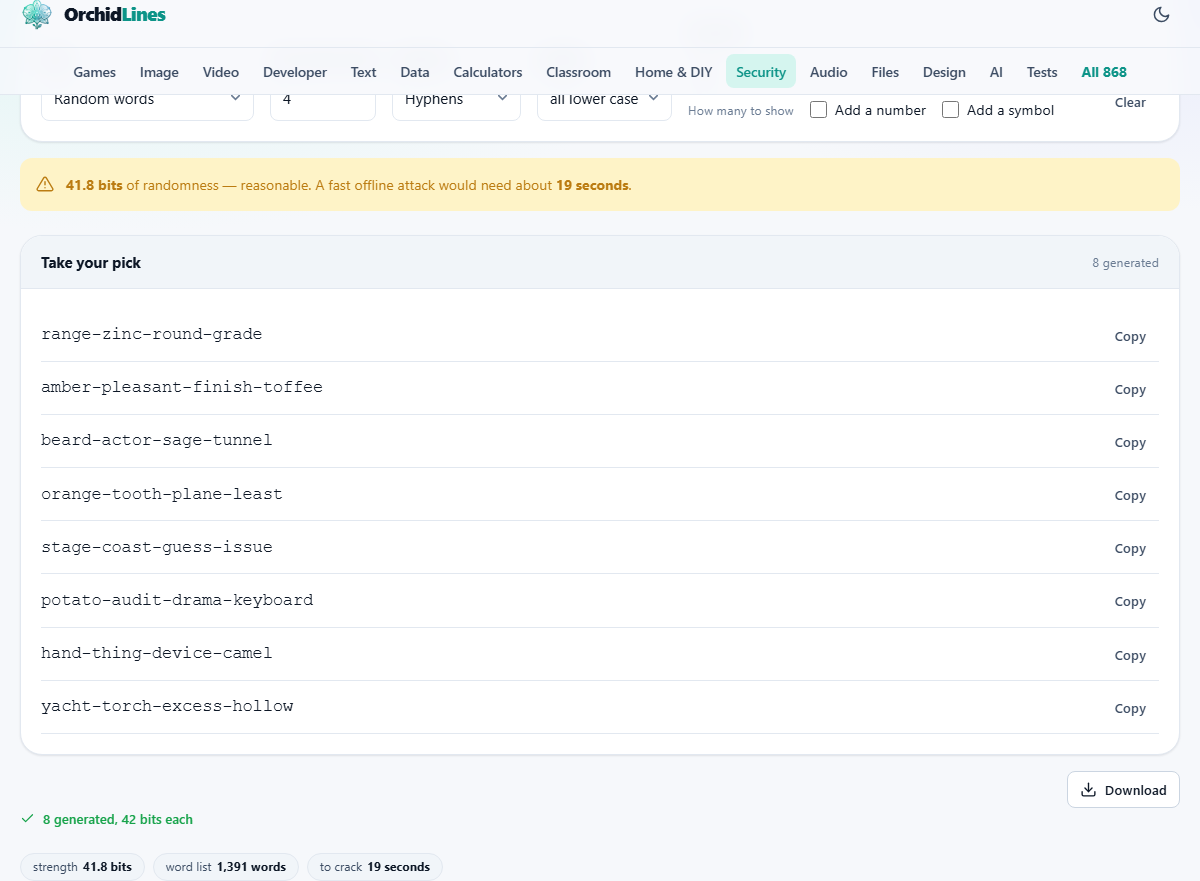
After every generation, the tool shows a coloured banner with the strength in bits and a label: weak, reasonable, strong or very strong. It also estimates how long a fast offline attack would need to guess the passphrase.
Bits of randomness, also called entropy, describe how many possibilities exist. Each bit doubles the count. Thirty bits means roughly one billion possibilities. Fifty-one bits, the strength of a four-word passphrase from this tool, means about two quadrillion. The bit count is calculated from the actual list size, so it never overstates the strength.
The crack-time estimate assumes an attacker making a hundred billion guesses per second. That is a realistic figure for dedicated hardware cracking a poorly stored password hash. Against a well-stored hash the time would be much longer, but the estimate gives you the worst case worth planning for.
Generating multiple passphrases at once
The Generate field controls how many passphrases appear in a single batch. You can request up to forty at once. Each one is drawn independently, so they are all different. The batch appears in a list with a Copy button beside each entry.
Generating several at once is useful when you want to pick the one that sticks in your mind most easily. Read through the list and choose the phrase that forms the most vivid mental picture. A passphrase you can see in your imagination is one you will not forget. Once you have picked one, discard the rest.
Each passphrase in the batch carries the same strength, since they all use the same settings. The strength banner at the top applies to every entry equally. Choosing one over another based on how well it sticks in your memory does not change the security at all. The strength depends on the size of the word list and the word count, not on which particular words were drawn.
Worked example: creating a passphrase for a password manager
A password manager guards all your other credentials, so its passphrase should be strong. Set Style to Random words. Set How many words to six. Leave Joined by on Hyphens and Capitals on all lower case. Set Generate to eight so you have several to choose from.
The result might include phrases like bloom-coral-helmet-river-quest-marble or lantern-copper-ridge-olive-spark-cedar. Pick the one that forms the clearest image in your mind. The strength banner should show roughly seventy or more bits, labelled strong or very strong.
Copy your chosen phrase and paste it into the password manager during its setup. Then close this tab. The phrases exist only on the page and disappear when you navigate away.
Do not edit a generated passphrase
It is tempting to swap out a word you do not like or to add a personal touch. Resist that urge. Every change you make by hand reduces the randomness. If you replace one word with your pet's name, the strength drops by the full contribution of that word, because an attacker who knows anything about you will try pet names early.
If the generated phrase does not feel right, press Clear and generate a fresh batch. The randomness comes from the browser's cryptographic random number generator, which is the same source your bank relies on for its secure connections. Trusting it to pick the words is the entire point.
The same logic applies to rearranging the word order. Even if you keep all the same words but shuffle them into a sequence that appeals to you, you have replaced a random arrangement with a human one. The strength figure assumes every possible order was equally likely, and that stops being true the moment you pick your favourite.
Privacy and where the randomness comes from
Every value on this page comes from the browser's built-in cryptographic random number generator. It draws randomness from the operating system, which collects it from hardware events like mouse movements and disk timing. This is a proper source of unpredictable numbers, not the weaker kind used for games and animations.
Nothing is stored or sent anywhere. The passphrases exist only in your browser tab. When you reload or close the page, they are gone. There is no server behind this tool and no network request during generation. If you want to confirm that, disconnect from the internet after the page loads and watch it still work.