
Converting keys between PEM and JWK without losing a byte
Cryptographic keys come in several shapes, and the shape you have is rarely the shape you need. A token-signing library wants a JWK. A server configuration expects a PEM block. An old tool left you a file with a header the browser will not accept. This article explains what the Key Format Converter does with each kind of input, how to use every control, and where the subtle traps hide.
Why keys arrive in so many formats
A cryptographic key is a set of numbers. The numbers are the same no matter how they are written down, but the container changes. PEM is the format you see in configuration files: blocks of base-64 wrapped in BEGIN and END lines. A JWK is the same numbers expressed as a JSON object with named fields. A key set, usually published as a jwks.json file, is an array of JWKs wrapped in a JSON object with a keys member.
The reason there are so many PEM labels is that the structure inside the base-64 has changed over the years. The current labels, PUBLIC KEY and PRIVATE KEY, use a generic wrapper that names the algorithm inside the structure. The older labels, RSA PRIVATE KEY and EC PRIVATE KEY, use a format specific to each algorithm. Those older files are perfectly valid and still common, but browsers refuse to import them, which is exactly when you need a converter.
What you can paste in
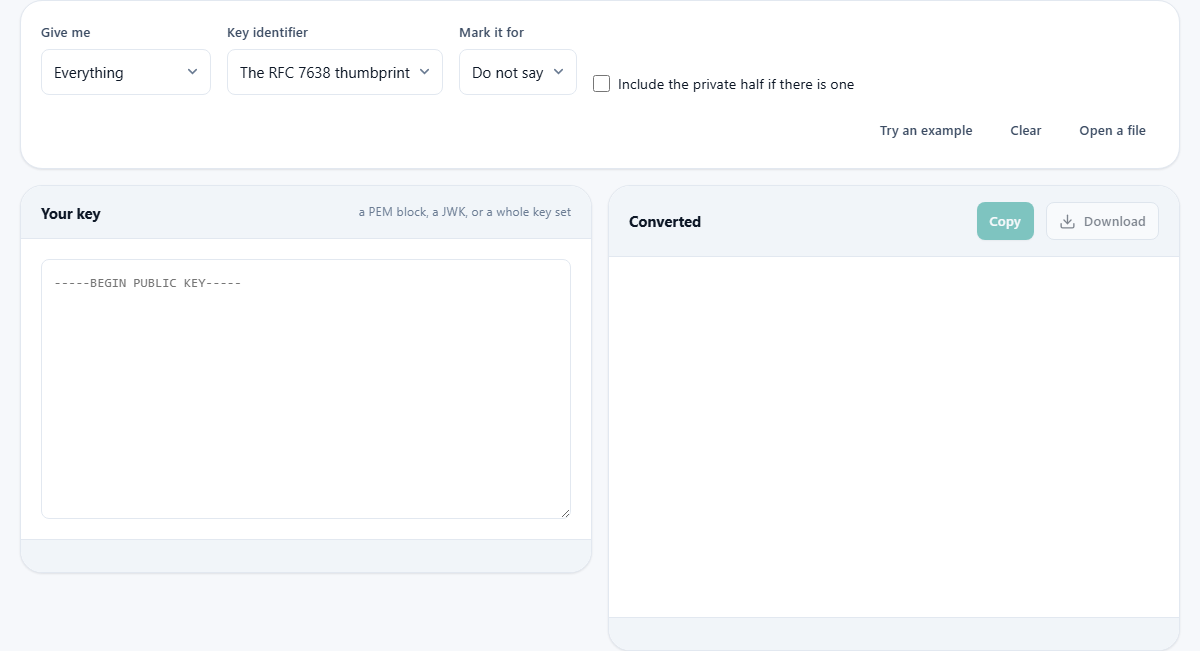
The left pane labelled Your key accepts PEM blocks, JWK objects, entire key sets, and even certificates or certificate signing requests. You can paste several at once and each is handled separately. The tool reads PEM files with both the current generic headers and the older algorithm-specific ones. It reads JWK objects in plain JSON, including arrays and key sets with the keys wrapper.
A certificate is accepted because it contains a public key at a fixed position inside its structure. A certificate signing request works the same way. In both cases, the key is extracted and converted; the rest of the certificate or request is not carried through, because the output is about the key alone.
The Open a file button reads a file from your device. Encrypted private keys are refused with a clear message: the tool will not ask you for a passphrase. Decrypt the file yourself first with your own key tooling, then paste the result.
The output options
The Give me dropdown controls what appears on the right. Everything shows the JWK, the PEM public key and, if a private key was pasted and the box is ticked, the PEM private key. The JWK only and The PEM only options give one format at a time. A jwks.json key set builds the array of public keys ready to publish at a fixed address. The key set always contains only the public half, regardless of what you pasted, because a key set is a file other people download.
The Key identifier dropdown offers two choices. The RFC 7638 thumbprint computes a short identifier from the key itself using a published recipe. The identifier is the same for any two people who hold the same key, which is why it is the usual choice: nobody has to agree on a name or hand one out. The other option, Do not add one, leaves the kid field out of the JWK entirely.
The Mark it for dropdown adds a use field to the JWK: signing, encryption, or neither. This field is informational. It tells a consumer what the key is intended for, but it does not change the key itself.
The private key checkbox and safety
The Include the private half if there is one checkbox is unticked by default. If you paste a private key, the output shows only the public half unless you tick this box. That is deliberate. When you are building a key set to publish, the public half is what you want. When you copy a key into a configuration file, the public half is usually what goes there. The private key is included only when you explicitly ask for it.
When the private half is included, a red warning appears reminding you that the private key is written out in the output. Nothing leaves the page, but a private key on your clipboard looks the same as a public key, and pasting it into the wrong place is a mistake that is hard to detect after the fact.
The coordinate padding trap
The most dangerous bug in a key converter is one that works almost all the time. In a PEM file, the numbers that make up an elliptic curve key are stored as variable-length integers. A leading zero byte is dropped because it does not change the value. In a JWK, the same numbers are stored as fixed-width fields: thirty-two bytes for the P-256 curve, forty-eight for P-384, and sixty-six for P-521. If a coordinate happens to start with a zero byte, the converter must pad it back out to the correct width.
About one key in two hundred and fifty-six has a coordinate that starts with a zero byte. A converter that forgets to pad works correctly for months and then, when it meets one of those keys, it produces a JWK that looks valid but fails to verify any signature. The failure is silent: no error, no warning, just a verification that says false. Every conversion in this tool was checked against the browser's own key handling in both directions to make sure this case is handled.
A worked example: PEM to JWK
Click Try an example. A P-256 public key in PEM format fills the input. The output shows a panel with the key type (EC on P-256), the size, the signing algorithm (ES256), and the thumbprint. Below the summary table, the JWK appears as formatted JSON with the fields kty, crv, kid, x and y. The PEM public key appears below that, identical to the input because this is already the current format.
Now change the Give me dropdown to A jwks.json key set. The output adds a second panel with the complete key set document: a JSON object with a keys array containing one entry. The kid field holds the thumbprint, and the entry contains only the public fields. This is the file you would save and publish at a well-known address for token verifiers to download.
Building and maintaining a key set
A key set published at a fixed address is how token verifiers find the public key they need. Each entry has a kid that matches the one written in the header of the token. The verifier downloads the set, finds the entry with the right kid, and uses that key to check the signature.
When you rotate a key, add the new one to the set but leave the old one in place. Any token signed with the old key before the rotation is still valid until it expires. Removing the old key on the day you rotate breaks every outstanding token instantly. Leave it in the set until the longest-lived token has expired, then remove it.
Paste several keys at once to build a set with multiple entries. Each one gets its own thumbprint as a kid, and the key set output contains all of them in order.
How the thumbprint is computed
The thumbprint defined in RFC 7638 works from a fixed, short list of JWK members in a fixed alphabetical order, with no spaces anywhere. For an RSA key, only the exponent and modulus are included. For an EC key, only the curve name and the two coordinates. The hash function is SHA-256. Because the recipe is fixed and public, anyone holding the key arrives at the same thumbprint without any coordination.
Adding a use field, a kid field, or an algorithm hint to the JWK does not change the thumbprint. That is deliberate. The identifier stays the same as the description around the key grows, which is important because the kid appears in every token signed with that key. If the thumbprint changed every time you added a field, old tokens would stop matching.
Privacy and what stays local
There is no network activity on this page at all. The conversion is done by reading the binary structure of the key and rewriting it, using code on the page rather than the browser's own key import. That means it works on any connection, not just HTTPS, and it handles the older PEM formats that the browser would refuse. Your private key never leaves your device, which is why an encrypted key is refused rather than asking for the passphrase: accepting a passphrase would imply that this page is a safe place to enter one, and no web page should make that promise.