
Generating and verifying message authentication codes
When a payment provider sends your server a webhook, the body arrives with a signature. If the signature matches, the message really came from them. If it does not, somebody forged it or something changed along the way. This article explains what an HMAC is, how to use every control on the page, and what to watch for when debugging a signature that will not match.
What an HMAC does and why it exists
A plain hash of a message proves only that the message has not been altered since it was hashed. Anyone can compute it. An HMAC goes further: it mixes a shared secret into the process twice, by design, so only someone who holds the secret can produce or verify the result. The output looks the same as a plain hash -- a long string of hexadecimal characters -- but it was computed in a way that ties it to both the message and the secret. That double mixing is also what stops the length-extension attacks that a plain hash is vulnerable to.
This is the foundation of webhook signatures. A payment provider and your server both hold the same secret key. When a webhook fires, the provider computes the HMAC of the request body using that key and attaches it as a header. Your server does the same computation on the body it received. If the two values match, the body is genuine and untouched. If they do not, either the secret is wrong, the body was changed in transit, or someone sent a forged request.
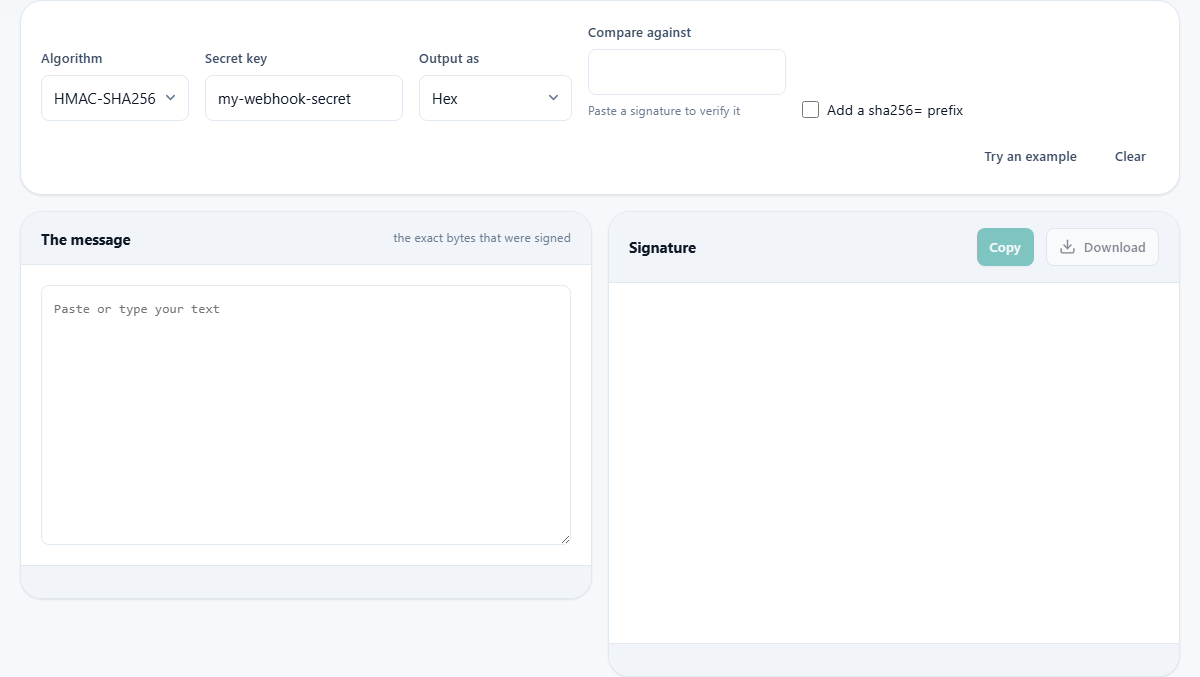
The controls across the top
The Algorithm dropdown chooses the hash function inside the HMAC. The choices are HMAC-SHA256, HMAC-SHA1, HMAC-SHA384 and HMAC-SHA512. SHA-256 is the default and by far the most common choice for webhooks and signed links today. SHA-1 is still considered secure inside an HMAC even though plain SHA-1 is broken, but there is no reason to choose it for anything new. SHA-384 and SHA-512 produce longer signatures and are occasionally required by a specification.
The Secret key field holds the string both sides share. It is never sent anywhere and never included in the downloaded output file. The Output as dropdown controls how the signature bytes are written: as hexadecimal, as standard base-64, or as URL-safe base-64. Hexadecimal is the most common format in webhook headers. Base-64 produces a shorter string for the same data. URL-safe base-64 replaces the plus and slash characters with dash and underscore, which avoids trouble in query strings and file names.
The prefix and compare controls
The Add a sha256= prefix checkbox prepends the algorithm name to the output, producing a string like sha256=a3f2... instead of just a3f2... Many webhook schemes use this format so the receiver knows which algorithm was used without having to guess. If the signature you are comparing against has a prefix, tick this box so the generated value matches the same format.
The Compare against field is where verification happens. Paste the signature you received from the webhook header or API response, and the tool tells you whether it matches the one it just computed. The comparison strips any algorithm prefix before checking, so you can paste the received value exactly as it arrived without cleaning it first. A green message says the signature matches the given message and secret. A red message says it does not, and suggests checking for a trailing newline or a re-serialised body, because those are the usual causes of a mismatch.
Signing a webhook body step by step
Suppose you are building a webhook sender and want to sign the body before sending. Paste the raw JSON body into the left pane. Enter the secret key you share with the receiver. Leave the algorithm on HMAC-SHA256 and the encoding on hex. The signature appears on the right. Copy it and send it as a header alongside the body.
The exact value for a body of {"event":"order.created","id":"ord_8842","total":4200} with the secret my-webhook-secret is shown when you click Try an example. The output panel displays the full signature, the algorithm, the byte length, and the message length in characters. Copy is a single click.
Verifying a received signature step by step
Now suppose a webhook arrived and you want to confirm it. Paste the exact raw body into the left pane. Enter the shared secret. Paste the signature from the header into the Compare against field. If the message and secret match what the sender used, the tool shows a green confirmation. If anything differs, even by a single byte, the tool shows a red warning.
When a verification fails, the cause is almost always in the message bytes. The most common problem is a trailing newline that was added when the body was read from a file or a log. The second most common is a re-serialised body: the webhook arrived as JSON, your framework parsed it into an object, and now you are signing the re-serialised version, which may have different whitespace or key order. The fix is to always sign the raw bytes as they arrived, before any parsing. A third common cause is encoding: if the secret was provided as a hexadecimal string and you are passing it as plain text instead of decoding it to bytes first, the key is wrong and every signature will fail.
Why byte precision matters so much
An HMAC is computed over a sequence of bytes, not over a logical document. Changing a single byte produces a completely different output. This is a feature, not a flaw: it is what makes forgery impossible. But it also means that anything that touches the bytes between signing and verifying will break the match.
Common things that change the bytes without being obvious include character encoding differences, line ending conversions from Unix to Windows style, whitespace normalisation by a proxy or load balancer, and JSON libraries that reorder keys or remove trailing zeros from numbers. Every one of these produces a body that means the same thing to a human reader but computes a completely different HMAC. When debugging a failed match, comparing the raw byte sequences side by side is the fastest way to find the difference.
- Store the raw request body as bytes before parsing it.
- Never re-serialise a signed payload for verification.
- Check for a trailing newline if the body was read from a file.
Choosing between the algorithms
For new work, SHA-256 is the right choice. It is fast, widely supported, and produces a 32-byte signature that is long enough to be secure and short enough to fit in a header. SHA-512 doubles the length and offers a theoretical security margin that no practical attack needs today, but some standards require it. SHA-384 is a truncated form of SHA-512 and appears occasionally in government specifications.
SHA-1 inside an HMAC is still considered sound. The attacks that broke plain SHA-1 as a collision-resistant hash do not translate to HMAC, because the attacker would need to know the secret to exploit them. That said, choosing SHA-1 for something new invites questions from auditors and gains nothing in return, so it makes sense only when an older system you cannot change requires it. If you are integrating with a legacy API that sends SHA-1 signatures, this tool lets you verify them correctly.
Tips for production code
In your own code, never compare two signatures with a plain equality check. A normal string comparison returns as soon as it finds the first difference. That means a wrong signature that matches the first ten characters takes measurably longer to reject than one that differs at the start. An attacker who can send many requests and time the responses can use that leak to guess the correct signature one character at a time. Every major platform provides a constant-time comparison function built for exactly this purpose, and switching to it is a one-line change.
A valid signature does not expire on its own. Most webhook schemes solve this by signing a timestamp alongside the body and rejecting anything older than a few minutes. If your scheme does not do this, a replayed webhook from last week is still valid. Check the timestamp as well as the signature.
Privacy and local processing
The shared secret and the message never leave your browser. The signing is done by the browser's own built-in cryptographic functions, with the result displayed on the page. The download includes the signature and the message but deliberately leaves the secret out, because the whole point of a shared secret is that it does not end up in a downloads folder. No data touches any external server at any point during the process.