
Seeing what your browser tells every website without asking
Every time you open a web page, your browser hands over dozens of details about your device before you click a single button. Individually they are harmless. Taken together, they can identify you without a single cookie. This article explains what the tool collects, why certain signals matter more than others, and what you can realistically do about it.
What browser fingerprinting means in practice
A cookie is a label a site sticks on your browser so it can recognise you later. You can clear cookies, block them, or browse in a private window, and the label is gone. Fingerprinting works differently. It identifies you from the combination of details your browser reveals as part of normal operation: your screen size, your time zone, the fonts installed on your machine, the way your graphics card draws a test image, and many more.
No single detail identifies you. Millions of people share your browser version, and millions share your time zone. But the exact combination of all of them together is often unique, or close to it. That is what makes fingerprinting effective and what makes it hard to prevent. It needs no storage on your machine, works in private browsing, and survives clearing your history.
What the page collects and how it is shown
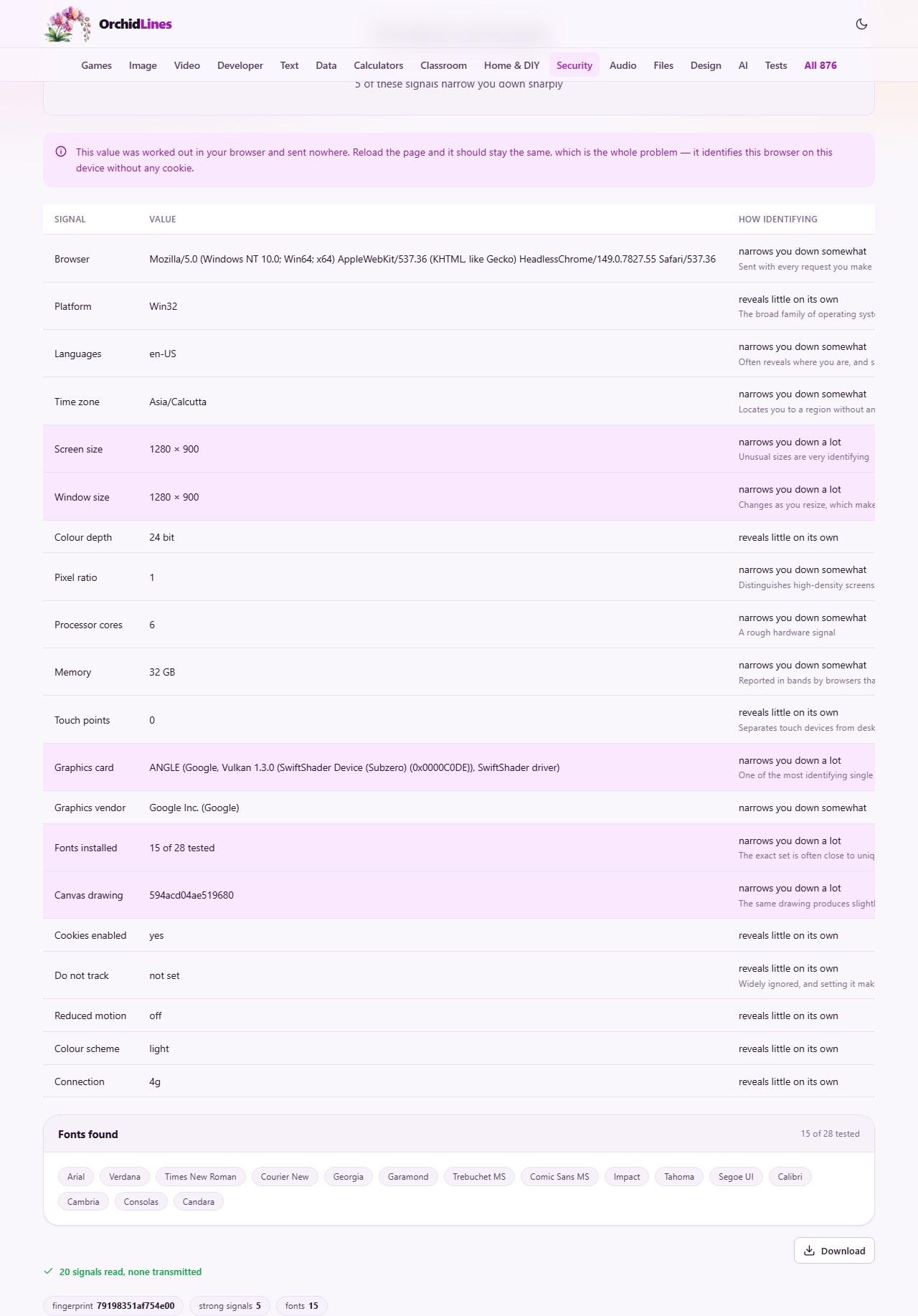
When the page loads, it gathers about twenty signals using the same methods any website can use. No special permissions are requested and no prompts appear. The results fill a table with three columns: the name of the signal, the value found on your machine, and a note about how identifying that particular signal is.
At the top of the results, a short hash acts as your fingerprint. It is built from all the values in the table combined. Reload the page and the hash should stay the same, which is exactly the problem it is showing you. Below the hash, a count tells you how many of the signals are strong identifiers. Rows that narrow you down sharply are highlighted in the table so they stand out.
Signals that identify you most
Five signals are flagged as highly identifying. Screen size is one. While a few standard resolutions are common, the exact pixel count of your display, especially on high-density screens, narrows the field quickly. Window size is even more specific because it depends on how you have arranged your browser, whether the bookmarks bar is showing, and whether the developer tools are open.
Graphics card, reported through the WebGL interface, is another strong signal. The exact make and model of your GPU, down to the driver version, is surprisingly unique. Canvas drawing takes this further: the tool draws a test image on an invisible canvas and converts it to a data string. Different graphics stacks produce subtly different pixels even from the same drawing instructions, and that difference acts as a hardware signature.
Fonts installed rounds out the strong set. The tool tests for 28 common fonts by measuring how a sample string renders in each one. The exact set present on your machine depends on your operating system, your language, and any programs you have installed, which makes it a strong differentiator.
Signals that add up rather than stand out
Several signals carry moderate identifying power. Languages reveals your preferred languages and their order, which often gives away both where you live and where you grew up. Time zone places you in a region without any location permission. Pixel ratio separates high-density displays from standard ones. Processor cores and Memory are rough hardware measures that help narrow the field.
Other signals reveal little on their own. Colour depth is nearly universal at 24 bit. Touch points mostly separates phones from desktops. Cookies enabled and Reduced motion are binary, and Do not track is rarely set. Colour scheme tells the site whether you prefer dark or light mode. Connection type, when reported, gives a rough idea of your network speed. Each of these contributes a small amount to the overall fingerprint even though none of them is distinctive alone.
Why private browsing does not help
Private browsing clears cookies, history, and local storage when you close the window. It was designed to prevent a site from recognising you through stored data. Fingerprinting does not use stored data. Every signal on the page, your screen size, your fonts, your graphics card, your time zone, is exactly the same in a private window as in a normal one. The browser reveals the same details because it has to in order to render pages correctly.
This means that a site using fingerprinting can recognise you across private sessions, across different tabs, and even after you clear all your browsing data. The only thing private browsing defeats is cookie-based tracking, which is the simpler and more visible kind.
What you can do about it
The most effective defence is to use a browser that deliberately makes all its users look alike. Some privacy-focused browsers standardise the values they report so that every user presents the same screen size, the same fonts, and the same canvas output. This works because fingerprinting relies on differences, and if everyone looks the same there is nothing to distinguish.
Blocking individual signals is less effective and can backfire. A browser with an unusual combination of blockers is itself unusual, which means it stands out more, not less. An extension that lies about your screen size helps with that one signal but makes the overall fingerprint more distinctive if few other people use the same extension with the same settings.
There is no complete solution. As long as browsers need to report details about the device to render pages properly, there will be signals to collect. Reducing how many unique details you expose is the realistic goal, and comparing your fingerprint across different browsers, which this tool makes easy, helps you see where the biggest differences lie.
Trying it in a second browser
Open this page in two different browsers on the same machine and compare the tables side by side. Many values will match because they come from your hardware: screen size, processor cores, memory, and graphics card. Others will differ because they come from the browser itself: the user agent string, the window size, and sometimes the canvas hash if the browsers use different rendering engines.
This comparison is the fastest way to understand which signals are about you, which are about your browser, and which are about the combination. It also shows you which browser exposes more. If one reports fewer details or returns generic values where the other gives specifics, it is doing more to protect your privacy.
How sites use fingerprints in practice
Advertising networks use fingerprinting to track you across sites when cookies are blocked. Fraud detection systems use it to spot when one person creates many accounts or when a bot pretends to be a human. Banks use it as part of their login security, flagging when someone signs in from a device they have not seen before. Analytics services use it to count unique visitors without cookies.
Not all of these uses are hostile. Fraud prevention is a legitimate reason to recognise a device. The discomfort comes from the fact that the same technique can be used for surveillance, and you cannot tell which purpose a particular site has in mind. Knowing what your browser reveals is the first step toward making informed choices about which browsers and settings to use.
Common misunderstandings about fingerprinting
People sometimes assume that changing one setting, like switching to dark mode or installing a new font, makes their fingerprint completely different. In reality it changes one value in a table of twenty. The rest stays the same, and a tracking system that looks at the whole pattern can still link the old fingerprint to the new one with high confidence.
Another common belief is that a VPN defeats fingerprinting. A VPN hides your IP address, which is valuable for other reasons, but it does not change your screen size, your fonts, or your graphics card. Fingerprinting and IP tracking are separate techniques, and defending against one does nothing for the other.
All collected locally, none transmitted
Every signal on the page is gathered by your own browser and displayed on your own screen. The fingerprint hash, the table, and the font list are built locally and sent nowhere. You can verify this by loading the page and then disconnecting from the internet; the results are identical because there is no server involved in the collection. The whole point of the tool would be lost if it collected data the way a tracker does, so it does not.