
Scoring a vulnerability so two people get the same number
CVSS is a standard way to rate how serious a security flaw is. This article explains each metric group, walks through a real scoring session with concrete values, and covers the details that make scores disagree between calculators or between people.
What the score measures and what it does not
A CVSS score measures how bad a flaw is, not how urgent it is for you. A remote code execution bug on a test server that holds nothing important scores high because the flaw itself is severe. Whether it deserves your time right now is a separate question that depends on what the server does in your world. Keeping those two judgements apart is the whole point of the system.
The calculator on this page uses version 3.1 of the standard. It follows the published equations exactly, including a special rounding step that ordinary rounding gets wrong. It does not look anything up. There is no vulnerability database here and no way to search one. You describe the flaw by answering questions, and the page does the arithmetic.
Getting started with a vector string or the dropdowns
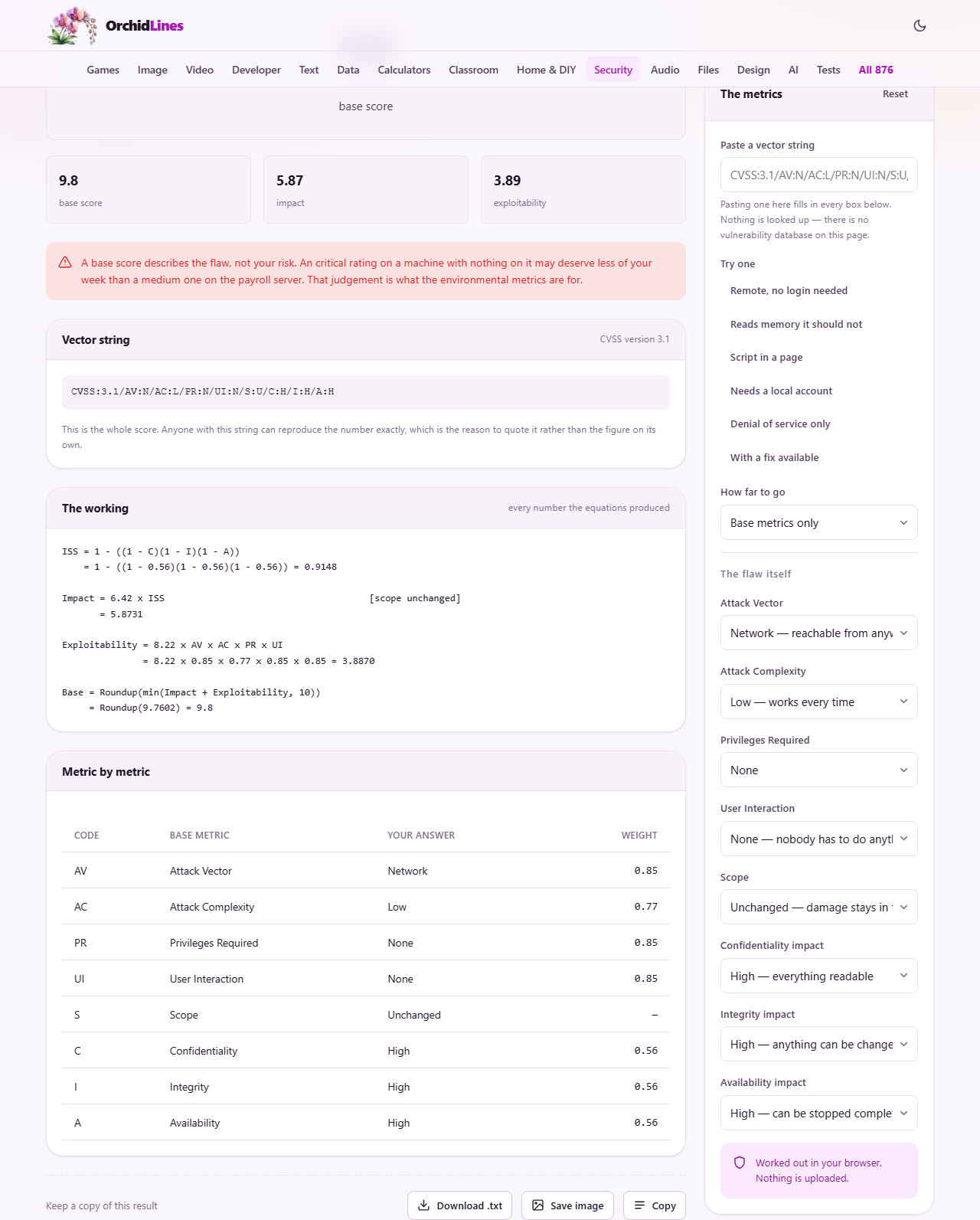
There are two ways in. If you already have a vector string from an advisory or a bug report, paste it into the Paste a vector string field at the top of the settings panel. A valid string begins with CVSS:3.1 and fills in every dropdown below it. The page tells you how many metrics it read and warns you if anything was left out.
If you are scoring from scratch, work down the dropdowns instead. Every answer is written as a plain description rather than a single letter, so you do not need to memorise the abbreviations. A row of example buttons below the paste field loads common patterns: a fully remote flaw with no login needed, a denial-of-service, a cross-site scripting case, and several others. These are useful for learning how the metrics interact before you score something of your own.
The eight base metrics
Attack Vector asks how close the attacker needs to be. Network means reachable from anywhere on the internet. Adjacent means the same local network. Local means they need a session on the machine already. Physical means they need to touch the device.
Attack Complexity is about whether the attack works reliably. Low means it succeeds every time. High means it needs luck, preparation, or conditions the attacker cannot control. Privileges Required asks whether they need an account. User Interaction asks whether a real person has to do something, like clicking a link, for the attack to work.
Scope asks whether the damage stays inside the thing that was attacked or escapes beyond it. A virtual machine exploit that reaches the host is a scope change. This metric raises the score sharply and is the one people argue about most.
The last three, Confidentiality impact, Integrity impact, and Availability impact, each ask how much damage the flaw does in that area. High means total loss, low means partial, and none means that area is unaffected.
The threat metrics and why they can only lower a score
Switch How far to go to Add the threat metrics and three more dropdowns appear. Exploit Code Maturity describes what attackers actually have. A proof of concept lowers the score slightly because it takes more work to use than a packaged exploit. Remediation Level describes what defenders have. An official fix lowers the score because the risk can be removed. Report Confidence describes how well the flaw is understood.
All three metrics default to Not defined, which is the same as their worst case. A confirmed report with a working exploit and no fix available scores exactly the same as leaving all three blank. These metrics exist to reduce a score while a flaw is still theoretical, never to increase one. That surprises people who expect setting them to make the number go up.
The environmental metrics and how they make the score yours
Switch How far to go to Everything and a longer set of fields appears. The first three, Confidentiality Requirement, Integrity Requirement, and Availability Requirement, say how much each area matters for the specific system you are protecting. A database server where confidentiality is everything but downtime is tolerable will weight those very differently from a public status page.
Below those are the modified base metrics. Each one lets you say how the flaw behaves on your particular setup rather than in the general case. If a network-reachable flaw can only be reached from your local network because of your firewall, set Modified Attack Vector to Adjacent. The environmental score takes all of this into account and produces a number that is specific to your situation rather than to the flaw in the abstract.
Reading the output
The result shows a large headline number with a severity label: None for zero, Low up to 3.9, Medium up to 6.9, High up to 8.9, and Critical from 9.0 to 10.0. Below it, stat tiles show the base score, the impact sub-score, and the exploitability sub-score. If you filled in threat or environmental metrics, those scores appear as well.
A working panel lays out every step of the calculation. It shows the impact sub-score formula, the exploitability formula, and the final rounding. For the environmental score it includes the modified impact sub-score and its different formula. This is not decoration. Anyone who needs to check or dispute a score can follow the arithmetic line by line.
A vector string panel at the bottom holds the complete metric string. Copy this rather than the bare number when sharing a score. The string carries every answer you gave, so anyone who pastes it back gets the same number and can see exactly which judgement they disagree with.
A worked example from advisory to action
An advisory reports a flaw in a web framework. It can be triggered from the network with no login, the attack works every time, and it lets the attacker read everything in memory but not change anything or crash the service. You set Attack Vector to Network, Attack Complexity to Low, Privileges Required to None, User Interaction to None, Scope to Unchanged, Confidentiality to High, Integrity to None, and Availability to None. The base score is 7.5, rated High.
Now you add your environment. Your copy of this framework sits behind a reverse proxy that requires authentication, and the server holds nothing confidential. Set Modified Privileges Required to Low, and Confidentiality Requirement to Low. The environmental score drops noticeably because in your setup the flaw is harder to reach and the data it would expose matters less. That adjusted number is the one to act on, and it is the calculation a published advisory cannot do for you.
Why two calculators sometimes disagree
Version 3.1 defines a rounding step that works in whole numbers rather than on the decimal value. A score of 8.5 arrives inside the computer as 8.4999999 or 8.5000001 depending on the order the multiplications ran in. A calculator that uses ordinary rounding turns one of those into 8.6, which is wrong by the standard. This one follows the published integer step, so the answer it gives is the one the specification defines.
The other common source of disagreement is the environmental impact formula. For a changed scope it uses different constants and a different exponent from the base formula. Calculators that reuse the base formula with modified inputs produce a different number. These are the kind of details that only matter when two people are comparing results and cannot agree.
Common traps when scoring
A few patterns catch people regularly.
- Confusing severity with priority. A critical score on an isolated lab machine may matter less than a medium score on your production database. The score rates the flaw, not your week.
- Quoting the number without the vector string. A bare 7.5 is a claim nobody can verify. The string lets anyone check your reasoning.
- Expecting the threat metrics to raise a score. They can only reduce it. If you set them and the number stays the same, that means your choices carry a weight of one, which changes nothing.
- Scoring without filling in the environmental metrics. The base score is generic. The environmental score is about your actual risk, and skipping it means you are patching by someone else's priorities.
All arithmetic, no network
Every calculation happens in your browser. There is no server involved, no database consulted, and no data sent anywhere. You can disconnect from the internet after loading the page and score as many flaws as you like. The vector strings you copy out are plain text that carry the full state, so you can share them through whatever channel you already use for security discussions.