
Debugging cross-origin errors without guessing
Cross-origin resource sharing, known as CORS, is a set of rules that browsers enforce when a page on one address tries to read a response from a different address. The error messages are famously unhelpful, and the fix is always on the server, never in the browser. This simulator lets you describe your request and paste the headers your server sends back, and it tells you exactly which check failed and why. No actual request is sent.
What cross-origin means and when it applies
Two addresses are considered different origins when their scheme, host, or port do not match. A page at https://app.example.com calling https://api.example.com is cross-origin because the hosts differ, even though both are subdomains of the same domain. A page at http://localhost:3000 calling http://localhost:8080 is cross-origin because the ports differ. A page at http://example.com calling https://example.com is cross-origin because the schemes differ.
When a page and the address it is calling share the same scheme, host, and port, no CORS rules apply at all. The simulator tells you this right away if you fill in two matching addresses. Everything that follows only matters when the two addresses are different.
Filling in the simulator
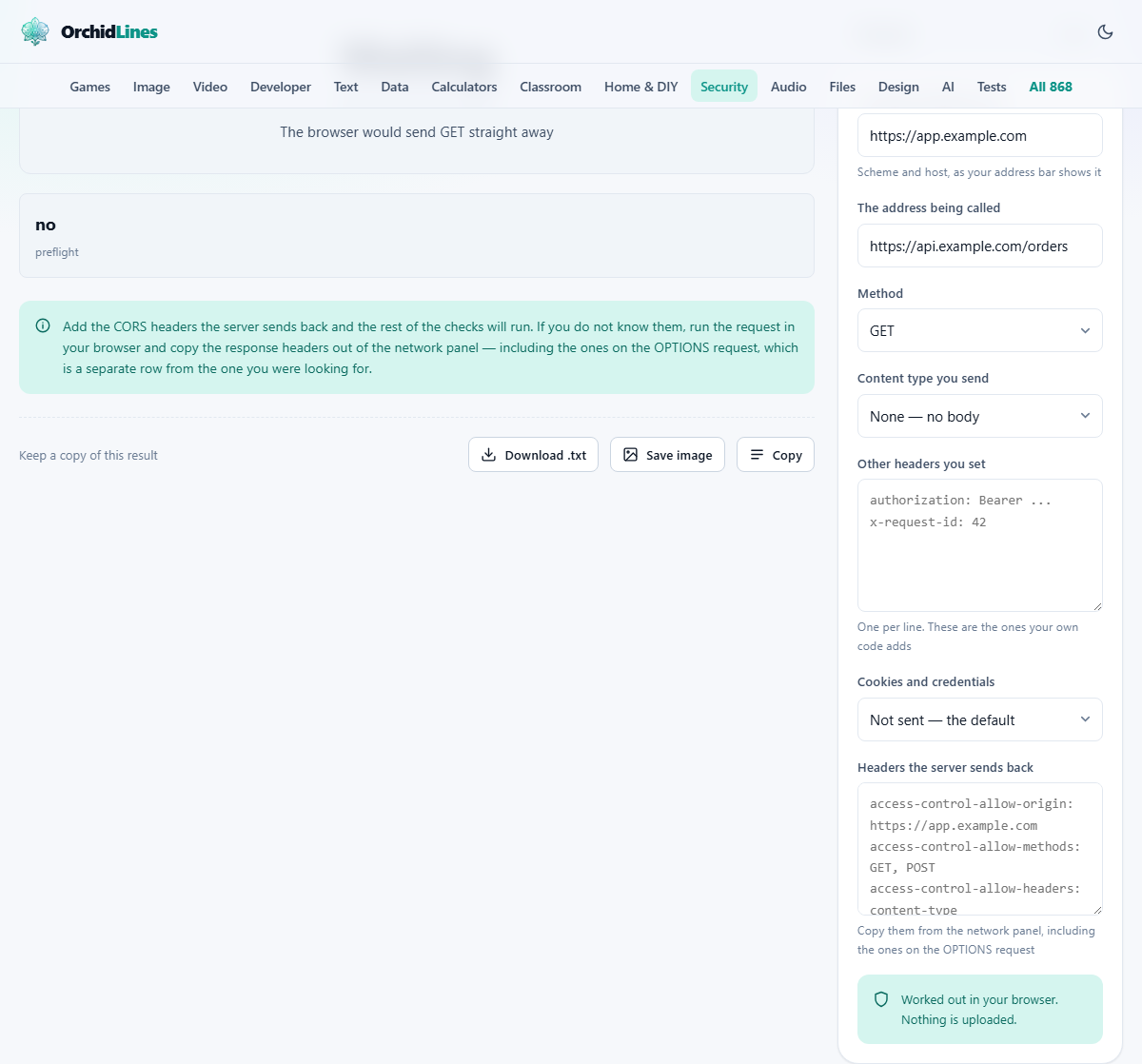
The tool has a panel on the side with several fields. The page making the call is the address of the web page that contains the code making the request. The address being called is the server it is trying to reach. Only the scheme, host, and port matter for the origin comparison, so you can type any path you like.
Below those, the Method selector lets you pick the HTTP method your code uses. The Content type you send dropdown covers the body format. The Other headers you set text area is for any custom headers your code adds, like an authorization token or a request identifier. The Cookies and credentials selector tells the simulator whether your request includes cookies. Finally, the Headers the server sends back is where you paste the response headers you see in your browser's network panel.
Simple requests versus preflighted requests
Not every cross-origin call triggers a preflight. A request using GET, HEAD, or POST with only safelisted headers and a content type that is one of three plain types is considered simple. The browser sends it straight to the server and only checks the response headers afterwards. If those headers are wrong, the browser blocks your code from reading the response, but the server already received the request and may already have acted on it.
A preflight happens when the request uses a different method, sets a custom header, or uses a content type outside the three safe ones. Before the real request, the browser sends an OPTIONS request asking the server what it allows. Only if the server's answer passes every check does the real request follow. This is why adding a single custom header to a previously working call can break everything: it pushed the request from simple to preflighted.
The wildcard and credentials trap
A server can respond with Access-Control-Allow-Origin set to an asterisk to allow any page to read the response. This works for public data with no cookies involved. The moment the request includes credentials, which means cookies or an authorization header sent with the request, the asterisk is rejected. The server must echo back the exact origin of the calling page instead.
This is the single most common cause of a call that works until someone adds a login to it. The API was public, the wildcard was fine, and then authentication was added. Suddenly the same call that worked yesterday fails today. The fix is to stop using the wildcard and echo back the requesting origin after checking it against your own list. Add a Vary: Origin header too, so shared caches do not serve one site's response to another.
The authorization header exception
Even when a server uses a wildcard in Access-Control-Allow-Headers, one header is deliberately excluded: Authorization. The standard names it as the one non-wildcard request header. If your call sends an Authorization header and the server replies with only a wildcard in its allowed headers list, the browser rejects it. The server has to list Authorization by name every time.
This catches people who think a wildcard means everything is allowed. For every other custom header it does, at least when credentials are not involved. For Authorization it never does. The simulator flags this specifically, because it is one of the hardest problems to diagnose from the browser console alone.
A worked example: a JSON call with a bearer token
Suppose your front end at https://app.example.com sends a POST to https://api.example.com/orders with a content type of application/json and an Authorization header carrying a bearer token. Credentials are not included, meaning no cookies are sent.
Fill in the two addresses, select POST as the method, choose application/json as the content type, and type authorization: Bearer abc123 in the custom headers field. Leave credentials on the default setting. The simulator immediately tells you a preflight is needed because application/json is not one of the three safe content types and because the Authorization header is not safelisted.
Now paste the response headers your server returns for the OPTIONS request. If the server sends Access-Control-Allow-Origin: * and Access-Control-Allow-Headers: *, the simulator flags the Authorization problem: the wildcard does not cover it. The fix is to change the allowed headers to content-type, authorization. With that correction pasted in, the simulator shows every check passing.
Method matching and the case sensitivity trap
The Access-Control-Allow-Methods header lists the methods the server permits. The browser compares these against the request method byte for byte. If the server returns delete in lower case but the browser sends DELETE in upper case, the match fails. The standard normalises request methods to upper case, so the server must list them in upper case too. A value that looks correct at a glance can still fail because of this invisible difference.
The three safelisted methods, GET, HEAD, and POST, are always allowed even if the server does not list them. Every other method must appear in the allowed list exactly as the browser writes it.
Exposed response headers and why some are invisible
Even when a cross-origin request passes every check and your code receives the response body, it cannot read most response headers. Only a short list of safe response headers is visible by default: things like Content-Type, Cache-Control, and Content-Length. Custom response headers that the server sends, such as X-Total-Count or Content-Disposition, are silently hidden.
The server has to add an Access-Control-Expose-Headers header listing every extra response header it wants your code to see. Without it, those headers exist in the network panel but read as null from your script. This is a frequent source of confusion because the data is plainly visible in the developer tools but your code cannot touch it.
This is not a security system
CORS exists to protect users, not servers. It stops a random web page from reading data out of a service you happen to be logged in to. Any program that is not a browser ignores these rules entirely. A command-line tool, a server-side script, or a mobile app can call any address it pleases without asking permission. A server that relies on the absence of a CORS header to protect its data is not protected. The only real protection is authentication and authorization on the server itself.
The simulator makes this point clearly: when a simple request is blocked, the server already received and acted on it. Only the response was withheld from the script. If the request created a record or charged an account, that happened regardless. CORS does not prevent side effects. It prevents reading answers.
Privacy: nothing is contacted
The simulator does not send any request to any server. It applies the standard's rules to the text you typed in the form fields and reports the result. This means you can test a server configuration that does not exist yet, debug a production problem without touching production, or analyse a failure you saw earlier by reconstructing the headers from memory. Everything runs in your browser.