
Making identifiers that never collide
How the two UUID versions differ, what every control on the page does, how to read an existing identifier with the inspector, and why you can trust a number made from thin air.
What a UUID is and where it turns up
A UUID is a string of 32 hexadecimal characters, split into five groups by dashes. It looks something like 3f2504e0-4f89-11d3-9a0c-0305e82c3301. The whole point is that anyone, anywhere, can produce one at any moment without asking a central register, and the chance of two being the same is so small it can be ignored.
That property makes UUIDs the standard choice for database primary keys, API request identifiers, file names on a shared drive, and correlation tokens in logs. Any place where two systems need to agree on an identifier without talking to each other first is a place where a UUID fits.
They appear in web frameworks, mobile apps, message queues, and cloud storage paths. If you have opened a developer console or read a server log, you have already seen dozens of them, even if you did not know the name.
Version 4 and version 7
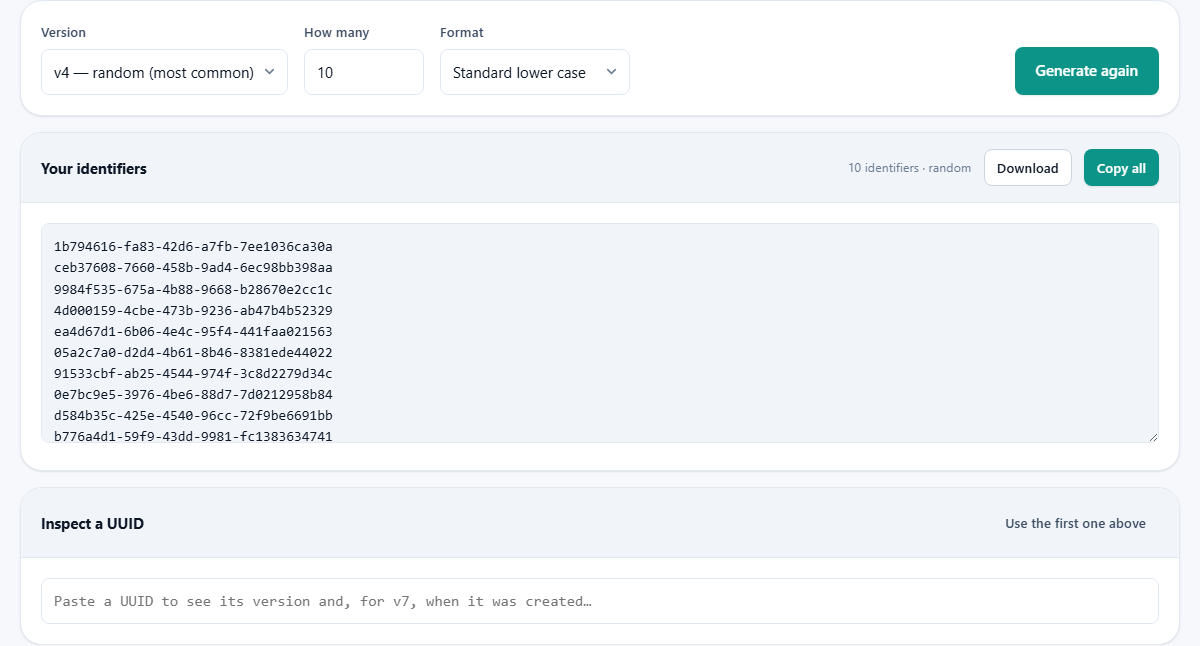
The Version dropdown offers three choices. The first, v4, is the one most people reach for. It fills all 122 available bits with random data drawn from your browser's cryptographic random source. The result is unique and has no structure beyond the version marker buried in the middle.
The second choice, v7, is newer and solves a problem that only shows up at scale. It puts the current time in milliseconds at the front of the identifier, then fills the rest with random bits. The values still cannot collide, but they sort in the order they were created. A database index built on v7 keys grows at one end like a stack of plates, instead of scattering new rows across random pages the way v4 does. If you are choosing a primary key type for a new table today, v7 is almost always the better answer.
The third choice, Nil, gives you a UUID of all zeroes. It exists as a defined placeholder meaning no value, for any field where the schema demands a UUID but nothing applies yet.
How many and the format
The How many field accepts a number between one and ten thousand. One is right for dropping into a config file or a migration script. A thousand is handy for seeding a test database. Ten thousand covers a load-test data set. The page handles all of them in under a second.
The Format dropdown changes how each identifier is written. Standard lower case is the form that most tools expect. UPPER CASE is the same with every letter capitalised. No dashes strips the four hyphens and leaves a raw 32-character block. The remaining three are for pasting straight into code: braces wraps each line in curly brackets, quoted puts double quotes around it, and urn:uuid: prepends the formal URN prefix.
Picking the right format before you generate saves a find-and-replace step later. If you are building a JSON fixture, choose quoted. If you are filling a C# Guid constructor, choose braces. The output is ready to paste with no editing.
The result panel
Press Generate again and the identifiers appear in a read-only text area under the heading Your identifiers. A note beside it tells you how many are showing. Two buttons sit beside the heading. Copy all puts every line on the clipboard in one go. Download saves them as a plain text file, one identifier per line, ready to feed into a script or a spreadsheet.
There is a built-in safety check. After every batch the page scans for duplicates. If two identical values ever appeared, a warning would show. In practice this will never fire, because 122 random bits give more possible values than there are grains of sand on every beach on earth, but the check is there because a broken random source is a real thing and catching it matters.
Inspecting an existing UUID
Below the output sits the Inspect a UUID panel. Paste any identifier into the text field and it tells you what version it is, whether it is valid, and for v7 identifiers, the exact date and time it was created. A small button labelled Use the first one above copies the first line of your latest batch into the inspector, so you can verify a v7 timestamp without leaving the page.
The inspector is useful for debugging. If a log line carries a UUID and you want to know when the request happened, paste it in and the timestamp is right there. It also catches the common mistake of treating a v4 identifier as though it had a timestamp. The inspector will tell you plainly that a v4 carries no time information at all.
It also reports the version number of any UUID you give it, which helps when you inherit a codebase and want to know what kind of identifiers it has been producing. Version 1 and version 4 look the same to the eye, but the inspector reads the version nibble and tells you which one you are holding.
A real example, start to finish
A developer is building a new orders table and needs a sample set of primary keys. She sets Version to v7 so the keys will sort by creation time. She types 500 into How many. She picks the quoted format because the values are going into an SQL insert script.
She presses Generate again. Five hundred quoted v7 identifiers appear in the text area. She clicks Download and saves the file. She opens it in her editor, wraps each line in an INSERT statement, and runs it against her test database. The keys land in order because v7 sorts by time, and the index stays compact.
Later, a tester reports that an order with a certain UUID is misbehaving. She pastes it into the inspector and sees it was created at 14:07 yesterday afternoon, which narrows the deploy window and points her at the right set of logs.
Mistakes worth avoiding
- Using a UUID as a password or access token. It is designed to be unique, not secret. Anyone who sees it can use it. For security tokens, use a purpose-built random generator.
- Choosing v4 for database primary keys on a large table when v7 would keep the index tidy. The performance difference is invisible on small tables and very visible on large ones.
- Generating a batch and then generating again without saving. The previous set is gone. There is no history and no undo, so copy or download before you press the button a second time.
- Stripping the dashes and forgetting that some systems put them back. A UUID without dashes is the same value, but not every parser agrees on that.
- Assuming the nil UUID will be accepted everywhere. Some validators reject all zeroes because they treat it as empty rather than as a defined placeholder.
Where UUIDs fit in beside other identifiers
A UUID is not the only kind of unique identifier. Auto-incrementing integers are simpler and smaller, but they need a single source of truth, which a distributed system does not have. Short IDs like those in URL shorteners are easier to read aloud, but they are generated from a counter and leak ordering information. Snowflake IDs, used by some large platforms, encode a machine number and a sequence, and need coordination at setup time.
A UUID needs nothing. No counter, no machine list, no central server. That independence is its entire value, and the cost is its length. Thirty-six characters is longer than most people want to type, but for any system that creates identifiers in more than one place, the trade-off is worth it.
Everything stays on your own machine
The identifiers are built inside your browser using its built-in cryptographic random number generator. No request is sent to any server. No data is stored after you close the tab. You can prove this by disconnecting from the network after the page loads and pressing Generate again. It still works, because there was never anything on the other end.
That also means there is no rate limit, no account, and no record of what you made. If the identifiers are for a system that has not launched yet and you would rather nobody else saw them, closing the tab is all the cleanup there is.