
Reading a cron schedule without getting it wrong
What each field in a cron expression stands for, how the parser turns it into plain English, why the day-of-month and day-of-week combination trips up almost everyone, and a full walkthrough with concrete times.
Cron in thirty seconds
Cron is the standard way Unix servers schedule repeating jobs. Back up the database every night. Send the weekly report on Monday morning. Clear the temp folder every hour. Each of these is one line in a crontab, and the first five tokens in that line are the schedule.
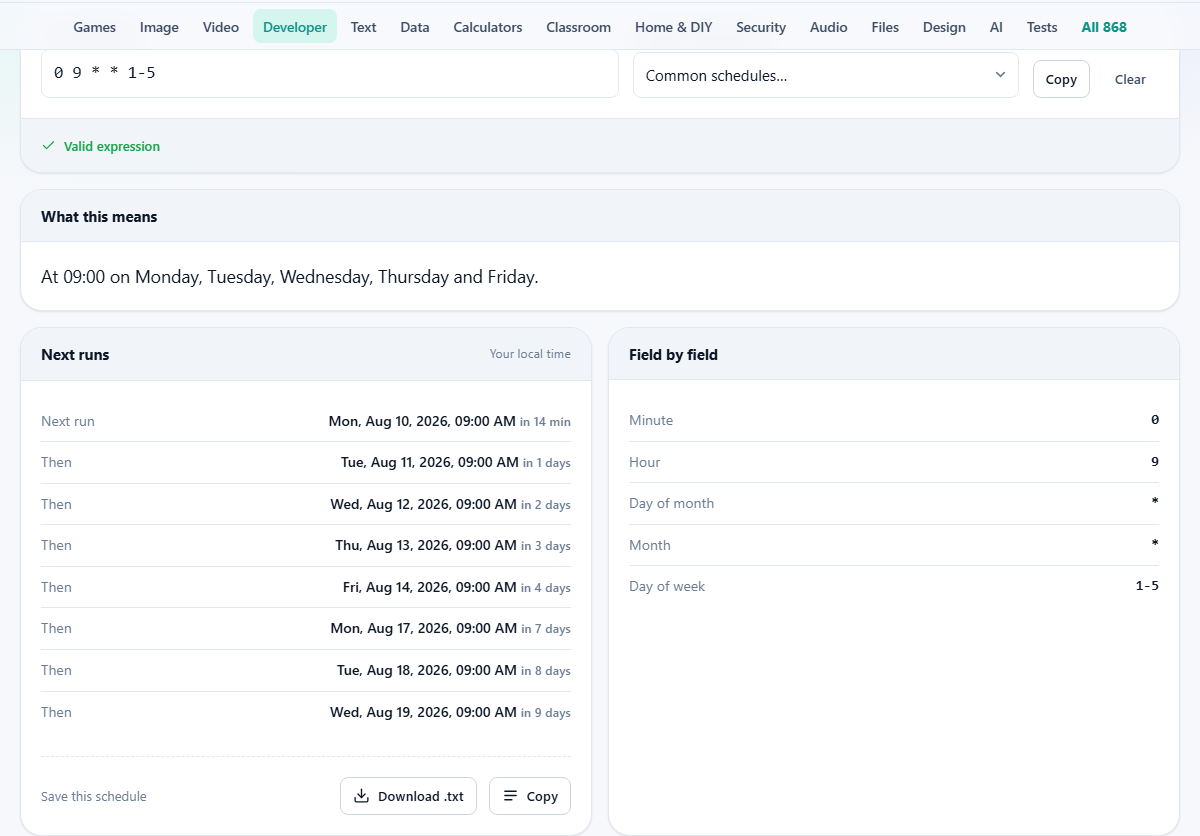
Those five tokens, separated by spaces, stand for minute, hour, day of month, month, and day of week. A star means every. So 0 9 * * 1-5 means 'at minute zero, hour nine, any day of the month, any month, Monday through Friday'. In plain English: 9 am on weekdays.
The format is terse, powerful, and easy to misread. One wrong number and a job runs every minute instead of every hour. The parser on this page translates the expression into English and shows you the exact dates and times of the next eight runs. If those times look wrong, the expression is wrong.
Entering an expression
The field labelled Cron expression takes a five-field or six-field string. Type it directly, or choose one from the dropdown labelled Or pick a common one. That dropdown offers presets like every minute, every hour, daily at midnight, weekly on Sunday, and monthly on the first.
Presets are a good starting point. Pick one that is close to what you want, then edit the numbers. The output updates as you type, so you can watch the description change in real time.
The Copy button puts the expression on your clipboard for pasting into a crontab or a scheduler configuration. Clear empties the field.
The five fields and what they accept
Minute runs from 0 to 59. Hour runs from 0 to 23, where 0 is midnight. Day of month runs from 1 to 31. Month runs from 1 to 12, though names like jan or feb are also accepted. Day of week runs from 0 to 6, where 0 is Sunday. Writing 7 for Sunday also works in most implementations, and this tool accepts it.
A star in any field means every value. A number means that exact value. A range like 1-5 means Monday through Friday in the day-of-week field. A list like 1,15 means the first and fifteenth of the month. A step like */15 in the minute field means every fifteen minutes.
You can combine them. The expression 0-30/10 in the minute field means every ten minutes during the first half of the hour: minute 0, 10, 20, and 30.
Reading the output
Below the input sit three panels. The first, labelled What this means, shows a plain English sentence describing the schedule. For 30 2 * * 0 it reads something like 'at 2:30 am on Sunday'.
The second panel, labelled Next runs, lists eight upcoming times when the job would fire. These are calculated in your own time zone and shown with full dates and times. This is the real check. If the dates do not match what you expect, the expression has a mistake.
The third panel, labelled Field by field, breaks the expression into its five or six parts and shows what each one means individually. This is helpful when the combined description is clear but you want to confirm that one specific field is doing what you think.
The day-of-month and day-of-week trap
This is the single most common source of confusion in cron. If you set both the day of month and the day of week, cron runs whenever either condition matches, not when both match at the same time.
So the expression 0 0 13 * 5 does not mean Friday the 13th at midnight. It means the 13th of every month at midnight, and also every Friday at midnight. That is far more often than most people expect.
The tool warns you when it detects this pattern. The next-run list makes the behaviour obvious: you will see runs on Fridays that are not the 13th, and runs on the 13th that are not a Friday.
The workaround, when you truly want both conditions to hold, is to move the logic into the script itself. Run the job every Friday, and let the script check whether today is also the 13th before doing its work.
Six-field expressions and seconds
Standard Unix cron uses five fields. Some schedulers, Quartz and Spring being the best known, add a sixth field at the front for seconds. If you type six tokens, the parser treats the first as seconds and shifts the rest over.
This means 0 0 9 * * 1-5 in a six-field context reads as 'at second zero, minute zero, hour nine, any day of month, any month, Monday through Friday'. The effect is the same as the five-field version, just with an explicit seconds position.
If your scheduler uses five fields and you accidentally paste six, the parser will still show you what the expression means. The mismatch between that description and what you intended should be obvious in the next-run list.
A worked example with two expressions
Start with something simple. Type 0 9 * * 1-5 into the field. The description reads 'at 9:00 am, Monday through Friday'. The next-run list shows the coming five weekdays at 9:00 am, skipping Saturday and Sunday. The field-by-field panel confirms: minute is 0, hour is 9, day of month is every, month is every, day of week is 1 through 5.
Now try something trickier. Type 0 */6 1,15 * * into the field. The description reads 'at minute 0, every 6 hours, on the 1st and 15th of every month'. The next-run list shows midnight, 6 am, noon, and 6 pm on the 1st, then the same four times on the 15th, then back to the 1st of the next month.
If you expected it to run on two days a month and it is showing eight runs, the confusion is between days and runs per day. The every-six-hours step fires four times in each matching day.
Time zones and the server clock
The next-run times shown on the page are in your local time zone. Your server almost certainly runs in UTC. A job scheduled at 0 9 fires at 9 am server time, not at 9 am in your city.
If your local time is five hours behind UTC, that 9 am job actually fires at 4 am your time. The page cannot know your server's zone, so you need to do the offset yourself. Many sysadmins convert to UTC before writing the crontab, which avoids daylight saving surprises.
Daylight saving time is another trap. A job at 2:30 am may be skipped entirely on the spring-forward night, or run twice on the fall-back night, depending on the cron implementation. The safest times are those that fall outside the changeover window.
Expressions that will never fire
It is possible to write a valid expression that matches no real date. The classic example is 0 0 30 2 *, which asks for the 30th of February. February never has 30 days, so the job will never run. The parser flags this with a warning rather than silently accepting it.
Less obvious cases include asking for the 31st of a month that only has 30 days. The job will fire in months with 31 days and be skipped in the others, which may or may not be what you want.
Pitfalls that catch experienced users
- Writing * in the minute field when you meant 0. This runs the job every minute of the specified hour, not once at the top of the hour.
- Confusing */2 with 2. The first means every two units. The second means only when the value is exactly 2.
- Setting both day fields and expecting them to combine with AND. They combine with OR. Check the next-run list to see the effect.
- Forgetting that month and day-of-week names are case insensitive. Writing MON or mon or Mon all work, but mixing numbers and names in the same field can be confusing.
- Scheduling a heavy job at midnight. Every other sysadmin had the same idea. Stagger your jobs by a few minutes to spread the load.
All parsing happens on your own machine
The expression is read and the run times are calculated entirely inside your browser. Nothing is sent to a server. This is a small thing for a cron expression, which rarely contains sensitive data, but it means the page works offline too.
Load the page, disconnect, and type an expression. The description and the next runs still appear. There is no server involved at any point.