
Making text safe to paste somewhere it will be read as code
Almost every awkward bug involving a stray quote, a broken link or a page that suddenly shows raw markup comes down to one thing: text was pasted somewhere that read part of it as an instruction rather than as content. The cure is always the same — rewrite the dangerous characters into a form that means the same and cannot be misread. This page does that three ways, and undoes all three. It replaces the separate Base64, URL encoder and escaping tools, and carries everything they documented.
Three jobs that are really one job
Base64, percent-encoding and escaping look like separate skills, and until recently they were three separate pages here. They are the same idea wearing different clothes. In each case there is a destination with rules about which characters are special, and the job is to rewrite anything that would break those rules into a substitute that means the same thing and cannot be misread.
What differs is only the destination. Base64 is for places that will carry nothing but a narrow alphabet of letters, digits and two punctuation marks. Percent-encoding is for web addresses, where a space or an ampersand changes what the link means. Escaping is for code, where a quote can end a string early and an angle bracket can open a tag nobody intended.
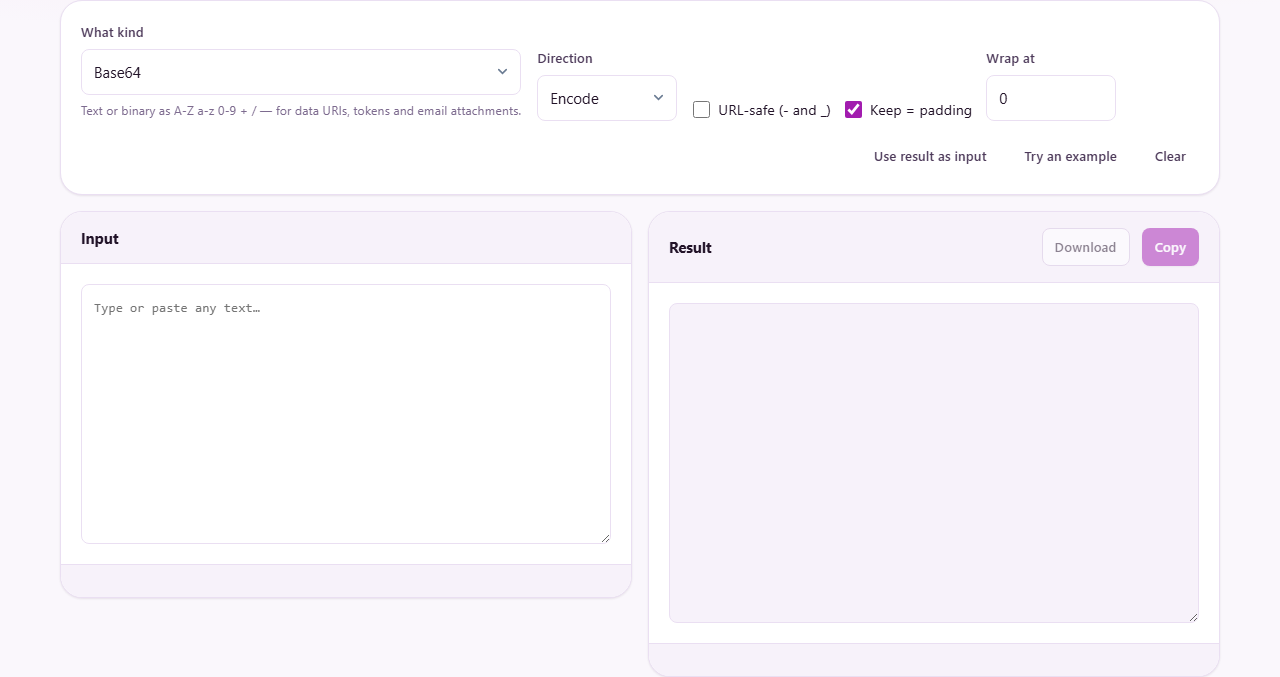
Because the shape is identical, the three now share one page. The What kind menu picks the destination, the Direction menu picks the way, and the options that do not apply are hidden rather than left sitting there looking meaningful. Everything the three separate tools could do, this page does.
Who reaches for each of them
Back-end developers decode a Base64 token from an API to check what is inside it. Front-end developers encode a small icon as a data URI to save a network request. Engineers decode a secret from a configuration file to confirm it holds the right value. Testers paste an encoded chunk out of a log and read back what the server actually sent.
The URL side draws a different crowd, or the same people on a different day. Most arrive needing to encode: a search term, a file name or a parameter value with a space or an accent in it. Decoding is just as common in practice, because a link from an analytics report or a redirect chain is unreadable until you reverse it, and server logs and support tickets are full of them.
Escaping is for anyone putting text somewhere it will be read as code. Front-end developers displaying user input on a page. Back-end developers reading a query that failed and trying to see where the quotes fell. Anyone building a regular expression out of a string that contains dots and brackets. Template authors pasting text into an XML feed that has to stay valid.
Base64: what it is and why it exists
Base64 rewrites any data using 64 safe characters — the upper and lower case letters, the digits, plus sign and forward slash, with the equals sign for padding. The result is plain text that survives systems built to carry text and nothing else: email headers, JSON messages, addresses, XML documents.
An image embedded in a stylesheet, a token in an HTTP header, an attachment inside a MIME message and a small file stuffed into a JSON payload are all carried this way. The encoding is everywhere in web work, which is why a converter for it sits on so many bookmarks bars.
The cost is size. Base64 output is about a third larger than what went in, because arbitrary bytes are being squeezed into a smaller alphabet. The readout under the result shows that growth as a percentage, which is the number you want when deciding whether to inline an image into a stylesheet or leave it as a separate file.
The three Base64 options, and when each matters
URL-safe swaps two characters. Ordinary Base64 uses plus and forward slash, both of which mean something inside a web address. The URL-safe variant uses minus and underscore instead, so the result can go straight into a link without a second round of escaping. JSON Web Tokens use this form, and so do a great many modern APIs.
Keep padding is on by default. Base64 works in blocks of three bytes, and when the data does not divide evenly, equals signs fill the gap at the end. Some systems require them and some reject them, so the switch exists for both kinds. The decoder does not care either way — it restores missing padding itself.
Wrap at breaks the output into lines of a fixed width. Seventy-six characters is the length the MIME standard uses, which is why encoded attachments in raw email look the way they do; sixty-four is the other common choice, seen in certificates and key files. Most modern uses want no wrapping at all, which is the default of zero.
All three only affect encoding, so they disappear when the direction is set to decode. The decoder strips line breaks and whitespace before it reads anything, so wrapped input needs no preparation.
Why accents and emoji survive here
The browser has a built-in pair of functions for Base64, and they have a trap: they only understand character values up to 255. Feed them the word café, a Japanese sentence or an emoji and they throw an error or return nonsense. A great many Base64 tools call those functions directly, which is exactly why so many of them fail on ordinary European names.
This page converts text to UTF-8 bytes before encoding, so every character in every script round-trips correctly. The accent comes back. The Japanese comes back as written. The emoji comes back unchanged. The built-in example is chosen to prove it rather than to look pretty — it contains a café, some Japanese and an emoji, and if those three survive, nothing you paste in is going to trouble it.
Data URIs, and reading someone else's
A data URI is a string beginning data: followed by a media type, then base64, then a comma, then the encoded payload. It embeds a file directly in HTML or CSS so no separate request is needed.
You can paste an entire data URI into the decoder. The prefix is recognised and stripped, the payload is decoded, and the media type it claims to be is reported beside the result. That is the quick way to find out what file is hiding inside a data URI you found in somebody else's stylesheet.
If the decoded content turns out to contain control characters, the status line says so rather than filling the pane with rubbish. That almost always means the payload was an image or another binary file rather than text, which is worth being told plainly instead of having to work out.
Base64 is not encryption
This is the most common and the most dangerous misunderstanding about Base64. Encoding a password, a key or a private message in Base64 hides nothing at all. Anyone can decode it in seconds, including on this very page. There is no key, no secret and no protection of any kind.
Security reviews regularly turn up passwords and tokens sitting in configuration files as Base64, with whoever put them there assuming the encoding concealed them. It did not. Treat it exactly as you would treat writing a number in hexadecimal: it changes how the data looks and stops nobody from reading it. Data that must stay secret needs real encryption, which is a different tool.
Addresses live inside tight rules
A web address can safely contain only a small set of characters. Letters, digits, hyphens, dots, underscores and tildes travel everywhere without trouble. Everything else either has a job in the address format itself or falls outside the permitted set.
Percent-encoding solves that by replacing each unsafe character with a percent sign and two hexadecimal digits giving the byte value. A space becomes %20. An ampersand becomes %26. An accented e becomes %C3%A9 — two codes for one character, because in UTF-8 that letter is two bytes and each byte gets its own code.
The same applies further up the scale. A Chinese character usually produces three percent codes and an emoji four. The length of the encoded output therefore tells you something real about the byte weight of the original, which matters when you are working against a length limit.
The level setting, and the mistake almost everyone makes
The How much to encode menu offers a single value or a whole web address, and choosing wrongly is the usual bug. It produces a link that looks plausible and does not work.
A single value encodes everything that could carry special meaning, including the colon, the slashes, the question mark and the ampersand. That is right when you are preparing one value to sit after an equals sign. If the search term is shoes & boots, the ampersand must be encoded, because a raw one would start a new parameter instead.
A whole web address encodes only what is never allowed anywhere, leaving the structural characters alone because in a complete address they are doing their job. Use it when you have a full link and simply want the spaces and accents cleaned up.
The failures are predictable in both directions. Encode a full address as a single value and it begins https%3A%2F%2F instead of https:// and the link is dead. Encode a single value as a whole address and an ampersand inside your data quietly splits the parameter in two. The page applies the correct function for each setting, so the only judgement required is matching the setting to what you actually have.
Spaces, plus signs, and why there are two conventions
A space can be written %20 or as a plus sign, and both are valid because they come from different rules. The plus dates to old HTML form submissions, which used a format called application/x-www-form-urlencoded; in that format spaces became plus signs and real plus signs became %2B.
The Spaces as + switch chooses which convention to follow, in both directions. Leaving it off gives %20, which is the safer default because it works in every part of an address. Turn it on when the system at the other end expects the form-encoded style — some older APIs and several analytics platforms still do.
Browsers paper over a lot of this for addresses typed into the address bar, but APIs, configuration files and logs do not. Many REST endpoints reject a request outright when a non-ASCII character arrives raw in the query string, and the error rarely names the character responsible.
The breakdown under the result
Whenever the text parses as a real address, the page splits it into its parts below the result: protocol, host, port if there is one, path, fragment, and every query parameter as its own row with the value already decoded.
That table is often the thing people actually wanted. A link from an advertising campaign might carry a dozen parameters, and reading them as rows beats scanning a wall of percent codes and ampersands. You can see at a glance what tracking data is attached, what redirect target is buried inside, and whether some parameter holds a value it should not.
Escaping, and the six destinations
Every language and format has characters that carry special meaning. In HTML a less-than sign starts a tag. In a JavaScript string a backslash starts an escape sequence. In SQL a single quote ends a literal. In a regular expression a dot matches anything at all. Escaping rewrites those characters so they are read as plain text rather than as instructions.
HTML mode replaces the five characters that matter inside a document — less-than, greater-than, ampersand, double quote and single quote — with entities. This is the mode for putting text a person typed onto a web page. A checkbox appears alongside it to escape non-English characters as numeric entities too, for systems that will not take anything beyond plain ASCII.
JavaScript and JSON string mode escapes backslashes, quotes, newlines, tabs and control characters, so text can sit inside a quoted string in code. JSON strings follow the same rules, so one mode covers both.
XML mode is nearly identical to HTML, differing only in using the apostrophe entity that the XML standard defines and older HTML does not. Regular expression mode puts a backslash in front of every character with special meaning in a pattern — dots, stars, plus signs, question marks, pipes, brackets, braces, parentheses, carets, dollar signs and backslashes — so they match themselves. Unicode escapes mode rewrites anything outside plain ASCII in the backslash-u form, for files that must stay pure ASCII.
Worked examples for HTML and for a pattern
Suppose somebody types this into a comment box: I think 3 < 5 & that's "obvious". Drop that into a page unescaped and the browser reads < 5 as the start of a tag, the ampersand as the start of an entity, and the quotes may close an attribute early. Set the kind to Escape, choose HTML, paste it in, and every dangerous character becomes an entity. Put that in your template and the reader sees exactly what was typed.
Now a pattern example. You want to find the literal text price is $5.00 (USD) in a log file. The dollar sign, the dot and the parentheses all mean something in a regular expression. Choose Regular expression, paste the string, and each of them comes back with a backslash in front. Drop that into your pattern and it matches the exact text instead of behaving like instructions.
In both cases switching the direction to Unescape and pasting the escaped version returns the original exactly. The round trip is clean, and the page checks that for you rather than asking you to trust it: after escaping, it unescapes its own output and compares. If the two do not match, the status line says so instead of letting you discover it when the data comes back wrong.
Why escaping SQL by hand is not enough
SQL mode doubles single quotes, which is the convention for putting an apostrophe inside a quoted value. That stops the simplest form of injection, where an attacker closes a string early and appends their own query. It does not stop everything.
Character-set tricks, comment injection and double-encoding all get past manual escaping. The safe approach is parameterised queries or prepared statements, where the database driver handles values itself and never builds them into the statement text at all.
The SQL mode here is for reading and debugging, not for building queries that face the internet. If a query failed and you want to see where the quotes fell, paste it and switch to Unescape — the raw text inside the doubled quotes is usually enough to find the bug.
Working in both directions
Every operation reverses, and the reverse lives on the same page rather than a different one. That matters more than it sounds, because the common workflow is not a single conversion. It is decode something, look at it, notice it is wrong, change it, encode it again.
Use result as input does that in one press: it takes what is in the result pane, flips the direction, and puts it in the input box. Decode a token, read it, re-encode it, without copying anything between two boxes or opening a second tab.
Try an example changes with the family, so the sample is always relevant to what you are doing — Unicode text for Base64, a messy address for URL, and a line of HTML with quotes and angle brackets for escaping.
The mistakes worth knowing about
Treating Base64 as security. It is an encoding, reversible by anyone, and it protects nothing.
Choosing the wrong URL level. Encoding a whole address as a single value kills the link; encoding a single value as a whole address lets an ampersand split your parameter.
Escaping twice. Running already-escaped text through again turns & into &amp; and the reader sees the entity rather than the character. If the output looks doubled, that is why.
Trusting hand-escaped SQL in production code. It is a debugging aid here, nothing more.
Expecting Base64 to handle a file. This page works on text you can see; turning an image or a document into Base64 is a separate job.
When a different tool fits better
For turning a picture or a document into Base64, including the data URI wrapper, use Image to Base64 or File to Base64 — they take the file directly rather than asking you to paste its contents.
For text that must actually be secret, use the encryption tools. Nothing on this page conceals anything from anybody.
For inspecting a JSON Web Token rather than merely decoding it, the JWT Decoder splits the header, payload and signature and shows the claims as a table, which is usually what you wanted when you reached for a Base64 decoder and a token.
Nothing leaves your browser
Every conversion on this page happens on your own device, inside the tab. Nothing you paste is sent anywhere, stored anywhere or logged anywhere.
That is not a small detail for this particular tool. The text people bring to an encoder is frequently sensitive: session tokens, API keys, signed URLs, connection strings, fragments of a customer record, addresses that reveal what somebody searched for. Pasting any of that into a service that does the work on a server means handing it over, and for anyone handling customer data or internal system tokens that is the difference between a quick check and a policy breach.
You can prove it rather than take it on trust: disconnect from the internet and use the page. Everything still works, because it is all local arithmetic with no network call in it. Close the tab and the text is gone, with no server-side copy to think about later.