
Turning a wall of SQL into something you can read
What the formatter does with your query, how the five settings shape the output, when squashing onto one line is the right move, and a practical look at leading commas, nested brackets, and the things formatting cannot change.
What formatting means for a query
SQL does not care about whitespace. A query that runs across twenty lines returns the same rows as the same query crushed onto one line. The database reads the keywords and the logic, not the indentation.
People are different. A query without line breaks is hard to scan. The clauses blur together, the column list runs off the edge of the screen, and a missing join condition hides in the middle of a long sentence. Formatting breaks the query at its clauses, indents what belongs inside them, and lines up the columns so you can see the shape of the statement at a glance.
That is all this tool does. It moves whitespace and changes the case of reserved words. It never reorders clauses, adds brackets, or rewrites joins. A formatted query returns exactly what the original did.
Pasting a query and picking up the result
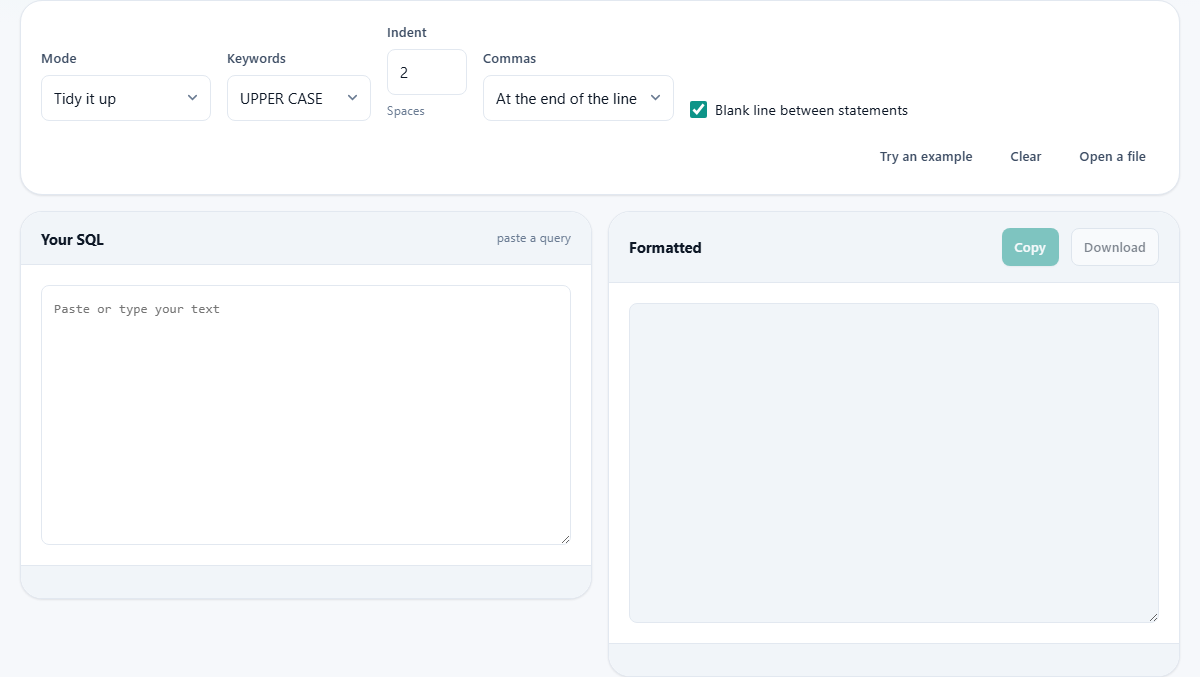
Paste your SQL into the left panel, labeled Your SQL. It can be one statement or a whole file full of them. The formatted version appears on the right, in the panel labeled Formatted. The result updates as you type and as you change the settings, so you can see the effect of each option right away.
Press Copy to put the result on your clipboard, or Download to save it as a text file. Press Try an example to load a built-in query that shows how the settings work. Press Open a file to load a .sql file from disk instead of pasting. Clear empties both panels.
The output keeps line numbers aligned, so you can refer to a specific line in a code review or a pull request. When the query is long, that numbering makes it easy to say exactly which part needs attention.
The five settings and what each one does
Mode is the first choice. Tidy it up breaks the query at every clause and indents it. Squash to one line does the opposite: it removes all the line breaks and extra spaces, leaving a single line. Squash is useful when a query has to live inside a quoted string in code, or in a configuration file where newlines cause trouble.
Keywords controls the case of reserved words like SELECT, FROM, and WHERE. UPPER CASE is the common convention and makes the clauses stand out from the column and table names. Lower case is quieter and suits codebases that prefer it. Leave as typed does nothing to the case at all.
Indent sets how many spaces each level of nesting is pushed in, from zero to eight. The default is two. If your team uses four, change it here and the output matches your house standard straight away.
Commas offers two positions. At the end of the line is the familiar style where each column ends with a comma. At the start of the line puts the comma at the beginning of the next column instead.
Blank line between statements is a checkbox. When it is on, each statement is followed by an empty line, making a file of many queries easier to scan.
Why leading commas save time
The trailing comma style puts the comma after each column name. That is natural to read, but it causes a small daily annoyance. When you need to comment out the last column in a list, you also have to remove the comma from the line above it, or the query breaks with a syntax error.
With leading commas, the comma sits at the start of each line after the first. Commenting out any line, including the last one, works without touching another line. Uncommenting it works the same way. For anyone who spends time adding and removing columns from a SELECT, this is a genuine time saver.
The calculator lets you try both on the same query. Paste one, switch the Commas setting, and the output changes instantly. You can copy each version and compare them in your editor to see which reads better for your team.
What happens to nested queries
Anything inside a pair of brackets gets its own indentation level. A subquery in a WHERE clause is pushed in one step, and a subquery inside that subquery is pushed in another. This is usually where an unreadable query becomes readable, because the nesting that was invisible on a single line suddenly has shape.
The same rule applies to CASE expressions, function calls with long argument lists, and grouped conditions joined by AND and OR. Each level is indented by the number of spaces you set, and the closing bracket lines up with the opening keyword.
Consider a query that selects from a subquery joined to another subquery, both with their own WHERE clauses. On one line that is almost impossible to follow. After formatting, each subquery sits in its own indented block, the join condition is on its own line, and you can read the whole thing top to bottom without scrolling sideways.
String literals and quoted names
The keyword casing rule deliberately skips anything inside quotes. A string literal like 'Active' keeps its original case even when everything around it is changed to upper case. Quoted identifiers work the same way. If your table is called "Order" with a capital O, the formatter leaves it alone.
This matters because changing the case of a string literal would change what the query does. A comparison against 'active' and a comparison against 'ACTIVE' can return different rows in a case-sensitive database. The formatter avoids that risk entirely by treating quoted text as untouchable.
Dealing with different database dialects
SQL comes in flavors. MySQL uses backticks for quoting names. PostgreSQL uses double quotes. SQL Server uses square brackets. Oracle has its own set of functions. Each database adds keywords and syntax that the others do not recognize.
The formatter passes vendor-specific syntax through without trying to reformat it. A MySQL-specific function call or a PostgreSQL array operator comes out the other side unchanged. Nothing is broken by a formatting rule that applies to a different database. The indentation and keyword casing still work, because those parts of the language are shared across every dialect.
Common table expressions, window functions, and lateral joins are all handled. The WITH clause at the top of a CTE gets its own line, and each named part is indented beneath it. These are the constructs that benefit most from formatting, because they are long enough on a single line to be genuinely hard to read.
Working with a file of many statements
You are not limited to one query at a time. Paste an entire migration file, a dump of stored procedures, or a batch of INSERT statements, and each one is formatted on its own. The Blank line between statements checkbox puts a gap between them, so you can tell where one ends and the next begins.
The stats at the bottom count how many statements were found and how many lines the output runs to. If the number of statements is not what you expected, check for a missing semicolon. Each statement is separated by a semicolon, and a missing one causes two statements to be treated as one. Adding the semicolon and formatting again shows the correct count.
Your queries never leave your machine
The formatting happens entirely in your browser. The query is parsed, broken at its clauses, and reassembled on the page. Nothing is sent to a server. There is no queue, no account, and no copy sitting on a remote disk.
That matters for real queries, the ones that name your tables, your columns, and sometimes your data in their WHERE clauses. Production queries often contain customer names, account numbers, or internal project codes in their conditions. Knowing that none of that text ever leaves your device is the reason you can paste a real query without a second thought. You can prove it by opening the page, turning off your network connection, and pasting a query. It still formats, because the formatter never needed the network to begin with.