
Reading a dependency version range without guessing
What the three numbers in a version mean, how the caret and tilde choose what to allow, why version zero changes the rules, how pre-release tags are handled, and how to test a range against a real list of versions.
The three numbers and what they promise
A version number like 2.5.3 has three parts. The first is the major version. The second is the minor version. The third is the patch version. Each one carries a promise about what changed.
A patch update fixes bugs without adding anything new. A minor update adds features but does not break anything that already works. A major update may break existing code and usually means the library has changed in ways that require you to rewrite parts of your own project.
These promises are a convention, not a law. Library authors follow them to varying degrees. But the tooling around package managers assumes they are kept, and the range syntax in dependency files is built entirely around these three slots.
When you install a package and specify a range, the package manager uses these three numbers to decide which releases are safe to pull in. The symbols that control this decision are small but carry a lot of weight.
What the caret allows
The caret is the most common symbol in a dependency file, and most people think it means roughly this version. What it actually means is anything up to the next major version.
So ^1.4.2 allows 1.4.3, 1.5.0, 1.9.9, and everything else that starts with 1. It does not allow 2.0.0. The logic is that minor and patch updates should be safe to accept automatically.
Below version one the rule changes. ^0.4.2 does not allow 0.5.0. It only allows 0.4.3 and up to but not including 0.5.0. The reason is that packages below version one make no stability promises. The minor number is treated as the breaking-change boundary instead of the major. This catches people out regularly because the same symbol behaves more narrowly than expected.
The Explain the range in words feature spells this out clearly. It tells you the exact lower and upper bounds of the range in numbers you can read, not just the symbol.
What the tilde allows
A tilde is stricter. ~1.4.2 allows 1.4.3, 1.4.4, 1.4.99, and nothing else. It locks the minor version and only lets patch updates through.
The practical difference is large. ^1.4.2 could pull in 1.8.0, which might add features you do not want yet. ~1.4.2 stays within 1.4 and only picks up bug fixes. For projects that value stability over freshness, the tilde is the safer choice.
Some teams use tildes for everything as a policy, and then upgrade minor versions by hand when they have time to test the changes. Other teams use carets everywhere and rely on their test suite to catch regressions. Neither approach is wrong, but the tool shows you the exact scope of what each range allows, so you can decide with real information.
A good habit is to paste both variants and compare the output. Seeing the two lists side by side often settles the discussion faster than talking about it in the abstract.
Other range styles
Beyond caret and tilde, you can write explicit comparisons. >=1.4.0 <2.0.0 does the same thing as ^1.4.0, but spelled out. You can combine conditions with a space for and, or a double pipe for or.
An exact version like 1.4.2 with no prefix allows that single release and nothing else. A star like 1.4.* allows any patch under 1.4. These are less common in everyday dependency files but show up in lock files and CI configurations.
The tool accepts all of these forms in the Range box. Type whatever is in your dependency file and the explanation below it describes the allowed range in plain words as well as symbols. If the range has a mistake or a contradiction, the explanation catches it and tells you what went wrong.
Using the checker
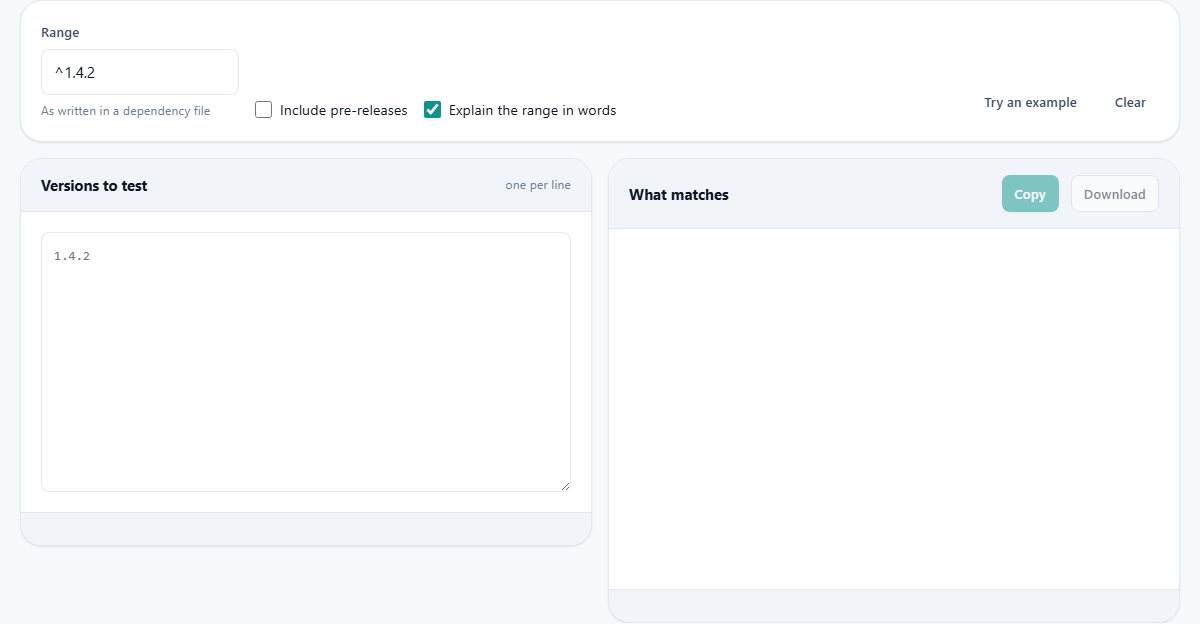
Type or paste the range into the Range box at the top of the page. Below it, on the left side, list the versions you want to test against, one per line. The right side shows which of those versions the range accepts and which it rejects.
The Try an example button fills in both sides with a range and a list of versions so you can see the output without preparing your own data first. The Clear button empties everything.
The Include pre-releases checkbox is off by default. Standard semver rules say a range does not match a pre-release version unless the range itself mentions one. If you are testing whether a beta or an alpha would be pulled in, turn this on.
The Explain the range in words checkbox is on by default. It adds a plain English sentence below the range that says exactly what the range allows, including the boundaries. This is the part most people get wrong, so reading the explanation before trusting the range is worth the few seconds.
Pre-release versions and build metadata
A pre-release tag is attached with a hyphen: 2.0.0-beta.1 or 3.1.0-rc.2. It signals that the version is not finished and should not be used in production. By default, a range like ^2.0.0 will not match 2.0.0-beta.1, even though the numbers fit. You have to opt in explicitly.
This catches people who publish a beta and wonder why nobody is getting it. Their users have ^2.0.0 in their dependency file, and the package manager skips the pre-release because it was never asked for.
Build metadata is attached with a plus sign: 1.0.0+build.42. It is ignored completely in comparisons. Two versions that differ only in their build metadata are considered equal in terms of ordering. It exists for informational purposes, not for matching.
When pre-releases are compared against each other, the dot-separated identifiers after the hyphen are compared one by one. Numeric parts are compared as numbers, text parts as strings. So 1.0.0-alpha.1 comes before 1.0.0-alpha.2, and 1.0.0-alpha comes before 1.0.0-beta because a sorts before b.
Why version zero deserves special attention
Version zero means the package is in early development. The semver specification says anything may change at any time. No promise of backwards compatibility applies.
Package managers reflect this by tightening the rules. A caret range on a zero-major version only allows patch updates, not minor updates. ^0.4.2 means 0.4.x only, not 0.5.0 and above. This makes a dependency on a version-zero package more cautious by default.
If you depend on a package at version 0.x and want to track its releases closely, check the range with real version numbers. You may find that the caret is narrower than you assumed, and a specific comparison range gives you the window you actually intended. The plain-English explanation on this page spells out the boundaries so there is no need to memorise the rule.
Common traps when managing ranges
- Assuming the caret and tilde do the same thing. The caret allows far more. A single character difference in the prefix can be the difference between accepting a new minor version and locking out everything past the current patch.
- Leaving a wide range on a package you do not test regularly. ^1.0.0 on a fast-moving library could pull in dozens of minor versions over time, and one of them might carry a breaking change despite the convention.
- Not testing the range before publishing. If you maintain a library, paste your own dependency ranges and the list of your published versions into the checker and verify that the range you declare matches what you intended.
- Forgetting the version-zero rule. The caret on a zero-major package is not the broad range people expect. Check it here before assuming it will accept the next minor release.
- Combining multiple ranges without checking the overlap. A range like >=1.2.0 <1.5.0 || >=2.0.0 can have gaps or unintended matches. List enough versions to cover both sides and see exactly where each range kicks in.
Everything stays on your own machine
The range parsing and the version comparisons all happen inside your browser. Nothing is sent anywhere. There is no login, no stored history, and no server involved after the page finishes loading.
You can verify this by loading the page, cutting your network, and typing in a range and a list of versions. The results still appear. For internal package registries with version numbers that should not be exposed outside the company, that isolation is the whole point. Close the tab and there is nothing left behind to delete or clear.