
Why one CSS rule beats another, explained with real numbers
How specificity decides which style wins, what the three columns mean, why adding more classes eventually stops helping, how to test selectors and XPath against your own HTML, and how newer pseudo-classes change the calculation.
The cascade problem in one sentence
Two CSS rules point at the same element. Both set the same property. One wins. The question is always which one and why.
The answer is specificity, a scoring system that gives every selector a weight. When two selectors match the same element, the browser compares their weights and the heavier one applies. If the weights are equal, whichever comes later in the stylesheet wins.
The trouble is that the scoring is not a single number. It is three numbers compared from left to right, and that left-to-right comparison is the reason a trick that worked five minutes ago suddenly does nothing. Understanding this system means you can predict the winner before you open the browser, and you stop reaching for hacks.
The three columns
Every selector breaks down into three counts. The first column counts IDs. The second counts classes, attribute selectors, and pseudo-classes. The third counts element names and pseudo-elements.
The selector #nav .link a has one ID, one class, and one element, so its weight is 1-1-1. The selector .menu .item .active has zero IDs, three classes, and zero elements, so its weight is 0-3-0.
Comparison starts at the left. 1-0-0 beats 0-3-0 because one is greater than zero in the first column. The second and third columns are never even looked at. That is the key point: columns never carry. No number of classes can outweigh a single ID.
This is why piling on extra classes eventually stops working. Once a competing rule has an ID in its selector, any number of classes on your side is not enough to win. Some guides write specificity as a single number like 112 for 1-1-2, but that breaks as soon as any column passes nine. The three-column format is the correct one.
Using the tester
Paste HTML into the HTML box on the right side of the page. It can be a full page or just a fragment. The tool parses it into a document either way.
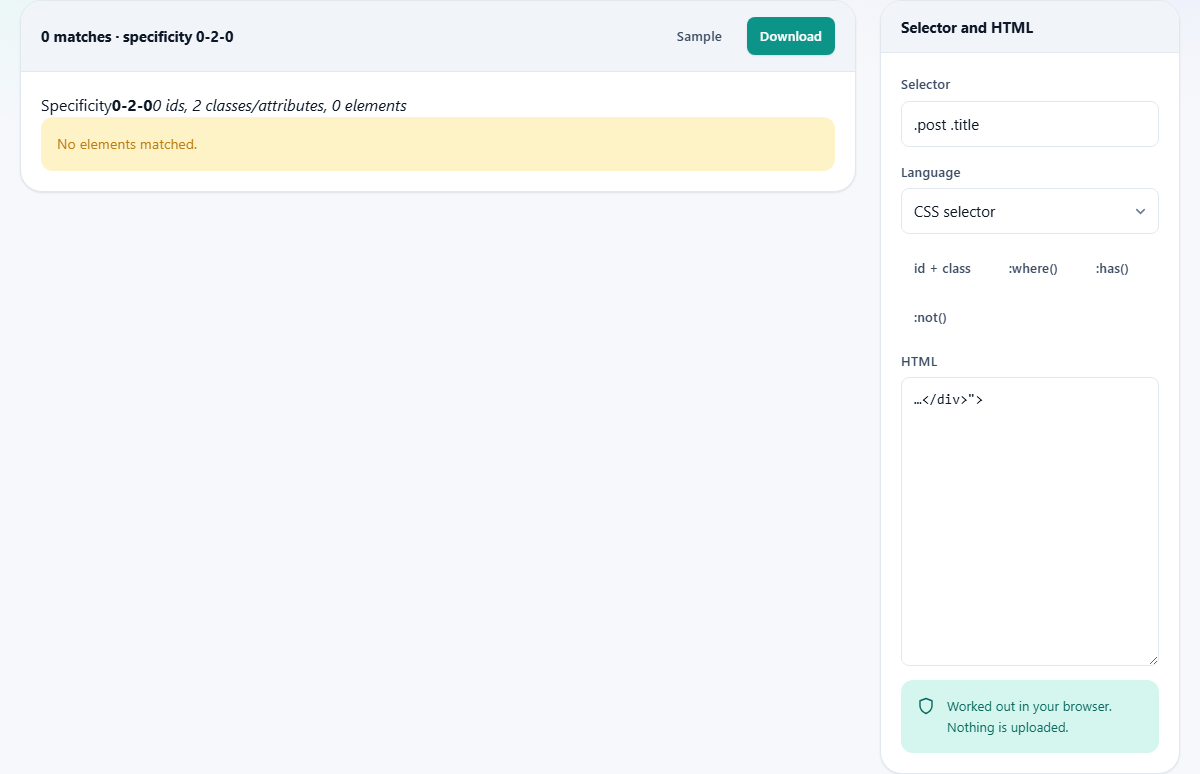
Type a selector into the Selector box above it. The results panel on the left shows every element that matches, listed with its tag name and enough context to identify it. The specificity is shown as the three-column figure.
The Language dropdown lets you switch between CSS selector and XPath. Both are run against the same parsed HTML, and the match list works the same way regardless of which language you choose.
The Sample button loads a small piece of HTML with some classes and IDs already in place, so you can experiment without preparing your own markup first. The Download button saves the full result as a text file.
Quick selector buttons
Below the selector input sit four small buttons that fill in common selector patterns so you can see specificity differences without typing anything.
id + class fills in a selector that mixes an ID with a class, showing how even one ID puts the first column above zero. :where() fills in a selector wrapped in :where(), which always contributes zero to specificity no matter what is inside it. :has() fills in a selector that targets a parent based on its children. :not() fills in a selector that excludes elements by a condition.
Each one updates the result immediately, so you can press them in sequence and watch the three columns change.
How :where and :is change the arithmetic
Older CSS had no way to write a selector with zero specificity. Every class you used raised the weight, even if you only meant it as a default that anything else should be able to override.
:where() fixes that. Whatever you put inside it contributes nothing to any column. A selector like :where(.sidebar) .link has the same weight as .link alone, because the :where wrapper erases the sidebar class from the count. This is the right tool for writing base styles that other rules can override easily.
:is() does the opposite. It takes the specificity of its most specific argument. :is(.big, #main) scores as if #main were written directly, giving the whole selector an ID column of one. :not() and :has() follow the same rule as :is and take the weight of whatever is inside them.
These distinctions are the reason the same selector can behave differently in a modern browser than in an older one that does not support these pseudo-classes.
XPath and what it can do that CSS cannot
CSS selectors can match elements by tag name, class, attribute, and structural position. What they cannot do is match by text content. There is no CSS selector that says find every paragraph containing the word hello.
XPath can. Switch the Language dropdown to XPath and type //p[contains(text(),"hello")]. It finds every p element whose text includes that word. XPath can also walk upward to a parent, which CSS only recently gained with :has(), and navigate between siblings in either direction.
XPath is more verbose than CSS, but for scraping, testing, and automation it covers cases that CSS still does not reach. The tool runs both against the same parsed HTML, so you can compare results side by side by switching back and forth.
One useful pattern is to find the XPath for an element first, then write the closest CSS selector you can manage and compare the match counts. If they differ, the gap tells you what CSS cannot express for that particular query.
Common mistakes and what beats what
- Assuming more classes always win. 0-99-0 loses to 1-0-0. The columns are separate counters, and the first non-equal column decides the winner.
- Forgetting that inline styles sit above all selectors. Only !important can override an inline style, and another !important later in the source order overrides that.
- Using an ID when a class would do. An ID locks you into the highest normal specificity tier. Classes are easier to override later and work better in component-based designs.
- Debugging by adding !important everywhere. Each one creates a new specificity contest among the !important rules, and you end up in the same problem one layer up.
- Expecting the universal selector * to contribute weight. It adds nothing at all. Neither do combinators like >, +, and ~. They describe structure, not specificity.
- Writing a selector that matches nothing and blaming the browser. Most often the problem is a misspelled class name, or expecting a descendant where the element is actually a sibling. The match list settles this instantly.
A worked example with conflicting rules
Suppose your HTML has a div with the ID hero that contains a paragraph with the class intro. Two rules target it. The first is #hero .intro and the second is .page .hero-section .intro .first-paragraph.
The first selector has one ID and one class: 1-1-0. The second has zero IDs and four classes: 0-4-0. Despite having far more parts, the second rule loses because the first column decides the contest before the second column is reached.
To fix this without restructuring the HTML, wrap the second selector in :is() with nothing extra, which does not help, or remove the ID from the first rule and replace it with a class. That moves both selectors into the same tier and lets the number of classes decide again.
Paste the HTML into the tool, try both selectors, and compare the specificity figures. The numbers make the answer obvious without any guessing.
Now try wrapping the second selector in :where(). The specificity drops to 0-0-0 because :where() erases every piece inside it. That makes the second rule the weakest possible, and any other rule overrides it. This is how library authors write default styles that any project-level class can beat.
Your HTML stays in your browser
The selector matching and the specificity calculation both happen on your own machine. The HTML you paste is never sent anywhere. There is no account, no size limit beyond what your browser can hold in memory, and no record of what you tested.
For testing against production markup that includes internal class names or layout details, that privacy matters. Load the page, go offline, and it still works. The browser is the only engine involved. Close the tab and every piece of pasted HTML is gone without a trace.