
Catching bad JSON before it reaches production
What JSON Schema does, how the two-pane layout works, what the pointers in the error list mean, why the format checkbox exists, and the two schema lines that prevent almost every silent mistake.
The problem a schema solves
JSON is easy to write and easy to read, but it has no built-in way to say what shape a document should have. A config file that expects a number for port will happily accept the string eight thousand and not complain until the application crashes.
A JSON Schema is a second JSON document that describes what the first one should look like. It says which fields must exist, what types they must be, how long a string can be, what values are allowed, and how deeply arrays can nest. A validator compares the two and lists every place where the document breaks the rules.
That check belongs early in the process, not late. Catching a missing required field while you are still editing is faster than catching it in a failed deploy or a customer bug report. The feedback loop is minutes instead of hours.
The two panes and how to fill them
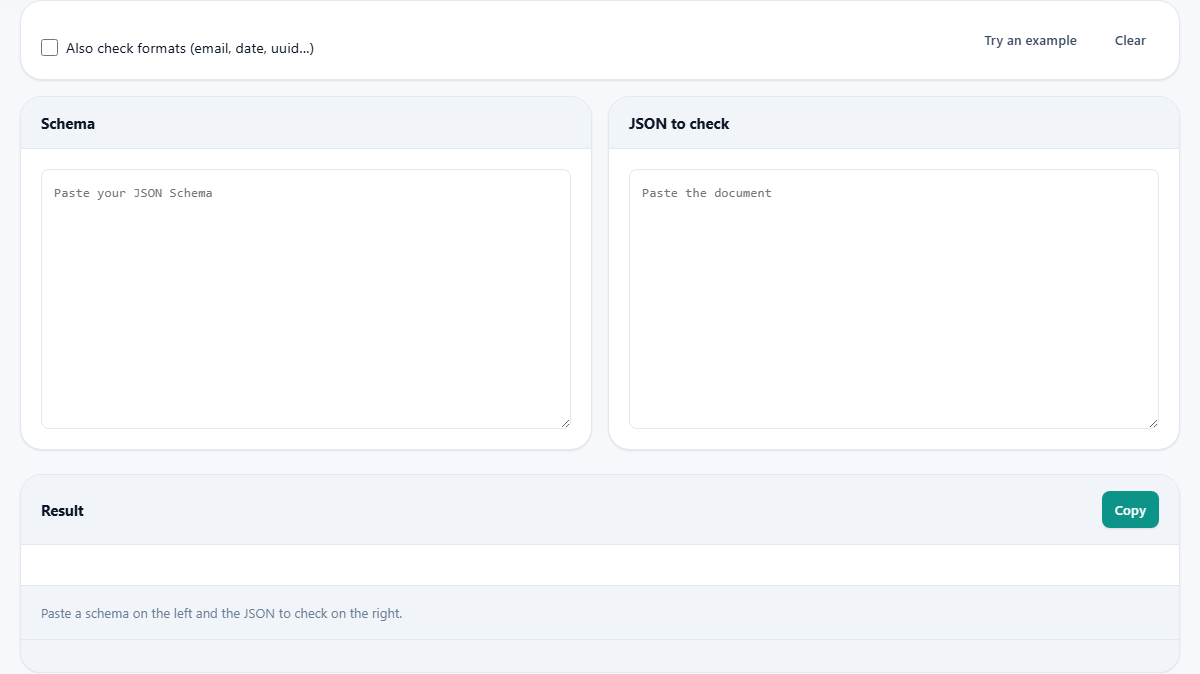
The page is split into two side-by-side text areas. The left pane is labeled Schema and the right one is labeled JSON to check. Paste your schema on the left and your document on the right. Checking runs as you type, so the result updates with every keystroke.
If you do not have a schema handy, the Try an example button fills in both sides with a small schema and a document that has deliberate errors. It is the quickest way to see what the output looks like before working with your own files.
The Clear button empties both sides. Copy puts the result list on your clipboard so you can paste it into an issue tracker or a code review comment.
Reading the error list
The Result panel below the two panes shows every problem. Each line has a path and a reason. The path is a JSON Pointer, which is a standard way to name a location inside a JSON document.
An empty path means the root of the whole document. /name points to the field called name at the top level. /address/town points to the town field inside the address object. /tags/2 points to the third item in the tags array, because arrays count from zero.
The reason is written as a short sentence. It might say the type is wrong, a required field is missing, a value is not one of the allowed options, or a string is shorter than the minimum. Each error stands on its own, so you can fix them in any order.
When every problem is gone the result turns green. That is your confirmation that the document follows every rule the schema sets out.
The format checkbox
Above the two panes is a checkbox labeled Also check formats (email, date, uuid...). It is off by default, and that is not a bug.
The JSON Schema specification treats the format keyword as an annotation rather than a rule. A validator is allowed to report it but is not required to enforce it. That means a schema can say a field should hold an email address, and a standard-following validator will let through any string at all.
Ticking the box tells this tool to go further and actually check the common formats: date, date-time, email, hostname, ipv4, uuid and uri. If your schema uses the format keyword and you want it enforced, turn this on. If your schema does not use format at all, the checkbox does nothing.
The two lines that prevent silent mistakes
Most schemas that pass a bad document are missing one or both of these.
The first is the required array. Listing a field under properties only says what it must look like if it appears. It does not say it must appear. A required array at the same level names the fields that are compulsory. Forgetting this is the most common reason a document passes when it should not.
The second is additionalProperties set to false. Without it, any field that is not listed under properties is silently accepted. A misspelled key becomes an extra field rather than an error. With additionalProperties set to false, every unexpected field is rejected.
Together these two lines mean that a document must have the right fields, must not have extra fields, and every field must match its declared type. That covers the vast majority of real-world validation needs.
How references work and where they stop
A schema can define a piece once and reuse it in several places using $ref. The tool follows pointers that stay inside the same schema, like #/$defs/address. You define the shape of an address once under $defs, and then anywhere that shape is needed you write $ref with that pointer.
What the tool cannot do is follow a reference to a different file or a URL. A remote reference would need a network request, and this page runs with no network. Rather than skip the reference quietly and call the document valid, the tool tells you it could not follow it. That is safer than a false pass.
If your schema uses remote references, bring the referenced pieces into the same document under $defs and update the pointers. The validation will then cover everything. This flattening step takes a few minutes and makes the schema self-contained for any tool that reads it.
allOf, anyOf, oneOf and what catches people
JSON Schema lets you combine sub-schemas with logic. allOf means the value must satisfy every one of them. anyOf means at least one. oneOf means exactly one and no more.
The trap with oneOf is the word exactly. If a value matches two of the branches, that is a failure, even though both branches accept it on their own. The usual cause is branches that overlap. For example, one branch allows strings and another allows any type. Every string matches both, so every string fails oneOf. If you do not need the exclusivity, switch to anyOf.
The if/then/else keywords add conditional rules. If the value of one field matches a condition, then a second set of rules applies, otherwise a third set applies. They are powerful but can make a schema hard to read. Start without them and add them only when simpler keywords fall short.
Which keywords are supported
The validator covers Draft 7, which is the most widely used version of the specification. That includes type, required, properties, patternProperties, additionalProperties, items, contains, enum, const, minimum, maximum, minLength, maxLength, pattern, allOf, anyOf, oneOf, not, if/then/else, and local $ref pointers.
It also supports prefixItems and dependentRequired from the newer 2020-12 draft. prefixItems lets you describe each position in an array separately, so the first item can be a string while the second is a number. dependentRequired says that if one field is present, certain other fields must be present too.
These two additions cover the gaps that people hit most often when Draft 7 alone is not enough, without pulling in the full complexity of the latest draft.
A worked example with a small config file
Suppose you have a config file with three fields: name, port, and debug. Name should be a string, port a number between 1 and 65535, and debug a boolean. The schema lists all three under properties, puts all three names in the required array, and sets additionalProperties to false.
Paste that schema on the left. On the right, paste the config file but misspell debug as deubg and set port to the string 8080 instead of the number 8080. The result lists two problems: deubg is not an allowed field, and port has the wrong type.
Fix the spelling and remove the quotes around the port number. The result goes green. That is the entire cycle: paste, read, fix, confirm. You can leave the page open while you edit and paste back after each change to see the list shrink.
Both documents stay on your device
The schema and the document are checked entirely inside your browser. Nothing is uploaded. There is no account, no usage cap, and no record of what you tested. Once the page has loaded, it works offline.
That matters when the document holds real data. A config file with database credentials, an API response with customer records, or a deployment manifest with internal hostnames can all be checked safely. Close the tab and the data is gone. You can prove it by loading the page, cutting the network, and pasting a schema and a document. The validation still runs because there was nothing on the other end to begin with.