
Writing server redirects without the syntax headaches
How redirect rules work across Apache, nginx and Caddy, what each status code really means, why ordering matters more than it looks, and how to build a redirect list that will not backfire when browsers cache it forever.
Why redirects exist
A redirect tells a browser or a search engine that a page has moved. The old address sends back a short response with the new one, and the visitor lands there without noticing anything happened. No content is served at the old address at all.
The need comes up whenever a site restructures its URLs, merges two domains, switches from HTTP to HTTPS, or drops the www prefix. Without a redirect the old link gives a 404 error, and any search ranking that page had is lost.
- A blog that moved from /posts/2024/title to /blog/title still gets visitors from old bookmarks.
- A shop that changed platforms keeps its product pages ranked while the new ones build trust.
- A company that bought a second domain sends its traffic to the main one without losing anybody.
- A site that just turned on HTTPS needs every HTTP request to go to the secure version.
- A marketing team that printed a short URL on a leaflet can point it at the real landing page.
The four status codes and when each one fits
The Status code dropdown offers four numbers. Each one tells the browser something different about how long the move lasts and whether the request method should stay the same.
301 means permanent. The browser remembers it and will not ask again. Search engines move the ranking to the new address. This is what you want when a page has moved for good, but think carefully before using it. Browsers hold on to a 301 for a very long time, sometimes until the user clears the cache by hand. A wrong 301 is difficult to undo.
302 means temporary. The browser follows it every time and does not remember it. Search engines keep the ranking on the old address. Use this while you are still testing, or when the move might be reversed.
308 works like 301 but preserves the HTTP method. A 301 may silently turn a POST into a GET, which breaks form submissions. If the old URL receives form posts, 308 is the safe choice for a permanent move.
307 works like 302 but again preserves the method. Use it for a temporary move of a URL that handles POST requests.
How the controls work
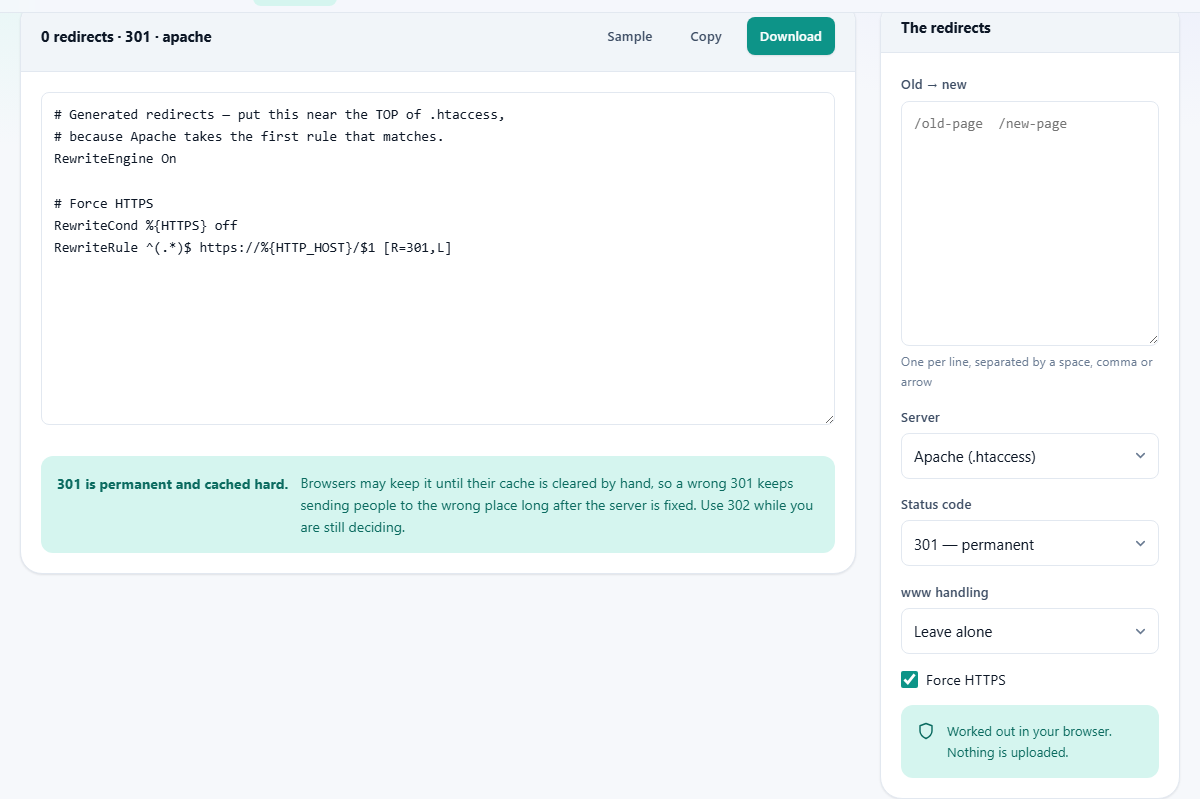
The Old to new box takes one pair of paths per line. Put the old path on the left and the new path on the right, separated by a space, a comma, or an arrow. A star at the end of a path acts as a wildcard and is carried across to the other side, so /old/* to /new/* moves every page under that directory at once.
The Server dropdown switches between Apache (.htaccess), nginx and Caddy. The output changes completely because each server has its own syntax, but the logic stays the same. You do not need to rewrite your list when you switch.
The www handling dropdown adds a rule that either strips the www prefix or adds it. Leave alone skips this step entirely.
The Force HTTPS checkbox adds a rule that sends every HTTP request to the HTTPS version. It is on by default because nearly every site should have it.
The ordering warning and why it matters
Both Apache and nginx process rules from top to bottom and stop at the first match. If a broad wildcard rule sits above a specific one, the specific rule is never reached. The tool checks for this and warns you when one rule shadows a later one.
Suppose you have /blog/* pointing to /articles/* and then /blog/welcome pointing to /home. The wildcard matches /blog/welcome first, so the visitor ends up at /articles/welcome instead of /home. The fix is to put the specific rule above the wildcard.
Caddy handles this slightly differently because its matcher syntax can be more precise, but the general principle holds. Specific rules should come before broad ones. When you see the warning, move the narrower rule higher in your list and the conflict goes away.
A worked example from start to finish
A small company is moving its blog from /posts/ to /blog/ and has three individual pages that need their own destinations. The list looks like this, one pair per line: /posts/about to /team, /posts/contact to /get-in-touch, /posts/* to /blog/*. The specific pages are listed first so the wildcard does not swallow them.
Server is set to Apache, code to 301, www handling to Strip www, and Force HTTPS is ticked. The output is a block of RewriteRule lines inside a RewriteEngine On section, with the HTTPS and www rules at the top.
Switching Server to nginx produces a completely different file with return statements inside location blocks, but the redirect behaviour is identical. The company copies whichever block matches their server and pastes it into the right config file.
Pressing Download saves the output as a text file. Copy puts it on the clipboard for pasting directly into a terminal editor.
Differences between the three servers
Apache uses .htaccess files that sit inside the web directory. The server reads this file on every single request, which makes it slower than putting the rules in the main config file. If you have access to the main Apache config, that is the better place.
nginx does not support .htaccess at all. Every rule goes in the server block of the main config, which is faster but means you need shell access and a config reload.
Caddy uses a Caddyfile with a clean, readable syntax. Redirects are shorter and often easier to scan at a glance. Caddy also handles HTTPS certificates on its own, so the Force HTTPS rule is less commonly needed there, though it does no harm to include it.
Mistakes that cost real traffic
- Using 301 while testing. Once a browser caches a 301, the only way to clear it is for the user to clear their cache. Start with 302 and switch to 301 only when the move is final.
- Chaining redirects. Each hop adds a network round trip and search engines lose patience after two or three. Point old URLs straight at the final destination.
- Forgetting the trailing slash rule. Some servers treat /page and /page/ as different URLs. A redirect that covers one but not the other leaves half the old links broken.
- Redirecting to a page that itself redirects. This creates a loop. Browsers will stop after a few attempts and show an error, and the visitor sees nothing.
- Leaving old redirects in place forever. A rule for a page removed five years ago still runs on every request. Clean out the ones that no longer get traffic.
- Ignoring the ordering warning. A wildcard above a specific rule silently swallows it, and you only find out when someone reports the wrong page.
Redirect chains and how to spot them
A redirect chain is when page A redirects to page B, which redirects to page C. The browser follows each one in turn, adding a network request every time. Two hops are fine. Five are not. Search engines may stop following after two or three, and the final page loses the ranking credit.
The usual cause is incremental changes. In 2021 you moved /about to /company. In 2023 you moved /company to /team. Now /about goes to /company goes to /team. The fix is simple: update the first rule so /about goes straight to /team.
When building a new batch of redirects, check whether any of the old paths already have rules. If they do, point the old rule at the final destination rather than adding another link to the chain.
Nothing leaves your machine
The rules are generated inside your browser. Your URL list is not sent to a server, there is no account, and once the page has loaded the tool works with no internet connection at all. You can prove this by opening the page, going offline, and typing in a list. The output still appears.
For a site migration that involves hundreds of internal URLs, this means you can paste the full list without worrying about it being stored or logged anywhere. Close the tab and the data is gone. There is no history, no upload, and no cleanup step.