
Writing a README that gets read
Why reading order matters more than completeness, what each field in the generator does, how the audit catches the gaps that cost a project users, and a walk through building one from scratch.
Ten seconds to convince a stranger
A person lands on a repository for the first time. They see the README. In about ten seconds they decide whether to keep reading or move on. That is the entire window.
Most of those ten seconds are spent on the first two things they see. If the first thing is a row of badges and the second is a table of contents, the visitor has learned nothing about what the project does. They have seen a build status and a list of headings. Neither answers the question they came with.
A good README opens with what the project is and why it exists. Then it shows the project in use. Then it explains how to install it. Badges, contributing guidelines and licence details come after, when the reader has already decided to stay. This generator follows that order because it is the order that works.
The fields on the right
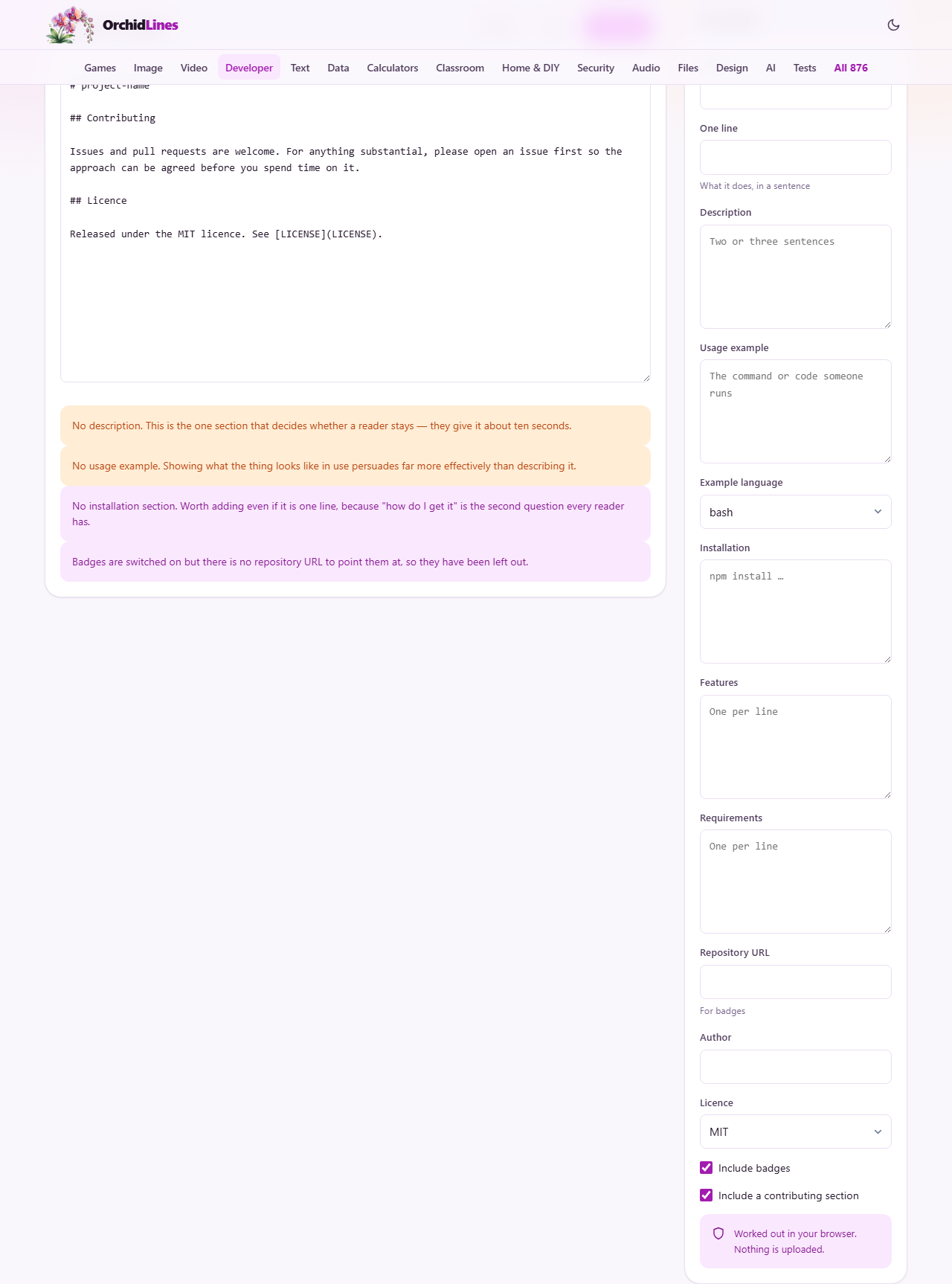
The side panel holds everything the generator needs. Name is the project name that appears as the top heading. One line is the single sentence that tells a stranger whether to keep reading. It appears directly under the heading and does the hardest job on the page.
Description is two or three sentences that expand on the one-liner. It answers why the project exists and who it helps. Usage example is a real command or code snippet. One real line of working code persuades more than three paragraphs of explanation.
Example language sets the syntax highlighting fence in the Markdown output. The choices are bash, js, python, ts, go, rust and plain. Pick the one that matches the snippet you wrote.
Installation holds the command someone runs to get the project. Features is a list with one item per line, turned into bullet points. Requirements lists things the project needs to be present before it will work, like a specific version of Node or Python.
Badges, author and licence
Repository URL is used to build badge links. If you fill it in with a GitHub URL, the badges point at the right place. If you leave it empty, the badges are skipped.
Author is the name that appears in the licence section at the bottom. Licence offers MIT, Apache 2.0, GPL 3.0, BSD 3-Clause or None. Picking None drops the licence section entirely, which the audit then flags as a problem.
The Include badges checkbox is on by default. When it is on, badges appear after the description, not before it. That placement is deliberate. A badge wall above the fold spends the reader's attention on build status when they have not yet learned what the project does.
Include a contributing section is also on by default. It adds a short section inviting pull requests and pointing at an issues page. For personal projects with no outside contributors, turning it off makes the README shorter without losing anything useful.
What the audit tells you
Below the generated output, an audit section checks for the omissions that hurt a project the most. It looks at what you filled in and what you left empty, and it tells you what is missing.
A missing licence is the most important warning. Without a licence, no one may legally use your code, regardless of what the README says. Open source only works when the terms are stated. The audit calls this out clearly.
A missing usage example is the next most common gap. People want to see the project in action before they read about it. A README that describes a tool without showing a single command or snippet leaves the reader guessing whether it fits their situation.
The audit does not force you to fill everything in. It only points out what a reader would miss. You decide which fields matter for your project.
Walking through a real example
Suppose you are documenting a small CLI tool that resizes images. You fill in the Name field with imgscale, the One line field with a sentence about batch resizing from the terminal, and the Description field with two sentences about supported formats and output quality settings.
In Usage example you write the command that resizes every PNG in a folder. Example language is set to bash. Installation says npm install -g imgscale. Features lists three items: batch processing, quality control and format conversion. Requirements says Node 18 or later.
You leave Repository URL set to the GitHub link, Author set to your name and Licence set to MIT. Badges and contributing are both checked.
The preview on the left updates as you type. The heading is imgscale. The one-liner sits under it. The usage block shows your command inside a fenced code block. Badges appear after the description. The licence section at the bottom names MIT and credits you. The audit shows no warnings.
Saving and using the output
Press Download to save the file as README.md. Put it in the root of your repository. Every major hosting platform - GitHub, GitLab, Gitea, Codeberg, npm - renders a file with that name automatically on the project page.
Press Copy to put the Markdown text on your clipboard. That is useful when you want to paste it into a pull request description, a wiki page or an issue template.
The output is plain GitHub-flavoured Markdown. It uses fenced code blocks, heading levels and bullet lists. No HTML, no custom extensions. It renders correctly everywhere without changes.
How long should a README be
Long enough that a stranger can use the project without asking you a question. That usually means less text than people fear. A one-page README that covers the what, the how and the licence is better than a ten-page document that nobody finishes.
If the API reference is short, include it. If it is long, move it to a separate docs folder or a wiki and link to it from the README. A README that scrolls for ten screens stops being a welcome page and starts being a reference manual.
A table of contents is rarely needed. For anything under about ten sections, it adds a full screen of scrolling and saves nobody any time. Most hosting platforms generate one from the headings anyway, so adding your own just doubles it.
Keeping the README in step with the code
A README written on day one and never touched again slowly becomes wrong. The installation command changes. A flag gets renamed. A dependency version requirement moves up. The README still describes the old world, and a newcomer follows the instructions straight into an error.
The simplest guard is to re-read your own README after any release. Run the installation command it describes on a clean machine. Try the usage example. If either fails, update the text before you announce the release. A README that works on every published version is one of the clearest signs that a project is maintained.
This generator does not solve that problem on its own. It gives you the first version. Keeping it honest is a habit, not a tool.
Mistakes that cost a project readers
- Opening with badges. They answer a question nobody has asked yet.
- Describing the project without showing it. A usage example does more than any amount of prose.
- Forgetting the licence. This is a legal hole, not a style choice. Without a licence, the default in most places is that nobody may use or distribute the code.
- Writing installation steps that assume the reader already knows which language and package manager the project uses. Name the tool and version.
- Listing every feature the project will ever have instead of the ones it has now. A roadmap section is fine, but it should be separate from the features list.
- Putting the contributing guide inline instead of in a CONTRIBUTING.md file. A long contribution guide pushes the rest of the README below the fold.
Assembled on your own device
The generator runs entirely in your browser. The project name, description and code snippets you type are never sent anywhere. There is no account, no storage on a remote server, and no copy saved once you close the tab.
That is worth noting because project details can be sensitive before a launch. A product name, an internal API path in a usage example, or a deployment command that names an internal host - none of it leaves the page.