
Domain names beyond the Latin alphabet
How the domain name system handles accents, Arabic, Devanagari and emoji, what the xn-- prefix means, how to convert between the two forms, and why the mixed-script warning matters more than the conversion itself.
Why domain names have a language problem
The domain name system was designed in the early 1980s. It carries labels made of letters, digits and hyphens, and those letters are ASCII. That means a through z and nothing else. No accents, no Arabic script, no Chinese characters, no Devanagari.
That was fine when the internet was mostly used by English speakers at American universities. It stopped being fine a long time ago. A cafe in Munich wants muenchen.de, not a transliteration. A business in Cairo wants its name in Arabic. A news site in Delhi wants Hindi in its address bar.
The solution is called Internationalised Domain Names, or IDN. It lets people register and use domain names in their own script while keeping the underlying system unchanged. The trick is an encoding called Punycode, defined in RFC 3492, that squeezes any Unicode label down into the ASCII set that DNS already knows how to carry.
What Punycode looks like
A Punycode label starts with the prefix xn-- followed by a string of ASCII characters. The prefix signals that the label is encoded and needs to be decoded before showing it to a person.
Take the German city name as an example. The domain muenchen.de has a u with an umlaut in the original spelling. Encoded, it becomes xn--mnchen-3ya.de. The ASCII letters that were already safe come through unchanged. The accented character is represented by the trailing code. The dot and the top-level domain stay the same because they were already ASCII.
Each label between the dots is encoded on its own. A subdomain like shop.muenchen.de becomes shop.xn--mnchen-3ya.de. The shop label was already ASCII so it passes through untouched. Only the label that actually contains non-ASCII characters gets the prefix.
Using the converter
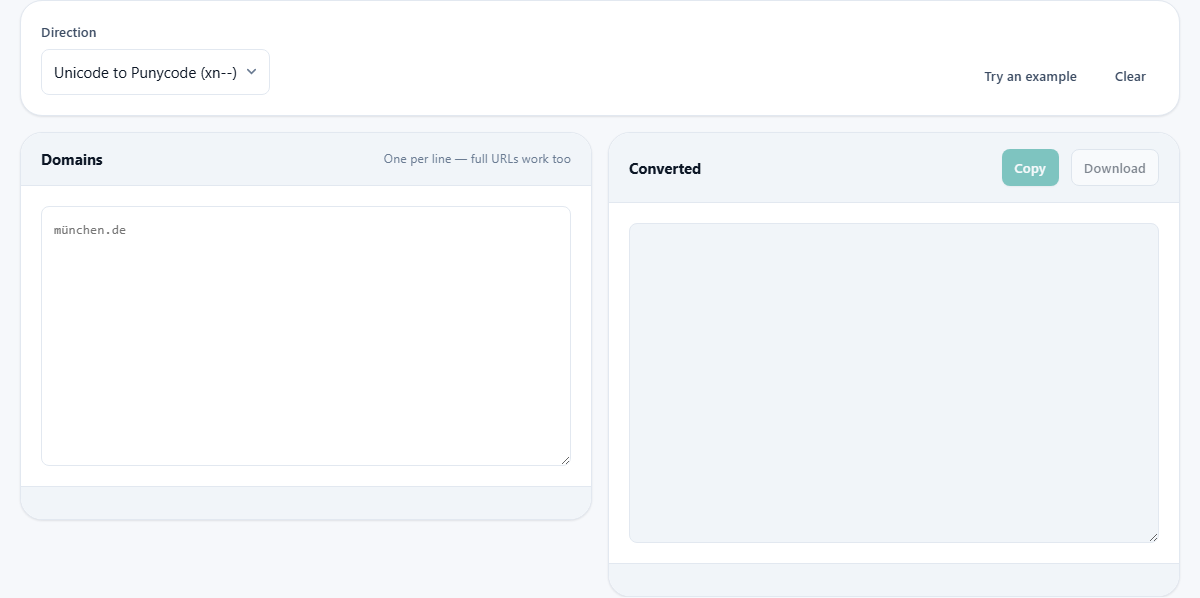
Paste one or more domains into the left panel, one per line. Full URLs work too. The scheme and path are left alone and only the host part is converted.
The Direction dropdown has two choices. Unicode to Punycode gives you the xn-- form. Punycode back to Unicode shows you the readable name that a Punycode string represents.
Press Try an example to load a set of sample domains in different scripts. The converted output appears on the right. Copy puts it on your clipboard. Download saves it as a text file.
Where each form is used
Browsers show the Unicode form in the address bar. That is what people see and type. DNS records, TLS certificates, server configuration files and email headers use the Punycode form. That is what machines send over the wire.
This split causes confusion. A domain that renders as a perfectly readable name in the browser looks like nonsense in a certificate. A certificate that spells out xn--mnchen-3ya.de is genuinely for the same domain as the one that shows as muenchen.de in the address bar. They are not two different domains. They are two ways of writing the same one.
When you set up a DNS record for an internationalised domain, you almost always need the xn-- form. When you order a TLS certificate, the certificate authority usually wants the xn-- form as well. This converter gives you that form without having to look up the encoding rules by hand.
The homograph problem
Punycode opened an old door to a new kind of phishing. Some characters in different scripts look identical. The Latin letter a and the Cyrillic letter a are visually the same but have different code points. A domain written entirely in Cyrillic letters could render in the browser as something that looks exactly like a trusted English name.
This is called a homograph attack. The attacker registers a domain that renders identically to a bank, a social network or a software company, then sends people links to it. The address bar shows a name they trust, but the server behind it belongs to the attacker.
The converter flags this. When a label mixes characters from two or more scripts, a warning appears. That mix is the classic giveaway. A legitimate German domain uses Latin letters and might have an umlaut, but it does not mix Latin and Cyrillic in the same label.
Browsers fight this too. Most modern browsers show the Punycode form instead of the Unicode form when a domain mixes scripts, so the user sees xn-- in the address bar instead of a familiar-looking name. But not every browser does this consistently, and older browsers do not do it at all.
Decoding as a safety habit
If someone sends you a link and the domain starts with xn--, paste it into this converter and decode it. The Unicode output shows you what the name really says. That one step catches phishing domains that rely on visual similarity.
Even if the link does not start with xn--, you can still paste it and encode it. If the encoded form comes back different from what you expected, the name may contain characters from a script you did not notice. A Latin o and a Cyrillic o sit side by side without any visible difference, but the encoded forms are not the same.
Making this a habit takes five seconds per suspicious link. It is one of the simplest ways to check whether a domain is what it claims to be.
A worked example across three scripts
Suppose you paste three domains into the input, one per line. The first is muenchen.de, a German city name with an umlaut. The second is a domain in Arabic script. The third is a domain in Devanagari.
Set Direction to Unicode to Punycode. Each domain gets its own line in the output. The German domain becomes xn--mnchen-3ya.de. The Arabic domain becomes a longer xn-- string because more characters needed encoding. The Devanagari domain gets its own xn-- label as well.
Now flip Direction to Punycode back to Unicode and paste the xn-- forms instead. The readable names appear on the right, each in its own script. This is the round trip that proves the encoding preserves everything.
If one of the domains mixes scripts, a warning appears next to that line. The other two remain clean. The warning is per label, not per batch, so a single suspicious name does not hide among the safe ones.
Practical situations where you need this
- Setting up a DNS A record or CNAME for a domain that contains accented characters. The hosting panel expects the xn-- form.
- Ordering a TLS certificate for an internationalised domain. The certificate authority needs the ASCII-encoded label.
- Configuring a web server virtual host for a domain that includes non-Latin characters.
- Checking a suspicious link sent by email. Decode the xn-- domain to see what it really says before clicking anything.
- Verifying that a domain you just registered resolves to the name you intended, especially if the registration form accepted the Unicode form but the DNS panel shows the encoded one.
Registries and what they allow
Punycode can encode any Unicode character, but that does not mean every registrar will sell you the result. Most registries now restrict each label to a single script. A .de domain can have German umlauts but cannot mix Latin and Cyrillic. That restriction exists precisely to stop homograph attacks at the registration level.
Emoji domains are a special case. Punycode encodes them just fine. A few small country-code registries allow them. Most do not. Encoding working here says nothing about whether a registrar will accept the name.
The encoding step also lower-cases the label. Domain names are case-insensitive, and the IDN standard normalises to lower case before encoding. ASCII-only labels are passed through unchanged because they do not need the xn-- prefix.
Everything stays on your own device
The conversion runs in your browser. No domain name you paste is sent anywhere. That matters less for public domains than it does for internal hostnames, but the principle holds either way.
No DNS lookup is made. No certificate is checked. The page does not contact the domain you are converting. It reads the characters, encodes or decodes them and shows you the result. Disconnect from the network and it still works, because there was nothing on the other end.