
Reading an API spec without running the server
What an OpenAPI or Swagger file actually contains, how to load one and browse it as documentation, what the example payloads are built from, and why nothing on this page ever contacts the API it describes.
A contract that is hard to read raw
An OpenAPI file describes an API in a structured way. It lists every endpoint, says what each one expects in the request, and defines the shape of every response. It also carries authentication details, server URLs and version information. Teams share this file so that a front-end developer and a back-end developer can agree on the contract before any code ships.
The trouble is that the file itself is dense. A moderately sized API produces hundreds of lines of nested YAML or thousands of lines of JSON. References point from one schema to another. Responses inherit from shared definitions. Reading it raw in a text editor means scrolling back and forth, holding a stack of cross-references in your head.
Spec viewers exist to solve that. They turn the nested tree into something that reads like documentation. This one does it entirely on your own device, without uploading the file or calling the described API.
Loading the file
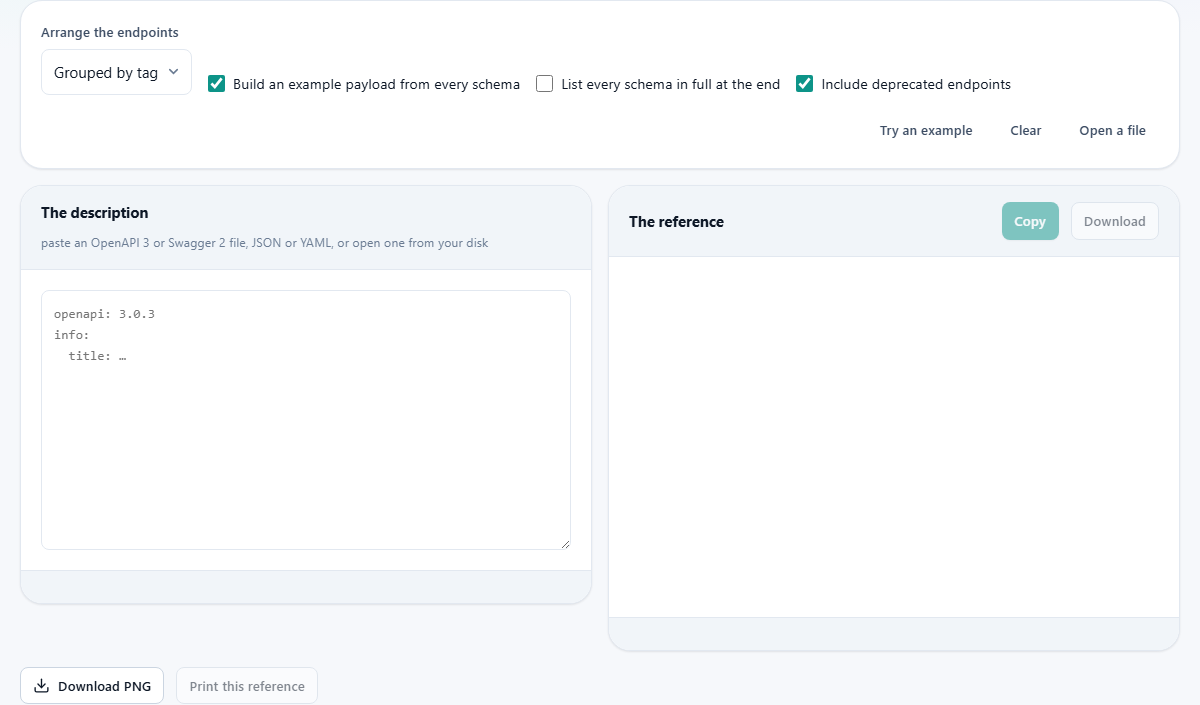
Paste the contents into the left panel, titled The description. The input accepts both JSON and YAML, and works out which one you gave it from the content. You do not need to tell it.
If the file is on your device, press Open a file and pick it. If you want to see what the output looks like first, press Try an example to load a built-in spec that covers the common patterns.
The version of the spec is read from the file. An OpenAPI 3 file has an openapi field near the top. A Swagger 2 file has a swagger field instead. Bodies, servers and security are described differently between the two versions, and both shapes are handled.
Arranging the endpoints
The dropdown labelled Arrange the endpoints offers two choices. Grouped by tag reads like documentation. Most teams tag their endpoints by resource or feature area, so this view puts all the user endpoints together, all the billing endpoints together, and so on.
In path order is a flat list that follows the URL structure. It suits the moment when you know the path you are after and just want to jump straight to it without scanning through headings.
Most spec files have tags. If yours does not, both views produce the same flat list because there is nothing to group by.
Example payloads and how they are built
The checkbox Build an example payload from every schema is on by default. For each schema in the spec, the viewer creates a filled-in JSON object you could paste into a request or compare against a response.
The examples come from the schema definition itself. A string field with a date format produces a date. An enum field uses its first value. An integer gets a plausible number. If the spec author wrote an explicit example or a default, that value is used instead.
References are followed. If a response schema points at a shared User definition that itself points at an Address definition, the viewer resolves the entire chain and shows one complete object. That saves the manual work of opening the components section and piecing the parts together by hand.
Where a schema uses oneOf to offer alternatives, the example is built from the first option. The other options are named beside it. Merging them would produce an object that satisfies none of the alternatives, so showing one honestly is better than combining them incorrectly.
Self-referencing schemas
Some data structures contain themselves. A comment has replies, and each reply is itself a comment. A folder contains items, and some of those items are folders.
The viewer handles this by following the reference once and then marking where it would repeat. You see one level of nesting with a note rather than an infinite expansion that crashes the page. This is the honest way to display a shape that has no natural bottom.
If you see the words indicating a repeated reference in an example, that is this mechanism at work. The schema is valid. It simply loops, and the viewer chose to stop rather than guess how deep you wanted to go.
The other controls
List every schema in full at the end is a checkbox that adds a reference section below the endpoints. It shows every named schema in the components block with its properties and types laid out, which is useful when you want the definitions on their own rather than scattered across response descriptions.
Include deprecated endpoints is on by default. Turning it off hides any endpoint the spec marks as deprecated, so you see only the current surface.
Print this reference sits below the output panel. It strips the input box and the controls, leaving just the rendered documentation. That is useful for design reviews, architecture discussions, or any meeting where someone needs the endpoints on paper without the surrounding furniture.
YAML anchors and the one thing not supported
YAML has a feature called anchors and aliases. An anchor marks a block of content with a name, and an alias reuses that block elsewhere. Some hand-written specs use this to avoid copying the same definition twice.
This viewer does not expand anchors. Instead of guessing and possibly giving you the wrong schema, it tells you plainly. A wrong schema that looks right is worse than an error message, because you would build against it and discover the mistake later.
Nearly every machine-generated spec avoids anchors entirely. If your spec was written by a code generator, a framework export or an editor like Stoplight, it almost certainly does not use them. If yours does, most editors can write out an expanded copy that replaces every alias with the content it points to.
A walked-through reading
You paste a 600 line YAML file describing a bookstore API. The viewer picks up the openapi: 3.0.3 header and recognises it as version 3. Arrange the endpoints is set to Grouped by tag.
The output shows three groups: Books, Authors and Orders. Under Books you see GET /books, GET /books/{id}, POST /books and DELETE /books/{id}. Each endpoint lists its parameters, its request body if it has one, and its response schemas.
The POST /books endpoint has a request body with fields for title, author_id and isbn. The example payload shows a filled-in JSON object with a plausible title, the integer 1 for author_id and a string for isbn. You could copy that object and use it as a starting point for a test request.
Under the Orders group, the response schema for GET /orders/{id} has a nested items array that references the Book schema. The viewer has followed that reference and shows the complete structure, so you see exactly what comes back without opening a second section.
When the output is not what you expected
If the input fails to parse, you usually get a message about invalid JSON or malformed YAML. The most common cause is a missing comma in JSON or bad indentation in YAML. Fix it in your editor and paste again.
If some endpoints are missing, check whether they are marked deprecated. The Include deprecated endpoints checkbox is on by default, but if you turned it off, those routes disappear from the view.
If a schema shows up as empty or without properties, the spec may define it using allOf to combine multiple schemas. The viewer resolves allOf combinations, but a spec that uses inheritance in unusual ways might show fewer fields than you expect. Comparing with the raw file usually reveals which parent schema carried the missing properties.
Nothing leaves your device
Spec files name internal hosts. They sometimes carry API keys in example headers. They describe endpoints that the outside world is not supposed to know about. Uploading one to a hosted viewer means trusting that service with all of that.
This page reads the file inside your browser and never sends a byte. It also never calls the API described in the file. That is deliberate. A viewer that made live requests against the endpoints it found would be a tool for testing, not reading, and a dangerous one if the spec described a production system.
Load the page, cut your network, paste the file. Everything still renders. There is no server involved at any step.