
Choosing the right ID scheme for your database
What ULIDs, NanoIDs and Snowflake IDs bring to the table that UUIDv4 does not, how each one is built, how to generate and decode them, and which scheme fits which job.
The problem with random identifiers
Every row in a database needs a unique key. The easiest answer is UUIDv4: 128 bits of randomness, formatted as a familiar string of hexadecimal digits separated by hyphens. It is simple and collision-proof for any realistic workload.
The trouble shows up when the table grows. A B-tree index stores keys in sorted order and appends new ones at the end when they arrive in sequence. Random keys do not arrive in sequence. Each insert lands in a different spot, forcing the database to read and rewrite pages across the whole index. That scattered pattern is called fragmentation, and it slows writes steadily as the table gets bigger.
Sortable identifiers solve this by putting a timestamp at the front. Keys created one after another sort one after another, so inserts always land at the end of the index. The database stays fast without any tuning.
The four schemes on the page
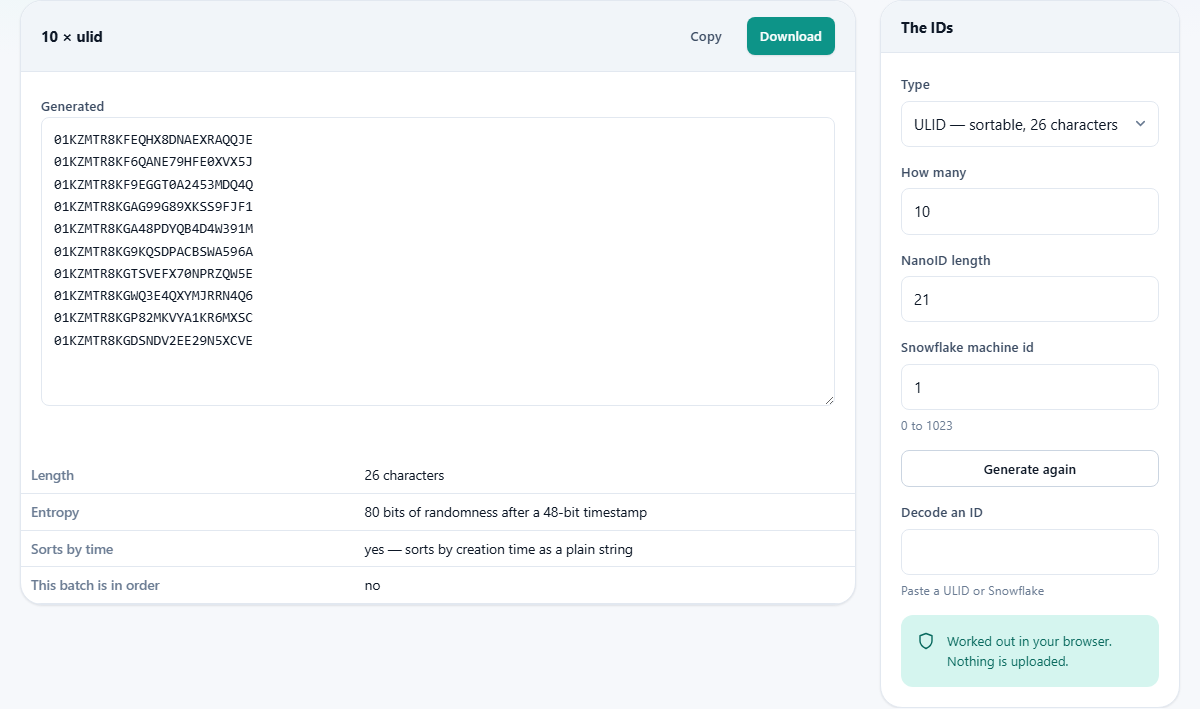
The Type dropdown offers four options. Each one solves a different set of constraints.
ULID is a 26-character string built from the current time in milliseconds plus 80 bits of randomness. It sorts correctly as plain text and uses Crockford base32, which skips the letters I, L, O and U to avoid confusion with digits and to dodge unfortunate words.
NanoID is a short, URL-safe string with no timestamp at all. Its length is adjustable. At the default of 21 characters it carries slightly more randomness than a UUIDv4, but it can be made shorter when the number of possible values is small enough to tolerate the higher collision risk.
Snowflake packs a timestamp, a machine identifier and a sequence counter into a single 64-bit integer. It fits a bigint column, which is half the storage of a UUID and comes with faster comparisons because the database compares one integer instead of 16 bytes. The trade-off is that the machine identifier is only 10 bits wide, limiting you to 1,024 separate generators.
UUIDv4 is included for comparison. It is still the right choice when nothing about the key needs to be sortable and when compatibility with existing UUID columns and libraries matters more than insert performance.
Controls and what they change
Type chooses the scheme. How many sets the batch size, from 1 to 200.
NanoID length appears when NanoID is selected. It moves between 4 and 64 characters. Shorter values save space in URLs and QR codes but raise the chance of a collision. At 21, the default, the odds are in the same range as UUIDv4.
Snowflake machine id appears when Snowflake is selected. It accepts a number from 0 to 1023 and represents the node that is generating the IDs. In a real system every server or worker process needs its own number. On this page it simply shows how the machine bits end up inside the finished integer.
Generate again runs a fresh batch with the same settings. The Generated textarea fills with the results, one per line.
Reading the output
After a batch is generated the tool checks whether the values actually came out in sorted order. For ULIDs and Snowflakes this should always be true. For NanoIDs and UUIDv4s it is never true, since there is no timestamp to sort by. The summary line above the textarea states the result plainly.
A facts panel shows the properties of the scheme: how many bits of randomness, how many bits of timestamp, the total length, and whether the output is text or an integer. These numbers help when deciding which column type to use in a database.
Copy puts the batch on the clipboard. Download saves it as a text file. Both are useful when you need to seed a development database or paste a handful of IDs into a test fixture.
Decoding a ULID or Snowflake
The Decode an ID field at the bottom of the settings rail accepts a ULID or a Snowflake and pulls the timestamp back out. For a ULID the first 10 characters encode milliseconds since the Unix epoch, and the decoded result shows the date and time down to the millisecond. For a Snowflake the top 42 bits are milliseconds since a platform-specific epoch.
The decoder assumes the original Snowflake epoch, which is 2010-11-04. Other platforms that use the same 64-bit layout chose different starting dates, so a Snowflake from one of those services will decode to a time that is off by a constant amount. The tool warns about this.
Pasting a NanoID or a UUIDv4 into the field produces nothing useful, because neither of those formats carries a timestamp. The tool says so rather than guessing.
Worked example: picking IDs for an orders table
A web application needs a primary key for its orders table. Orders arrive at a rate of a few hundred per second at peak. The team wants keys that sort by creation time so that queries for recent orders are fast, and they want the key to be usable in URLs without encoding.
ULID fits both requirements. It is text, so it can go straight into a URL. It sorts by time. Generating 10 on this page and scanning down the list confirms that each one is greater than the last.
Snowflake would also work, but the key would be a large integer rather than a readable string, and the URL would look like a phone number.
NanoID would give shorter URLs but would lose the sort order, which the team needs for performance. UUIDv4 would lose both the sort order and the short length. The answer here is ULID.
Worked example: short link tokens
A different team needs six-character tokens for short links. They expect about a million links over the life of the product. Sort order does not matter and the tokens will never be a primary key.
NanoID at length 6 is a good fit. The alphabet has 64 URL-safe characters, so six characters give roughly 68 billion possible values. For a million links the collision probability is still safely low. Generating a batch of 20 and checking the lengths confirms that every value is exactly six characters.
ULID would work but would waste 20 characters on information nobody asked for. Snowflake would produce long integers. The answer here is NanoID.
Common mistakes
- Storing a ULID in a plain text column without a collation that sorts it correctly. Crockford base32 is case-insensitive, so the column should be too.
- Using machine id zero for every Snowflake generator. Two servers with the same machine id and the same millisecond will produce the same number.
- Choosing a NanoID length by feel instead of doing the collision arithmetic. Four characters gives only about 16 million possible values, which can collide in a busy system within hours.
- Assuming a decoded Snowflake timestamp is in your local time zone. The tool shows UTC. The offset to your wall clock is your own time zone difference.
- Treating sortable IDs as secret. The timestamp is readable by anyone who has the ID, and a sequence of IDs reveals how fast records are being created. Use random IDs when that information is sensitive.
When another tool is a better fit
- If you need to format or validate a piece of JSON that already has IDs in it, the JSON Formatter on the same site handles that.
- If you need to compare two API responses that differ only in their IDs, the JSON Diff tool ignores formatting and shows real changes.
- If you need a hash rather than an identifier, look at the Hash Generator, which produces SHA-256 and other digests.
- If you need a password or API key rather than a database key, the Password Generator is built for that job.
Everything stays on your machine
The random bytes come from your browser's crypto API, which is the same source of randomness that your operating system provides to any program. Math.random is never used, because its output is predictable and unsuitable for values anyone might try to guess. Nothing is sent to a server. You can disconnect from the internet after the page loads and every button still works, because there is nothing on the other end to talk to. Close the tab and the generated values are gone.