
Reading a raw HTTP message the way a server reads it
What a raw HTTP message looks like, why the byte count matters more than the character count, every part of the inspector explained, a worked example with a request that hangs, the framing traps that waste whole afternoons, and why pasting a captured message here is the safe place to do it.
The text behind every web request
Every time a browser loads a page, it sends a block of text to the server. That block starts with a line naming the method and the path, followed by a set of headers, then a blank line, and then the body. The server reads this text in order, decides what was asked for, and sends back a block of text in the same format with a status line at the top.
Most developers never see this raw text. Their framework handles it, and the browser's network panel shows a tidy summary. But when something breaks at the wire level, a tidy summary is not enough. A request that hangs, a response that truncates, or a proxy that rewrites headers all require looking at the actual bytes.
That is what this inspector does. Paste the raw text of a request or response and it takes it apart piece by piece, the same way a server would. It reports the start line, every header, how the body is framed, and the body itself with any chunked encoding undone.
Who pastes raw messages into a tool like this
Backend developers debugging a failing API call are the most common users. They capture a request from a proxy like Fiddler or mitmproxy, or from a curl trace, and need to see exactly what was sent.
Security researchers inspecting traffic for request smuggling vulnerabilities need to verify that Content-Length and Transfer-Encoding do not conflict. That conflict is the basis of an entire class of attacks, and spotting it by eye in a wall of text is error-prone.
DevOps engineers reading server logs often find requests printed in their raw form. Pasting one into the inspector is faster than counting bytes and parsing chunk sizes by hand.
- Verifying that Content-Length matches the actual number of bytes in the body.
- Decoding a chunked Transfer-Encoding to see the reassembled body.
- Checking whether line endings are proper CRLF or just bare line feeds.
- Finding headers that appear twice when they should not, like a duplicate Host or Content-Length.
- Understanding why a hand-written request never gets a response.
The input pane and what to paste
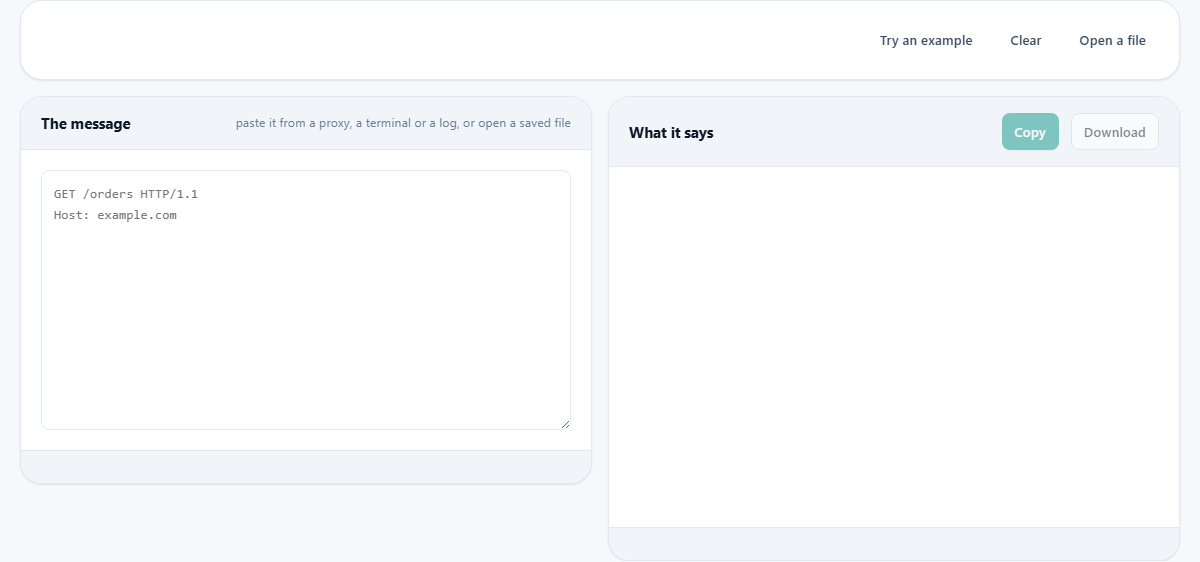
The left pane is labelled The message, with a hint that reads paste it from a proxy, a terminal or a log, or open a saved file. Paste the full message starting from the very first line. For a request, that is the method line, such as GET /orders HTTP/1.1. For a response, that is the status line, such as HTTP/1.1 200 OK.
Include every header line and the blank line that separates headers from the body. If there is a body, include that too. The tool figures out on its own whether you pasted a request or a response.
The Try an example button fills the input with a sample message so you can see the output without preparing your own text. Open a file loads a saved capture from disk. Clear empties both panes.
What the output shows
The right pane is labelled What it says. It breaks the message into named sections. The start line is identified as either a request line or a status line, and its pieces are labelled: the method, the path, and the protocol version for a request, or the protocol, the status code, and the reason phrase for a response.
Each header is listed with its name and value. Headers that appear more than once are flagged if the specification says they must not repeat. Two Content-Length headers, for instance, are a fault that a server is allowed to reject the entire message for.
The framing section is the most important part. It reports how the message says its body ends. There are three possibilities: a Content-Length header that states the byte count, a chunked Transfer-Encoding that breaks the body into labelled pieces, or no body at all. If both a length and a chunked encoding are present, the tool calls it out as a conflict.
The body section shows the raw body text and, if it was chunked, the reassembled version with the chunk markers removed. A byte count of the body is measured and compared against what Content-Length claims.
A worked example that explains a hanging request
Suppose you are writing a small HTTP client and your POST request never gets a response. You capture the raw text and it looks like this: POST /api/orders HTTP/1.1, then Host: shop.example.com, then Content-Type: application/json, then Content-Length: 27, then a blank line, then the body which is a JSON object with a name field containing cafe with an accent on the e.
You counted 27 characters in the JSON body and wrote that as the Content-Length. But the word cafe with an accent has a character that takes two bytes in UTF-8. The real byte count is 28, not 27. The server reads 27 bytes, sees an incomplete JSON object, and waits for the one remaining byte that never arrives. The request hangs until the server times out.
Paste this message into the inspector. The output measures the body at 28 bytes and compares it against the declared 27. The mismatch is reported clearly. Change the Content-Length to 28, send the request again, and the server answers immediately.
This is the single most common cause of a hand-written HTTP request that never gets a reply. Content-Length counts bytes, not characters, and any character outside the basic ASCII range takes more than one byte.
Chunked encoding and what it looks like raw
Some servers send the body in chunks instead of declaring its total length upfront. Each chunk starts with a line containing the chunk size in hexadecimal, followed by the chunk data, followed by a line break. The message ends with a chunk of size zero.
Reading this by hand is tedious and error-prone. The inspector decodes it for you. It reads each chunk size, joins the pieces together, and shows the reassembled body as a single block. If there is a trailer section after the final zero-length chunk, that is shown separately.
A message that carries both a Content-Length header and a chunked Transfer-Encoding is not just messy. It is a security risk. Two machines in a chain, such as a load balancer and an application server, can disagree about where the body ends. That disagreement is the foundation of request smuggling attacks. The inspector flags this conflict explicitly.
Line endings and the blank line rule
The HTTP specification requires lines to end with a carriage return followed by a line feed, written as CRLF. Many servers are forgiving and accept a bare line feed. But some are strict, and a request that works against one server can fail against another purely because of line endings.
The inspector reports what you actually pasted rather than silently fixing it. If your message uses bare line feeds, the output says so. That lets you know whether the line endings are a potential problem before you spend time looking elsewhere.
The blank line between the last header and the body is the most important single line in the whole message. Miss it and the server reads the first line of your body as a header. Add an extra blank line and the first line of your body becomes part of a larger gap that shifts everything by one line.
Mistakes that cost hours of debugging
- Calculating Content-Length by counting characters instead of bytes. Any accented letter, emoji, or non-ASCII character takes more than one byte in UTF-8.
- Sending both Content-Length and a chunked Transfer-Encoding. The specification says to ignore the length, but not all software follows the rule.
- Omitting the blank line after the headers. The server has no way to know where headers end and the body begins without it.
- Setting Content-Length to zero on a POST request that has a body. The server ignores the body and processes an empty request.
- Assuming that a header can safely appear twice. Most headers must appear only once. A duplicate Host or Content-Length is a fault, not a convenience.
- Pasting a message from a log that wrapped long lines. The line breaks that the log added are not in the original message and will break the parse.
When a different tool handles the job
- To look up what a status code or MIME type means without inspecting a full message, the HTTP and File Type Lookup page is a faster reference.
- To send a real HTTP request and see the response, you need a request client or the curl command. This tool reads messages but does not send them.
- To test whether a URL responds and what headers it returns, a header checker or the browser's network panel gives you live data.
- To decode a URL-encoded query string or form body, a URL decoder handles that step before you paste the decoded result here.
Your captured message stays on your own machine
The inspector reads the text you paste using your browser alone. It never makes a network request and never sends your message anywhere. That design is not just a feature. It is a necessity.
A captured HTTP request almost always contains an Authorization header, a session cookie, or an API key. Those credentials are as good as a password to anyone who intercepts them. Sending them to a third-party server to be parsed would defeat the purpose of examining them carefully. Here, the message stays in your browser's memory, and closing the tab is the only cleanup needed.