
Seeing the number your computer actually stored
Why 0.1 is not really 0.1 inside a computer, how the IEEE 754 bit layout works, what every field on the inspector shows, a full walkthrough with real values, and the practical fixes for the rounding that trips up every programmer at some point.
The problem every language shares
Type 0.1 + 0.2 in almost any programming language and the answer comes back as something like 0.30000000000000004. The usual reaction is to blame the language. The real cause sits much deeper: it is in the hardware. Every modern processor stores decimal numbers using a format called IEEE 754, and that format cannot represent most decimal fractions exactly.
Think of it like writing one third in decimal. You write 0.333... and eventually stop, because the pattern never ends. A binary fraction has the same trouble with values like 0.1. In base two, 0.1 becomes a repeating pattern that goes on forever: 0.0001100110011... The hardware has to cut it off after a fixed number of digits, and the result overshoots by a tiny amount. That tiny overshoot is what this inspector shows you, digit by digit, with nothing rounded for display. Most tools hide the extra digits so the number looks clean. This one prints every single one.
Who needs to look at the bits
Most programmers hit a floating point surprise once and learn to work around it. But some jobs require more than a workaround. Financial code needs to know exactly where rounding appears. Game physics tuning depends on the precise values that accumulate over thousands of frames. Scientific computing cares about the gap between the number you asked for and the number the hardware gave you.
Textbook explanations stop at the theory. This tool shows the actual stored value for any number you type, broken into the three fields the hardware uses. It replaces the mental arithmetic with a direct answer.
Typing a number in
The Value field in the sidebar accepts any number. Plain decimals like 3.14 work, and so does scientific notation like 1e-9 or 6.022e23. Below the input sit five shortcut buttons that load interesting cases: 0.1, 0.3, 2 to the power of 53 plus 1, a subnormal value, and negative zero. Each one reveals a different corner of the format.
The Precision dropdown switches between 64-bit double and 32-bit float. A double uses 52 bits for the fractional part, a float uses only 23. The error grows as precision shrinks, and switching between the two makes that gap visible. JavaScript, Python and most scripting languages use doubles by default. C, C++ and shader code often use floats, and game engines use them heavily because the GPU prefers 32 bits.
Reading the output
The main panel shows several pieces of information at once. At the top is the category of the number: normal, subnormal, zero, infinity or not a number. Below that come the three fields that make up the stored value.
The sign is one bit, 0 for positive and 1 for negative. The exponent is an 11-bit field for doubles or 8 bits for floats. It records how far left or right to shift the binary point. The mantissa, also called the significand, holds the fractional bits.
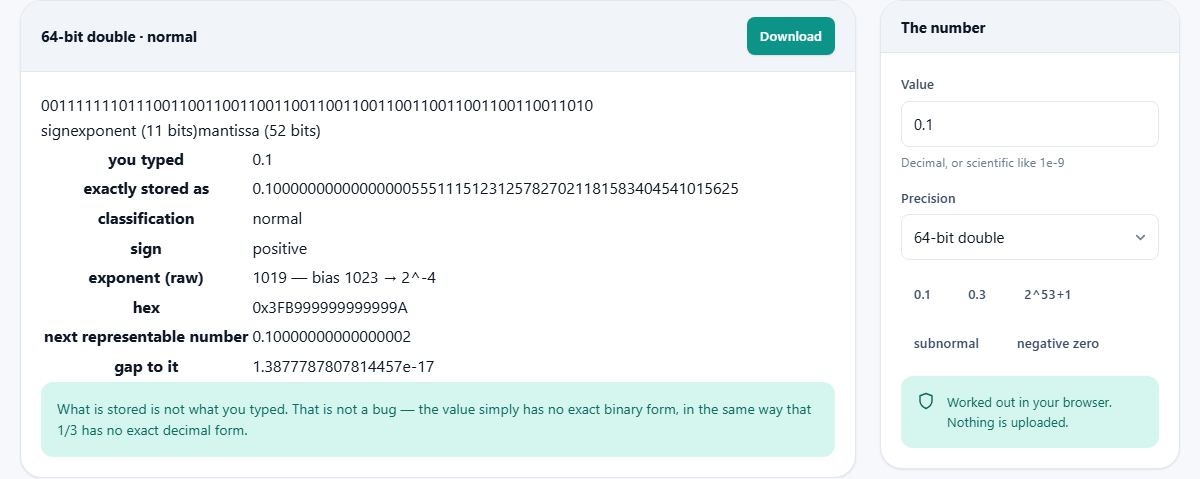
Underneath the bit fields sits the exact decimal value. For 0.1 stored as a double, it reads 0.1000000000000000055511151231257827021181583404541015625. Every digit there is real, computed with integer math that does not round. That long tail is the overshoot the hardware introduces, and seeing it removes any doubt about whether the error is there.
A full walkthrough with 0.1 and 0.3
Type 0.1 with the precision set to 64-bit double. The sign is 0. The exponent bits decode to a power of minus 4. The mantissa holds the repeating binary fraction. The exact stored value is slightly above 0.1.
Now type 0.3. Its exact value is slightly below the decimal 0.3 you meant. When the processor adds the stored 0.1 to the stored 0.2, it gets a value that sits a hair above 0.3. But the stored 0.3 itself sits a hair below. The two land on different sides of the exact decimal, so they are not equal. That is the entire explanation for the famous 0.1 plus 0.2 surprise, laid out in plain numbers rather than hand waving. Once you see both exact values side by side the mystery disappears.
Switch to 32-bit float and type 0.1 again. The mantissa is shorter, the exact value has a different overshoot, and the error is larger. This is why single precision is not used for anything that cares about the seventh decimal place.
Special values worth trying
Press the subnormal button and the number drops to 1e-320. Subnormal values sit below the smallest normal exponent. They trade precision for range, losing mantissa bits to keep representing numbers that are very close to zero. The inspector shows the reduced bit count and the exact value, which has fewer significant digits than a normal number.
Press negative zero. The sign bit is 1 and every other bit is 0. Negative zero compares equal to positive zero in every language, but dividing 1 by positive zero gives positive infinity while dividing 1 by negative zero gives negative infinity. The sign bit is not decorative.
Type Infinity or NaN. The exponent fills with ones. For infinity the mantissa is all zeros. For NaN at least one mantissa bit is set. These are edge cases, but code that parses user input or reads sensor data meets them regularly. A division by zero, a square root of a negative number, or a parse failure on a text field can all produce these values, and knowing their bit pattern helps when debugging a corrupted data file.
The integer cliff above two to the power of 53
Press the button that loads 2 to the power of 53 plus 1. A double has 52 mantissa bits plus one implied bit, so it can hold integers up to 2 to the power of 53 exactly. Above that, the gaps between representable numbers grow wider than 1.
That means the number you typed and the number the hardware stores are different integers. In a language like JavaScript, where every number is a double, this bites anyone passing large database IDs or Twitter snowflake IDs between systems. A 64-bit integer ID can hold values well above 2 to the power of 53, but the moment it passes through a JSON parse in JavaScript the low bits vanish silently. The inspector shows the stored value and the gap, which is the clearest proof that strings or BigInt are the right transport for those IDs. It is not a theoretical risk. Production bugs from this cause appear in every large system eventually.
Practical fixes for rounding trouble
- For money, store values in the smallest unit. Pence instead of pounds, cents instead of dollars. Then every value is an integer and floating point rounding never enters the picture.
- For comparisons, check whether two values are close enough rather than exactly equal. A tolerance of 1e-9 or so covers the accumulated error of most calculations.
- For display, round to the number of decimal places the user expects. The stored value may be 2.0000000000000004, but printing two decimal places gives the correct 2.00.
- For large integer IDs, use strings or a big integer type. A 64-bit double cannot hold every 64-bit integer, and the silent rounding creates collisions that are very hard to track down.
When a different tool fits better
This inspector shows what a single number looks like in memory. It does not do arithmetic on pairs of numbers or convert between bases. For base conversion there are dedicated tools on the site. For checking the result of a calculation, paste the result here to see its exact stored form, then decide whether the error is acceptable.
If the question is not about storage but about formatting, a number formatter or a precision calculator is what you want. This tool answers one narrow but important question: what did the machine actually hold for the number I gave it. Knowing that answer is the first step to deciding whether the rounding matters for your use case or whether it can safely be ignored.
Computed on your own device
The bit breakdown and the exact decimal are worked out entirely in your browser using BigInt, which means every digit is real integer arithmetic rather than a rounded display value. No number you type is sent anywhere. The page works offline, and closing the tab leaves no trace. For unreleased code where the exact constants matter, that privacy is worth having. You can verify it by opening the page, turning off your network connection, and typing any value. The result appears the same as before, because no server was ever involved.