
Moving project settings from one format to another
How to convert between .env files, INI, JSON, Java properties, shell exports, YAML, and Docker Compose environment blocks without losing comments, breaking quoting, or leaking secrets along the way.
The problem with five formats that say the same thing
Most projects store their settings as a list of names and values. The database host, the port number, the API key. Every team agrees on that much. What they never agree on is the file format.
A Node project keeps its secrets in a .env file. A Java project reads a .properties file. The ops team wants the same values as shell exports. The deployment file needs them in a Docker Compose environment block. And somewhere along the way, someone asked for JSON.
Each format writes the same information with different punctuation. An equals sign here, a colon there, quotes in some places and not in others. Rewriting by hand takes a minute and introduces exactly the kind of mistake that does not show up until production.
Who reaches for this tool
A developer onboarding onto a project that stores its config differently from the last one. A DevOps engineer packaging an application that needs its settings in a Compose file. A sysadmin who has a working .env and needs to hand the same values to a script as exports.
Anyone who has ever sat with two terminal windows open, rewriting KEY=value lines from one syntax to another, will recognise the job.
The controls across the top
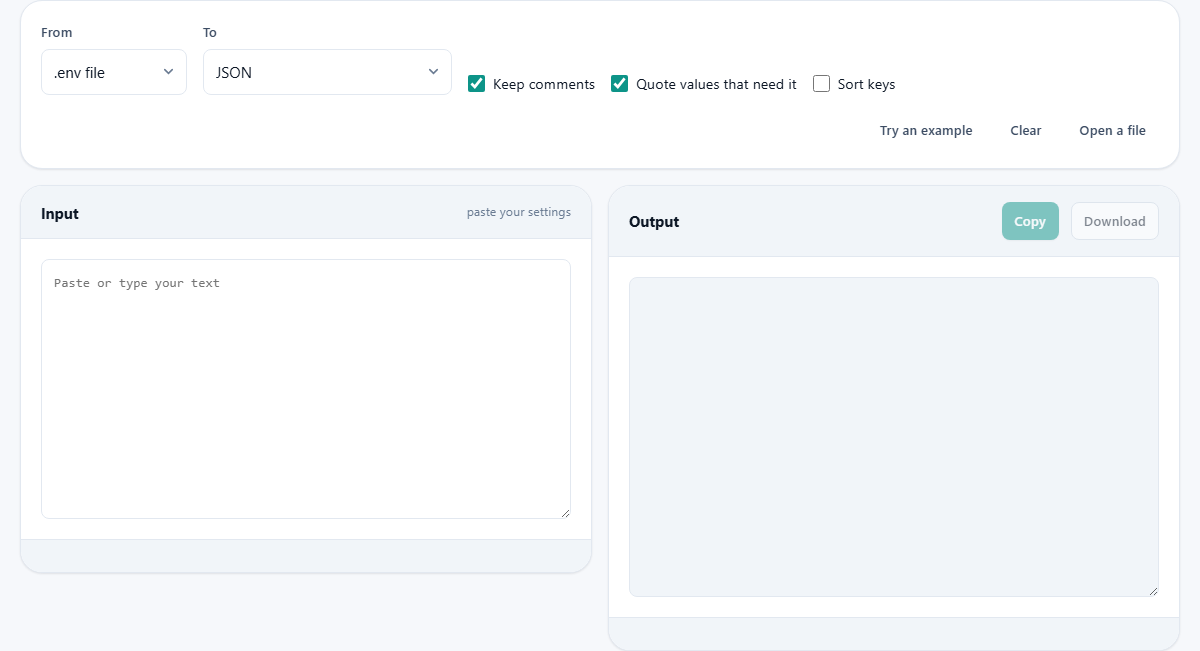
Two dropdowns sit at the top of the page. The first, labelled From, sets the input format. It offers .env file, INI, JSON, Java properties, and Shell exports. The second, labelled To, sets the output format. It adds YAML and Docker Compose environment to the list, giving you seven possible targets.
Three checkboxes follow. Keep comments preserves comment lines in the output where the target format supports them. JSON has no comment syntax, so they are dropped when you convert to JSON. Quote values that need it wraps values that contain spaces, hash signs, or quotation marks in the right kind of quotes for the target format. Sort keys arranges the output in alphabetical order by key name.
A Try an example button fills in a sample .env block. Clear empties both panes. Open a file lets you load a config file from disk instead of pasting.
The two panes
Below the controls sit two panels side by side. The left panel, headed Input, holds a text area where you paste your settings. The right panel, headed Output, shows the converted result with a Copy button and a Download button above it.
The conversion happens as you type. Change the From or To dropdown and the output updates at once. This makes it easy to try several target formats quickly and see which one fits your needs.
The status bar beneath the input shows what the converter found: how many keys it parsed and whether it ran into anything unexpected. If a line cannot be read in the chosen input format, the status tells you which line caused the problem so you can fix it before copying the output.
A worked example: .env to JSON and back
Suppose you have a .env file with three lines: DB_HOST=localhost, DB_PORT=5432, and SECRET_KEY=abc-def-123. Set From to .env file and To to JSON. Paste the three lines in the left panel.
The right panel shows a JSON object with three keys. Each value is a string. The output is ready to drop into a config loader that reads JSON.
Now switch To to Shell exports. The same three values appear as export DB_HOST="localhost", export DB_PORT="5432", and export SECRET_KEY="abc-def-123". The values are wrapped in double quotes because the shell would choke on the hyphens in the secret key if they were left bare.
Switch To to Docker Compose environment and the output writes the map form, where each entry sits on its own line with a colon. The map form is the one that handles values containing an equals sign without breaking the parser.
How INI sections map to nested objects
An INI file groups settings under section headings in square brackets. When you convert INI to JSON, each section becomes a nested object. The keys inside it become the properties of that object.
Going the other way works too. If you start with JSON that has one level of nesting, the converter writes each top-level key as a section heading and the inner keys as the settings under it. Deeper nesting is flattened with underscores between the level names.
Java properties files follow a similar flat key-value pattern but use a dot as a separator by convention. Converting from Java properties to JSON will give you a flat object. Converting from JSON back to properties will flatten any nested structure in the same underscore-joined style.
Quoting and why it causes most of the trouble
The formats disagree about quoting more than about anything else. A .env file is read by many different libraries, and they do not all handle quotes the same way. Some treat single quotes as literal. Some expand variables inside double quotes. Some allow multi-line values and some do not.
The converter follows the strict rules. It places no space around the equals sign. It wraps any value that contains a space, a hash mark, or a quotation mark. It avoids multi-line values entirely. That narrow set of choices is the one that works across the most parsers.
Shell exports are stricter still. An unquoted value containing a dollar sign will be expanded by the shell rather than stored as a string. The Quote values that need it option takes care of this, and leaving it on is almost always the right choice.
Comments: kept when possible, dropped when not
A .env file uses hash lines for comments. INI and Java properties use hash or semicolon lines. Shell scripts use hash lines. YAML uses hash lines. All of these carry comments through to the output when you convert between them.
JSON does not support comments at all. When you convert anything to JSON, comment lines are dropped because there is no legal place to put them. That is a limitation of the format, not of the tool. If you need comments in a JSON-like file, some projects use JSONC or JSON5, but those are not standard JSON and many parsers will reject them.
The Keep comments checkbox controls this. When it is ticked, comment lines in the input are written to the output wherever possible. When it is unticked, all comments are stripped regardless of the target format. That is useful when you want a clean file with no notes attached.
Pitfalls to watch for
- Committing a real .env file to version control. Use this tool to inspect what is in it, but keep the file out of your repository. A .env.example with blank values is the safe alternative.
- Forgetting that JSON flattens nested objects with underscores. If your original INI file has two sections that share a key name, the flat conversion will lose one of them.
- Pasting a partial file. If a value spans multiple lines in the original and the converter does not expect that, the result will split one setting into two broken entries.
- Assuming the output preserves insertion order. With Sort keys ticked, the output is alphabetical regardless of how the original was arranged. Turn it off if order matters to your workflow.
- Leaving quotes off when shell exporting values with spaces. A value like my database will be split into two arguments without quotes around it.
- Choosing the wrong input format. If your file is INI but you leave From set to .env, the section headings will be read as broken key lines and the result will be wrong. Match the dropdown to what you actually have.
Your secrets stay on your device
Config files are full of secrets. Database passwords, API keys, signing tokens. The conversion runs entirely in your browser. Nothing you paste is sent over the network, and there is no server behind the page.
That is worth knowing because the whole point of this tool is to handle the files you would never want to upload. Close the tab and the data is gone.