
Turning API examples into working code
How to go from a curl command you found in an API document to the exact same request written as JavaScript fetch, axios, or Python requests, without getting the headers, the body, or the auth wrong along the way.
Why every API speaks curl
Open any API guide and the first example will be a curl command. It is the common tongue because curl ships with every operating system and needs nothing installed. A single line can describe a request that carries headers, a body, cookies, and basic auth.
The trouble is that nobody ships curl commands in real code. A web front end needs fetch or axios. A back end in Python needs the requests library. Copying the command by hand means counting quotes, moving flags into named arguments, and remembering which library calls the body argument data and which calls it json.
Where these commands come from
Two places mainly. First, the documentation of any REST or webhook service. Stripe, Slack, Twilio, and hundreds of others print curl commands as their primary examples.
Second, your own browser. Right-click any request in the Network tab of the developer tools and choose Copy as cURL. That gives you the exact request the browser just sent, headers and all. It is the fastest way to get a working starting point for code that needs to make the same call.
The controls on the page
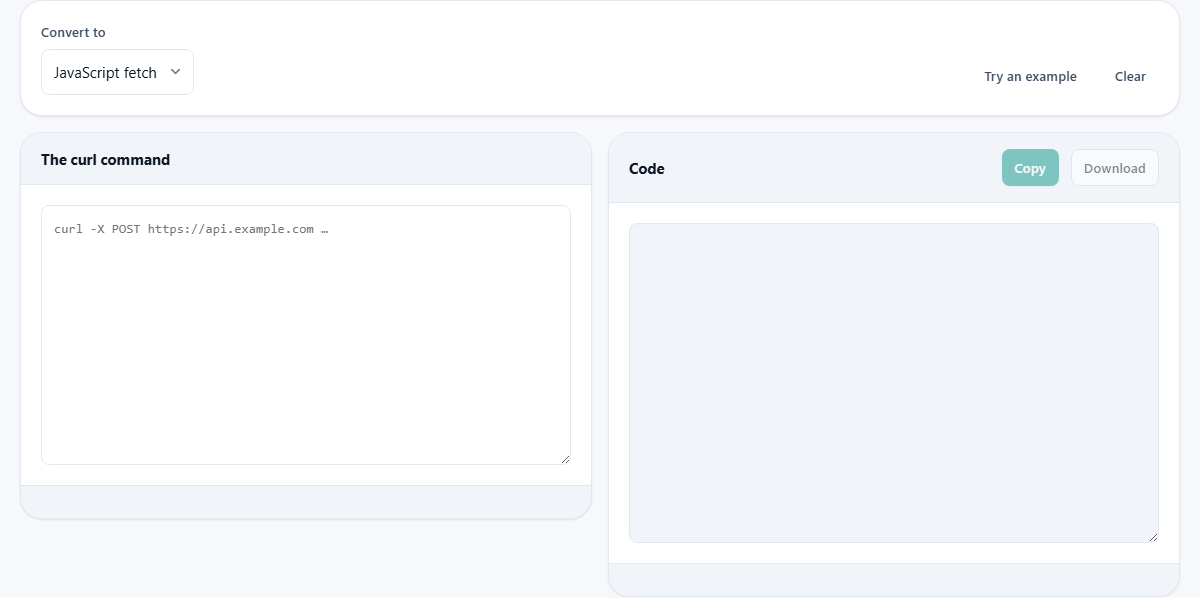
There is one dropdown at the top labelled Convert to. It offers three choices: JavaScript fetch, axios, and Python requests. Pick the language you are working in before you paste.
Below that sit two panels side by side. The left panel is headed The curl command and holds a text area for the raw command. The right panel is headed Code and shows the generated output. Two buttons sit above the output: Copy and Download.
A Try an example button fills in a sample command so you can see the shape of the result before touching your own data. Clear empties both sides.
The status line below the input tells you about the command as soon as you paste it. If it parses cleanly you see a quiet confirmation. If it cannot be parsed, the status names the problem it ran into.
Which flags the converter understands
The flags that shape the HTTP request are all handled. That list covers -X for the method, -H for a header, -d and its longer forms for the request body, --data-urlencode for form values, --json for the newer shorthand that sets the Content-Type and Accept headers at the same time, and -F for multipart form uploads.
Authentication is covered by -u, which maps to basic auth. Cookies are set with -b, a custom user agent with -A, and a referer header with -e. The -G flag moves the body to the query string, and -I switches to a HEAD request.
Flags that only affect curl itself are dropped without a warning. Silent mode, progress bars, output files, retry counts, and certificate checks have no matching concept in fetch or requests, so they vanish quietly. The code that comes out describes the request, not the tool that sent it.
A worked example from start to finish
Suppose an API document gives you this command: curl -X POST https://api.weather.example/v2/forecast -H "Authorization: Bearer abc123" -H "Content-Type: application/json" -d '{"city": "Oslo", "days": 3}'. You paste it into the left panel.
With Convert to set to JavaScript fetch, the right panel fills in immediately. It writes a fetch call with the URL, method set to POST, a headers object holding both headers, and a body built from JSON.stringify on a real object literal. The city and the number of days sit inside that literal, not inside a flat string.
Switch Convert to to Python requests and the same input produces a requests.post call. The headers are a dictionary, and the body appears as a Python dictionary with the json= keyword argument. True and False are fixed to Python style, and the variable names match the library's own conventions.
That is the real value. The output is not just correct. It reads the way a person would write it if they sat down and typed it fresh.
How JSON bodies are handled
If the body you paste happens to be valid JSON, the converter does something useful: it breaks it open into a real data structure. In JavaScript that means a plain object inside JSON.stringify. In Python it means a dict passed to the json= parameter.
That matters because debugging a request body written as one long string is painful. Seeing the keys and values laid out in code lets you change a field and know you will not break a bracket somewhere else.
The newer --json flag in recent versions of curl is also understood. It sets the body and both the Content-Type and Accept headers to application/json in one go. The converter expands it the same way, so the output always shows the full set of headers even when the original command used the shorthand.
Multi-line commands and shell quoting
API documents almost always break long commands across several lines with a backslash at the end of each one. That is a shell line continuation, and the converter joins them before parsing. The Windows caret (^) works the same way.
Quoting is handled the way a real shell reads it. Single quotes preserve everything inside them. Double quotes allow escapes. A backslash before a character takes it literally. This matters because the body of a POST command is often wrapped in single quotes that contain double-quoted JSON, and getting the nesting wrong loses the body entirely.
File uploads use the -F flag. Each form field becomes a FormData append in JavaScript or a files= entry in Python. When the original command reads from a local path with @photo.jpg, the generated code leaves a clearly marked placeholder, because a browser script cannot open a path on your disk.
Common mistakes and how to spot them
- Pasting half a command. If you copy from a document and miss the closing quote, the parser will tell you it found an unclosed string. Go back and select the full block.
- Forgetting to strip the dollar sign. Some guides write $ curl to show it is a terminal prompt. That leading dollar sign is not part of the command. The tool tries to handle it, but keeping the paste clean avoids surprises.
- Leaving real tokens in the output. A command copied from your browser contains your actual cookies and auth headers. The converter does its work on your device, so those secrets do not go anywhere, but the generated code still contains them. Replace them with variable names before you commit the file.
- Using a flag the converter does not support. Proxy settings, client certificates, and custom DNS are transport level concerns. They have no single equivalent in fetch or requests, so they are skipped. The status line will note their presence.
- Expecting the code to run without a library. The axios output needs the axios package installed. The Python output needs the requests library. fetch is built in to browsers and modern Node, so it works without installing anything extra.
When a different tool is the better fit
- If you need to compare two pieces of text or code, the Text Compare tool does that job.
- If you want to escape a string for use inside JSON, HTML, or SQL, the Escape and Unescape tool handles that directly.
- If you are building a set of environment variables for a project, the Config Format Converter moves settings between .env, JSON, and shell formats.
- If you need to inspect the headers of a response rather than build a request, your browser's Network tab is the right place.
Your command stays on your machine
The whole conversion takes place inside your browser. The curl command you paste is parsed in the page, and the generated code is assembled there. Nothing is sent to a server. There is no queue, no upload, and no copy sitting on someone else's storage.
That matters because the commands you paste often contain real credentials. An API key, a session cookie, a bearer token. The fact that the page works without a network connection is not a feature they added on top. It is how it was built from the start.