
Understanding CSS units and converting between them
What each CSS length unit is relative to, how to set the context boxes so the conversion matches your project, a worked example converting pixels to rem, and why the choice of unit is an accessibility decision.
Why CSS has so many length units
A pixel seems simple enough. It is one dot on the screen. But CSS also has rem, em, percentages, points, viewport units, inches, centimetres, and millimetres. Each one is measured against something different, and picking the right one decides whether your layout respects the visitor's browser settings or overrides them.
The short version is that rem is the right choice for font sizes, px works well for borders and shadows, viewport units are for full-screen hero sections, and the rest are for special cases that come up rarely. This converter shows all of them at once against a context you can adjust, so you see exactly how any value translates into every other unit without doing the arithmetic by hand.
Entering a value
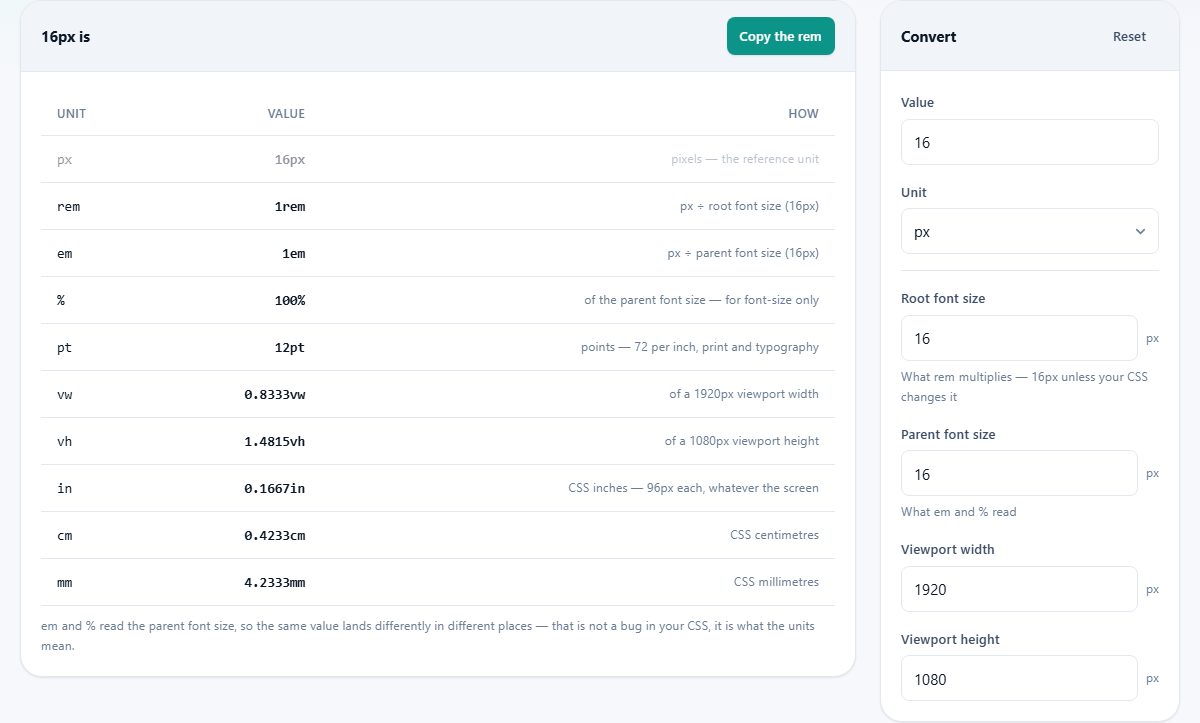
The Value box takes any number, including decimals. Type the number you want to convert. Below it, the Unit dropdown tells the converter what unit that number is measured in. The choices are px, rem, em, pt, % (of parent font size), vw, vh, in, cm, and mm. That covers every length unit defined in the CSS specification.
The results table updates as you type. It shows the same length expressed in every other unit side by side. If you type 16 and leave Unit on px, the table shows 1rem, 1em, 100%, 12pt, and the corresponding viewport and physical values, all assuming the default context. Change the number or the unit and every row recalculates instantly without any button press.
The four context boxes
A conversion between relative units is only correct when the context matches your project. Four boxes sit below the input and let you describe that context.
Root font size is what rem multiplies. Browsers default to 16 pixels. If your CSS changes the root with a rule like html { font-size: 18px }, set this box to 18 so the rem row on the table matches reality. Some codebases use the 62.5% trick, setting the root to 10px so that 1.6rem equals 16px. Enter 10 in this box and the table speaks that dialect immediately.
Parent font size is what em and % read. The em unit is relative to the parent element's computed font size. If the parent is 20px, then 1em is 20px in that context. The % row on the table uses this same value because, when applied to the font-size property, percentages are measured against the parent's font size rather than against width or height.
Viewport width and Viewport height tell the converter the size of the browser window. 1vw is one hundredth of the viewport width. 1vh is one hundredth of the viewport height. The defaults are 1920 and 1080, matching a common desktop resolution. Change them to 375 and 812 to preview what your values look like on a standard phone screen, or to 768 and 1024 for a tablet in portrait orientation.
A worked example: converting a design file to rem
A designer hands you a mockup with a heading at 32px, body text at 16px, and small print at 12px. Your codebase uses rem for all font sizes with the browser's default root of 16px.
Type 32 in the Value box, leave Unit on px and Root font size on 16. The rem row reads 2. That is your heading size: 2rem. Now change Value to 12. The rem row reads 0.75. That is the small print: 0.75rem. The body text at 16px is simply 1rem, the value you can read without even opening the page.
Now suppose the codebase uses the 62.5% trick. Change Root font size to 10. The rem row for 32px now reads 3.2, the body text at 16px becomes 1.6rem, and the small print at 12px becomes 1.2rem. Every value is the pixel figure divided by ten, which is the whole point of setting the root to that number. Seeing the full table update when you change the root box makes the trick far easier to understand than reading an article about it.
What each unit is actually relative to
rem reads the root element's font size and uses the same value everywhere on the page regardless of nesting depth. That predictability is why it became the standard for font sizes. If a visitor raises their browser's default text size to 20px, every rem value on the page grows proportionally. Values set in px stay fixed and ignore that preference.
em reads the current parent's computed font size. Inside a sidebar whose text is 14px, 1em is 14px. Inside the main content area where text is 18px, 1em is 18px. The meaning of em changes depending on where you use it. That is genuinely useful for padding inside a button, because the padding scales along with the button's own label text. But it causes confusion when nested elements compound the sizing. 0.9em inside another element already at 0.9em does not give you 90% of the root. It gives you 81%. That stacking surprise is the reason rem was invented.
% for font-size behaves like em. It reads the parent. 100% equals 1em. But for widths, margins, and paddings, the percentage is of the parent's width, which is a layout concern rather than a font-size conversion. The table here only shows the font-size meaning.
pt is a print unit inherited from physical typesetting. One point is 96/72 of a pixel, roughly 1.333px. So 12pt text works out to 16px, and that is why those two numbers appear together so often in design specifications and style guides. Points exist mainly for print stylesheets. On screens they rarely add any value that px does not already provide.
vw and vh divide the viewport into 100 equal slices. On a 1920-pixel-wide window, 1vw is 19.2 pixels. These units are useful for hero sections that need to fill the entire screen, but they should not be used for body text because the type would shrink to illegible sizes on a narrow phone.
in, cm, and mm are defined as fixed ratios of 96 pixels per CSS inch. They do not measure physical distance on your display. A CSS inch on a phone is not an inch long when you hold a ruler to the glass. These units exist for print media. On screens, treat them as oddities rather than everyday tools.
The accessibility case for rem
Some visitors raise their browser's default font size to 20 or 24 because they have difficulty reading small text. When your font sizes are in rem, the text grows with that setting because rem is a multiple of the root size. When your font sizes are in px, the text stays fixed and the visitor's preference is silently overridden.
This is the strongest practical argument for converting px to rem in your stylesheets. It costs nothing, it respects the visitor's own choice, and it takes about ten minutes to convert an existing project using this tool. That is also the reason the Copy rem button exists on the page. The conversion people need most often is px to rem, and it should be one click away.
Mistakes that trip people up
- Forgetting to change the Root font size box after adopting the 62.5% trick. All the rem conversions will be wrong by a factor of 1.6 until the box reads 10 instead of 16.
- Treating em and rem as interchangeable. They agree only when the parent and the root happen to share the same font size, and that is not guaranteed across different parts of the page.
- Nesting em values and being surprised by compounding. Two levels of 0.9em make the inner text 81% of the root, not 90%. Switch to rem to avoid this entirely.
- Using vw for paragraph text. The text will shrink on narrow screens and grow on wide ones, making it unreadable at both extremes unless you clamp it with min and max functions.
- Assuming that CSS inches or centimetres correspond to physical measurements on a monitor. They are abstract units pegged to a fixed pixel ratio.
- Ignoring the Parent font size box when debugging an em value that seems wrong. The same em figure means different things in different parts of the page.
All conversions happen on your own device
The arithmetic runs entirely inside your browser with no server involved. No values are sent anywhere, and the page works just as well offline as it does with a connection. Close the tab and nothing is stored. There is no account, no history, and no limit on how many conversions you run in a session.