
Getting from a run command to a compose file and back
What the converter actually does with each flag, why ports end up in quotes, how named volumes are declared, a full conversion with real flags, and the notes underneath the output that are often more useful than the file itself.
Two ways to describe the same container
A container run command and a compose service block say the same thing in two grammars. The run command is a single line you type in a terminal. The compose file is YAML that lives in a project folder and describes one or more services.
Most people start with a run command. They find it in a README, a blog post, or a colleague's message. It works. Then they want to add a second container, or they want the setup to survive a reboot, and they need to move everything into a compose file.
Doing that by hand is tedious and easy to get wrong. Flags map to keys, but not always with the same name, and some flags have no equivalent at all. The converter reads the command, writes the YAML, and lists everything it could not carry across.
Pasting the command and reading the output
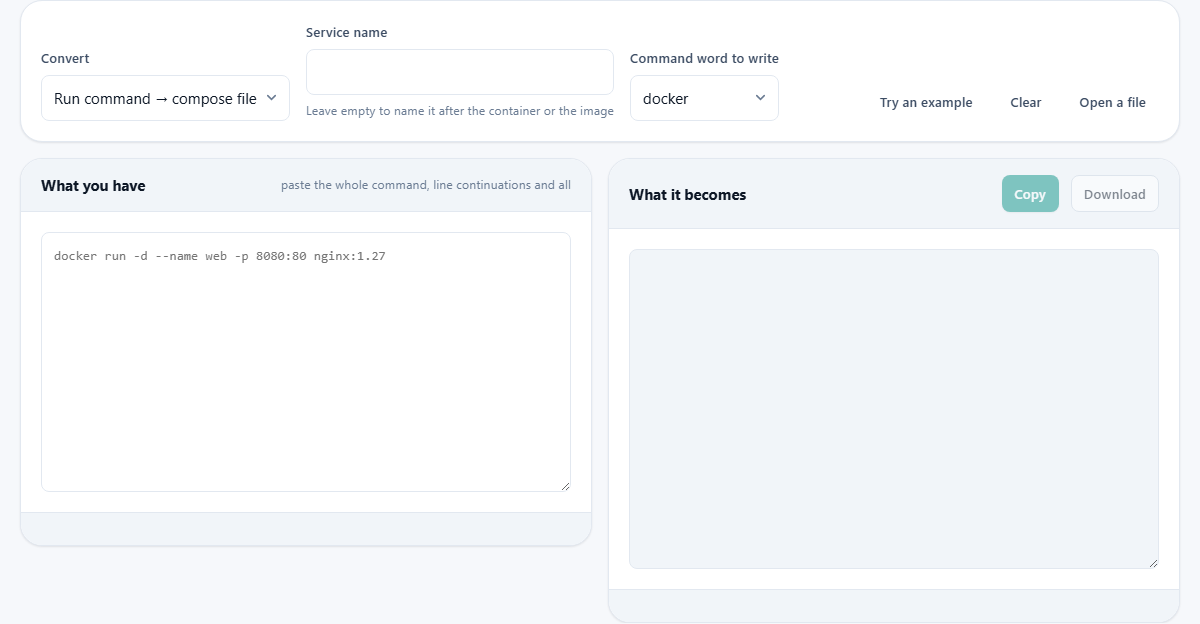
The left panel is labelled What you have. Paste the full run command, including any line continuations with backslashes. The tool splits it the way a shell would, so quotes and escapes work as they do in a terminal.
The right panel, labelled What it becomes, shows the compose service block as YAML. It updates live as you type or paste. The result is ready to save as compose.yaml and bring up with a single command.
Below the panels sits a notes area. Anything the converter could not translate is listed there with the reason. This is the part that saves you from silent surprises.
The controls above the panels
Convert is a dropdown with two choices. The default is Run command to compose file. Switch it to Compose file to run command and the direction reverses: paste a compose YAML on the left and get a run command on the right.
Service name lets you override the name of the service in the output. Leave it blank and the tool uses the container name from the command, or falls back to the image name if no container name was given.
Command word to write lets you pick docker, podman, or nerdctl. This only affects the output when you convert a compose file back to a run command. The leading word of the input is always thrown away before parsing, so it does not matter which runtime you used when you wrote the original command.
Try an example fills the input with a sample run command that uses several common flags. Clear empties both panels. Open a file lets you load a compose.yaml from disk.
Why ports end up in quotation marks
In the generated YAML, every port mapping is wrapped in quotes. This is not decoration. The YAML specification that most tools still follow reads a bare value like 22:22 as a number in base sixty, which evaluates to 1342. Written without quotes, a port pair can change meaning with no error from any parser.
The fix is to quote every value that contains a colon. The converter does this for you, but it is worth knowing why. If you hand-edit the file later and remove the quotes for tidiness, you may quietly break a port mapping.
Volumes, environment variables, and networks
When the run command mounts a volume with -v data:/var/lib, the word data has no slash in front of it. That makes it a named volume, which the container engine stores in its own managed space. Write ./data instead and it becomes a bind mount to the current folder. The two look almost the same but behave very differently.
The converter recognises named volumes and declares them in a top-level volumes block at the bottom of the file. Bind mounts stay as paths in the service block.
Environment variables set with -e show up in the environment block. If a variable is written with no value, like -e SECRET_KEY, it means 'pass through whatever the shell already has'. That changes the environment block from the dictionary form to the list form, because only a list can express a name without a value.
Networks joined with --network are marked as external in the output. A run command that names a network expects it to exist already. A compose project normally creates its own, so the external flag tells the engine to look for an existing one instead of making a new one.
Flags that have no compose equivalent
Some run flags describe the moment of starting, not the container itself. Running in the background with -d, removing the container when it exits with --rm, and publishing all exposed ports on random numbers with -P are all examples.
A compose file has no key for these because they are launch-time decisions, not service definitions. The converter lists every one of them underneath the output with a note explaining why it was not carried over.
This is deliberate. Nothing is invented and nothing disappears silently. The notes are often more useful than the file itself, because they tell you what you need to handle differently now that the container is managed by compose.
A worked example with several flags
Paste this command into the input panel:
docker run -d --name web -p 8080:80 -v html:/usr/share/nginx/html -e NGINX_HOST=example.com --restart unless-stopped --network frontend nginx:1.27 nginx -g 'daemon off;'
The output reads as a service block named web. The image is nginx:1.27. Ports lists '8080:80' with quotes. Volumes maps html to /usr/share/nginx/html. Environment has NGINX_HOST set to example.com. Restart policy is unless-stopped. The command after the image is kept as a list: nginx, -g, daemon off;.
At the bottom of the file is a top-level volumes section declaring html as a named volume. Under the notes, -d is listed as not carried over, because detaching is how you start a compose project, not a property of the service.
Switch the Convert dropdown to Compose file to run command. Paste the YAML back in. The output is a single-line run command with every flag restored except -d, which you add yourself when you run it.
Going the other way and handling multiple services
When you switch direction and paste a compose file that defines several services, the tool uses the first one and lists the names of the others below the output. You can then change the service name in the input to target a different one.
This is the common case when you have a compose file with a web server, a database, and a cache, and you want to test just one of them as a standalone container.
Mistakes that catch people out
- Removing the quotes from ports in the generated YAML. The file may still work in many tools, but 22:22 without quotes is technically a number, and a strict parser will misread it.
- Confusing a named volume with a bind mount. If the source has no dot or slash at the start, it is a named volume. If you meant a local folder, add a dot-slash prefix.
- Expecting -d to appear in the compose file. Detaching is how you bring a project up, not a property of the service. Run the project in the background with the -d flag on the compose up command instead.
- Pasting a multi-service compose file and not noticing which service was converted. Check the notes for the list of other services in the file.
- Assuming --network names a new network. In a run command it joins an existing one. Remove the external flag in the output only if you want compose to create it.
Your command never leaves the browser
The parsing and the YAML generation happen entirely on your own machine. No text is sent to a server. This matters when the command contains a password in an environment variable or an API key passed as a flag.
There is no account, no history, and no record of what you paste. Close the tab and everything is gone. You can verify this by disconnecting from the network and running a conversion - it still works without any connection.