
Writing commit messages that machines can read and humans still like
What the conventional commits format actually asks for, how the builder and the changelog generator work, a complete example with version bumps, and the mistakes that trip up most teams in the first month.
The problem with free-form messages
Most projects start with commit messages like 'fixed stuff' or 'updates'. That works until someone asks for a changelog, or until a CI pipeline needs to decide whether to bump the major version or the patch.
Conventional commits solve this by putting a machine-readable type at the front of every message. feat means a new feature. fix means a bug fix. The rest of the message is still human language, but that one word at the start gives tools enough to sort, group, and version automatically.
The convention is simple. The first line reads type(scope): description, where scope is optional. A body and footers can follow, separated by a blank line. That is the whole specification.
The builder on the right-hand side
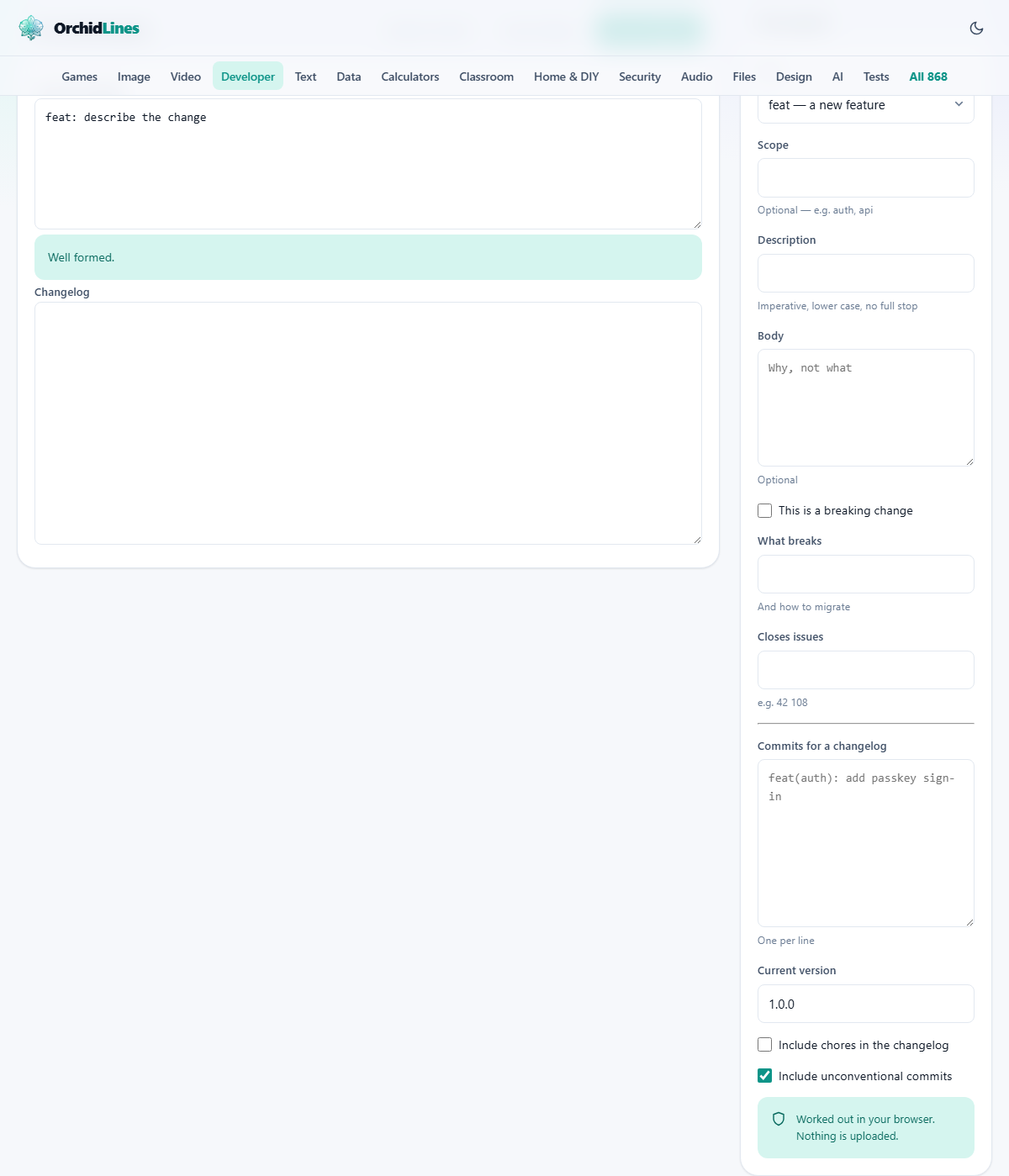
The tool has two halves. The right rail builds a single commit message. The left side shows the result and, further down, generates a changelog from many commits.
Start with Type. The dropdown offers eleven choices: feat, fix, docs, refactor, perf, test, build, ci, style, chore, and revert. Each one has a short note beside it explaining what it covers. Pick the one that describes the purpose of the change, not what files it touched.
Scope is a text field. It is optional. If you use it, put a short word that names the area of the project: auth, api, ui, payments. The scope appears in parentheses after the type and helps group related changes in the changelog.
Description is the main summary. Keep it imperative and lower case, with no full stop at the end. Think of it as completing the sentence 'this commit will ...' so 'add passkey sign-in' rather than 'added passkey sign-in'. The tool hints at this with the note 'Imperative, lower case, no full stop'.
Body is a text area for the longer explanation. It answers the question 'why?' rather than 'what?'. It is optional, and many commits do not need one.
Marking a breaking change correctly
The checkbox labelled This is a breaking change does two things. It puts a bang before the colon in the first line, turning feat into feat!. And it opens a field labelled What breaks, where you describe what callers or users need to change.
The page warns you directly: an exclamation mark inside the description does nothing. The bang must appear between the type and the colon, or a BREAKING CHANGE footer must appear in the body. Those are the only two positions that tools look at.
The Closes issues field takes numbers separated by spaces. Writing 42 108 produces footer lines that link the commit to those tickets. Some hosting platforms will close the issues automatically when the commit is merged.
The linter and the message it produces
As you fill in the fields, the Commit message text area at the top left updates live. It shows the assembled first line, the body, and any footers. The linter runs alongside it and flags common mistakes.
A description that starts with a capital letter gets flagged. A first line longer than 72 characters gets a warning, because git log and most hosting interfaces will cut it off there. A missing type or an empty description is rejected outright.
The Copy message button puts the finished text on your clipboard. From there you paste it into your terminal as the argument to git commit -m. The tool does not run git for you. It writes text, and you decide when and where to use it.
Generating a changelog from a list of commits
Below the single-commit builder is a larger text area labelled Commits for a changelog. Paste a batch of first lines here, one per line. They can come straight from git log --oneline. If the lines start with commit hashes, those are stripped automatically.
Next to it is Current version, which defaults to 1.0.0. The tool reads every line, sorts them by type, and produces a grouped changelog in Markdown. Features sit under one heading, fixes under another, and so on.
Two checkboxes affect what appears. Include chores in the changelog adds chore commits, which are often left out because they are internal housekeeping. Include unconventional commits keeps any line that does not follow the format, listed under a separate heading so nothing disappears without warning.
How the version bump is decided
Under the changelog sits the version bump. The rule is short. If any commit is a breaking change, the major number goes up. If there are no breaking changes but at least one feat, the minor number goes up. If there are only fixes, docs, refactors, and other non-feature types, the patch number goes up.
So if your current version is 1.3.2 and you paste five commits that include one feat and three fixes, the suggested next version is 1.4.0. Add a breaking change and it jumps to 2.0.0.
Below 1.0.0 the rules are looser by convention. Many projects treat 0.x releases as unstable and do not bump the major number for breaking changes until they reach 1.0.0. The tool follows the strict rule because it cannot guess your project's policy.
A full example with five commits
Set Current version to 2.1.0. Paste these five lines into the changelog area:
feat(auth): add passkey sign-in. fix(api): return 404 for missing users. docs: update the getting started guide. fix(ui): align the submit button on mobile. chore: bump dependencies to latest.
The changelog groups them into Features, Bug Fixes, Documentation, and Chores (if that checkbox is on). The bump reads 2.2.0, because there is one feat and no breaking changes.
Now add a sixth line: feat!(auth): remove password login. The bang makes it breaking. The bump changes to 3.0.0 and the changelog adds a prominent breaking changes note.
Mistakes that cause trouble in practice
- Putting the bang inside the description instead of before the colon. Writing 'feat: remove password login!' is just a normal feat. Write 'feat!: remove password login' for a breaking change.
- Making one commit do two things. If a commit adds a feature and fixes a bug, the changelog can only file it under one type. Split it into two commits.
- Using past tense. 'Added' instead of 'add' is not a strict error, but it reads badly in a generated changelog that says 'this release will: added passkey sign-in'.
- Forgetting the colon after the type. Writing 'feat add passkey sign-in' without the colon makes the line unparseable.
- Starting the description with a capital letter. The convention calls for lower case. The linter catches this, but many people ignore it until their generated changelog is a mix of cases.
- Writing a novel in the first line. Keep it under 72 characters. Move the detail into the body.
When this tool is not the right fit
If your project already has commit hooks that lint messages as they are written, you may not need a separate builder. The builder is most useful when you are learning the format or when you are writing a batch of commits for a squash merge.
If you want a changelog that pulls from a remote repository automatically, a CI tool like semantic-release does the reading and the publishing in one step. This tool is for the manual version of that workflow.
If your team does not use conventional commits and has no plan to start, the changelog generator will still try to group whatever you give it, but the output will be less useful because most lines will land under the 'other' heading.
No data leaves your browser
The commit builder, the linter, and the changelog generator all run in your browser. Nothing you type is sent to a server. This matters when the description mentions a security fix or a client name that should not appear in a third-party log.
There is no account, no saved history, and no telemetry on what you paste. Close the tab and the session is over. You can prove it by turning off your network connection and running through the whole workflow. The builder, the linter, and the changelog all keep working exactly the same way.