
Building a Cache-Control header that does what you think it does
What each cache directive actually tells browsers and CDNs, why no-cache and no-store are almost opposites despite sounding alike, how the four presets cover most real websites, and a full walkthrough of a header for a hashed JavaScript bundle.
The header and why it matters
Cache-Control is an HTTP response header. It tells every cache between the server and the user - the browser, a CDN, a corporate proxy - how long they may keep a copy and under what conditions they must check back.
Getting it right makes a site fast. A browser that already has a cached copy of a stylesheet does not need to download it again. Getting it wrong makes a site stale. A browser that caches an HTML page for a year will show outdated content to every visitor until that year runs out, and there is no way to take the instruction back once it has been sent.
The header is a comma-separated list of directives. Each directive is a word, sometimes followed by an equals sign and a number. The order does not matter. Some directives work alone. Some only make sense in combination. A few combinations are actively misleading, and the tool warns you when you build one.
The four presets
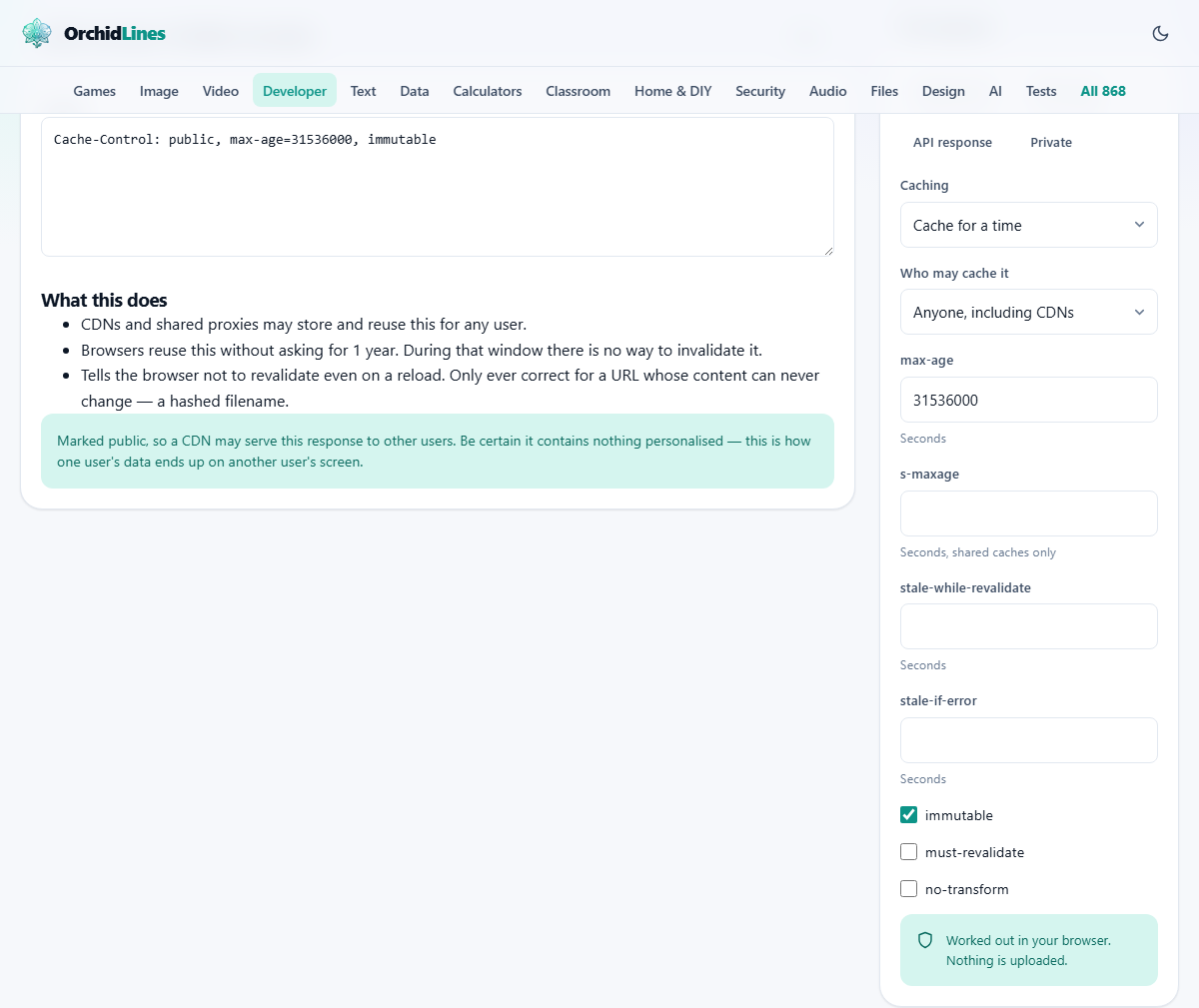
The panel on the right starts with four buttons: Hashed asset, HTML page, API response and Private. Each one fills in the controls below with a sensible starting point.
Hashed asset sets a max-age of one year with public, immutable. This is the standard recipe for a CSS or JavaScript file whose URL contains a content hash - something like app.3f8a2c.js. Because the hash changes whenever the content changes, the old URL will never be requested again, and a one-year cache is perfectly safe.
HTML page sets a short max-age or uses no-cache, because the HTML file is the one whose URL does not change. It needs to be checked on every visit so the browser picks up the new stylesheet and script URLs.
API response is similar to the HTML preset but may add stale-while-revalidate so the user gets a fast answer while a fresh one is fetched behind the scenes.
Private sets the visibility to private, meaning only the end user's browser may cache the response. A CDN or shared proxy must not keep a copy. This is the right choice for any page that shows data belonging to a logged-in user.
The directives one by one
The Caching dropdown has three modes. Cache for a time is the normal case: the response is stored and reused for the number of seconds you set in max-age. Store but always revalidate adds the no-cache directive, which stores a copy but requires the cache to check with the server before using it. Never store adds no-store, which tells caches not to keep a copy at all.
Who may cache it controls visibility. Anyone, including CDNs adds public. Only the user's browser adds private. Do not say leaves it unspecified, which usually behaves like private but is less explicit.
The max-age field is in seconds. Common values are 0 (do not use without checking), 3600 (one hour), 86400 (one day) and 31536000 (one year). The s-maxage field overrides max-age for shared caches only. Use both when you want a CDN to hold content for an hour while browsers hold it for five minutes.
The stale-while-revalidate field lets caches serve an expired copy while fetching a fresh one in the background. It is almost free speed. The user sees the old response instantly rather than waiting for the network round trip, and the next user gets the fresh one.
The stale-if-error field lets caches serve an expired copy when the server is down. It is a safety net that keeps the site looking alive during a short outage.
The three checkboxes at the bottom add immutable, must-revalidate and no-transform. Immutable tells the browser not to bother checking even on a hard refresh, because the content at this URL will never change. Must-revalidate forbids stale responses. No-transform tells proxies not to compress or convert images on the fly.
The output panel
The Header text area shows the complete header value, ready to copy. The Copy button puts it on the clipboard.
Below the header is a section called What this does. It lists each directive in plain words. Instead of requiring you to remember that s-maxage overrides max-age for shared caches, it says so in a sentence. This is the part to read when you are not sure what you just built.
If the combination you have chosen is contradictory or misleading, a warning appears above the output. For example, setting public together with no-store is technically allowed by the specification but almost certainly not what you meant. The warning explains why and suggests a fix.
A walkthrough: caching a hashed JS bundle
You have a JavaScript file called main.a7b3f9.js. The hash in the filename changes every time you rebuild, so no two versions share a URL. You want browsers and CDNs to cache it for as long as possible.
Click Hashed asset. The controls fill in: Caching is set to Cache for a time, Who may cache it is Anyone, including CDNs, max-age is 31536000, immutable is ticked. The header reads public, max-age=31536000, immutable.
The What this does section says the response may be stored by any cache, it is valid for one year, and the browser will not revalidate even on a hard refresh. That is exactly right for a hashed file.
Now suppose you want the CDN to recheck every hour while browsers keep the year-long cache. Type 3600 into the s-maxage field. The header now reads public, max-age=31536000, s-maxage=3600, immutable. The explanation updates to say that shared caches override the year-long lifetime with a one-hour one. Browsers still hold their copy for a year. The CDN refreshes every hour.
The confusion between no-cache and no-store
This is the single most misunderstood pair of directives in all of HTTP. The names suggest they are close relatives. They are nearly opposites.
no-cache stores a copy and checks with the server before every use. If the server replies with a 304 Not Modified, the cached copy is used and no download happens. This is efficient. It means the browser always has the latest version but avoids a full download when nothing has changed.
no-store instructs caches not to keep a copy. Every request goes to the server and downloads the full response. This is the right choice for a page that shows a bank balance or a medical record, where even a brief cached copy is a problem.
The confusion costs real money. A developer who writes no-cache when they mean no-store leaves sensitive data in the browser cache. A developer who writes no-store when they mean no-cache forces a full download on every page load, which slows the site down and increases bandwidth costs.
Mistakes that bite later
- Setting a long max-age on a URL that does not change when its content does. A browser that cached the old version will not check again for that entire duration. Content-hashed filenames solve this for assets. For HTML pages, use no-cache or a very short max-age.
- Using public for a page that shows user-specific data. A CDN or shared proxy might serve one user's page to another. Use private for anything behind a login.
- Forgetting stale-while-revalidate. It is free speed with almost no downside. The user gets the cached copy instantly and the fresh one arrives in the background for the next visitor.
- Setting immutable on a URL that does change. The browser will not check even on a hard refresh, so the only way to get the new version is to clear the cache manually.
- Assuming the CDN obeys the header. Many CDN products have their own cache rules that override origin headers. Always check the CDN dashboard if caching is not working as expected.
When another tool is a better fit
- For inspecting the headers an actual server is sending, the browser's network panel in developer tools shows every header on every response.
- For testing whether a cached resource is being revalidated, the same network panel marks 304 responses with a different colour.
- For building other HTTP headers like Content-Security-Policy or CORS, dedicated generators exist for each.
- For measuring how much caching helps a particular page, a performance audit tool like Lighthouse gives a concrete score.
Nothing is sent anywhere
The header is built entirely in your browser. The directives you choose and the values you type are processed locally. There is no server, no account and no saved history.
This matters when you are setting up caching for an internal application whose URL structure you would rather not share. Build the header here, copy it, and paste it into your configuration. The tool never sees the URLs the header will apply to.