
Seeing the bits behind every bitwise operation
What AND, OR, XOR, NOT and shifts actually do to individual bits, how the width setting changes the answer rather than just the display, the difference between arithmetic and logical right shifts, and a full worked example at 8 bits.
Why bitwise operations still matter
Bitwise operations work on individual bits inside a number. They are the lowest level of arithmetic a processor can do. AND, OR, XOR, NOT and shifts appear constantly in systems programming, network code, graphics, compression and cryptography.
They also appear in everyday web development more often than people expect. Feature flags stored as a single integer. Permission masks checked with AND. Color channels extracted with shifts. Hash functions built from XOR and rotation. Even JavaScript, a language that hides almost everything about how numbers are stored, has a full set of bitwise operators.
The controls on the right
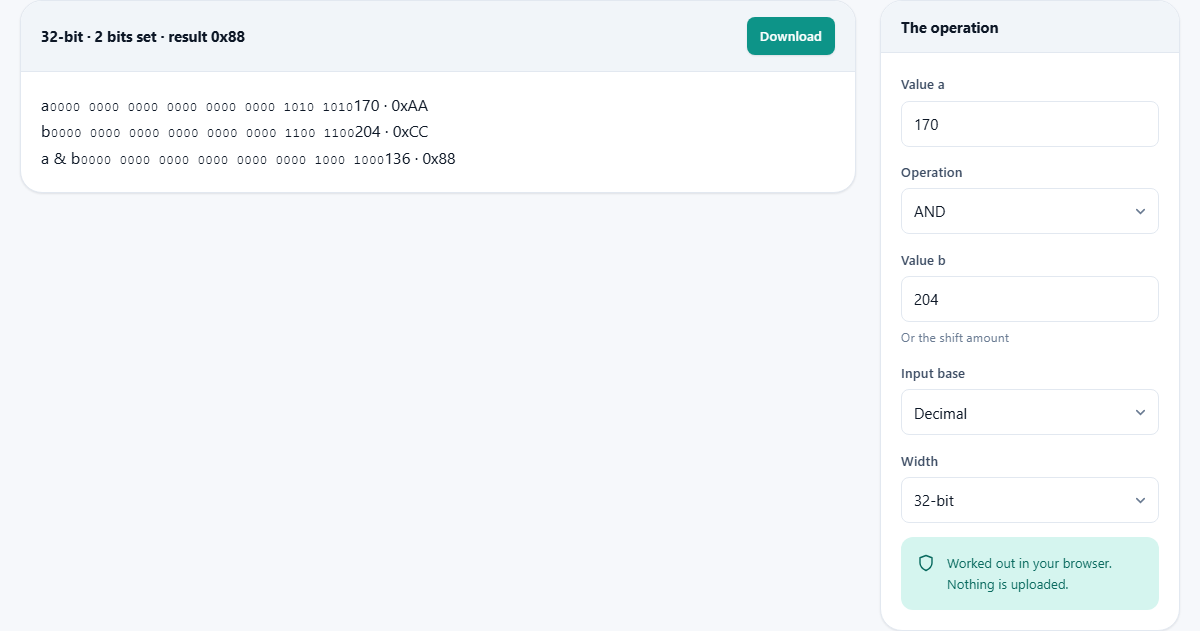
The panel labelled The operation holds every input. Value a is the first operand. Value b is the second operand, or the shift amount when the operation is a shift or rotation. Both accept decimal, hexadecimal and binary input.
The Operation dropdown lists nine choices. AND, OR, XOR and NOT are the four logic operations. Shift left, Shift right (arithmetic) and Shift right (logical) are the three shifts. Rotate left and Rotate right are the two rotations. NOT uses only Value a and ignores Value b.
Input base tells the tool how to read what you typed. It defaults to Decimal but switches to Hexadecimal or Binary when you prefer those. A 0x or 0b prefix is always recognised regardless of this setting, so you can type 0xFF into a decimal-mode box and it will still be understood.
Width chooses between 8-bit, 16-bit, 32-bit and 64-bit. This is not a display preference. It changes the result. The same operation on the same numbers gives a different answer at a different width because the bits that exist depend on how wide the register is.
What each operation does
AND compares each pair of bits and keeps a 1 only where both inputs have a 1. It is the natural way to test whether a particular bit is set. If you AND a value with a mask that has only bit 3 turned on, the result is non-zero only if bit 3 was set in the original.
OR compares each pair of bits and produces a 1 wherever either input has a 1. It is the natural way to set a bit. OR a value with a mask that has bit 5 turned on and bit 5 is now on in the result, regardless of what it was before.
XOR compares each pair and produces a 1 wherever the two inputs differ. It is its own inverse: a XOR b XOR b gives back a. That property makes it useful for checksums, simple ciphers and the classic trick of swapping two variables without a third.
NOT flips every bit. Every 0 becomes a 1 and every 1 becomes a 0. It uses only Value a. Combined with AND, it clears a single bit: AND the value with NOT of the mask.
Shift left moves every bit toward the higher end by the given number of positions. The vacated positions at the bottom fill with zeros. Each shift by one is the same as multiplying by two.
The two right shifts differ in what they put at the top. Arithmetic shift copies the sign bit, so a negative number stays negative. Logical shift fills with zeros, so a negative number becomes a large positive one. This is the single most common source of bitwise confusion.
Rotate left and rotate right move bits the same way shifts do, except that the bits that fall off one end come back at the other. Nothing is lost. Rotations are the core operation in most hash functions and block ciphers.
Signed and unsigned readings
The output shows both a signed and an unsigned reading of every value. They agree whenever the top bit is zero. They disagree whenever the top bit is one, because in two's complement that top bit means the number is negative.
At 8 bits the unsigned range is 0 to 255 and the signed range is -128 to 127. The bit pattern 11111111 is 255 unsigned and -1 signed. Both readings are correct. Which one you want depends on whether the value represents a count or a temperature.
This is exactly the kind of ambiguity that causes bugs. A byte read as signed in one place and unsigned in another will compare correctly sometimes and fail at the boundary. The calculator shows both so you can see the difference before it becomes a bug report.
A worked example at 8 bits
Set Value a to 170, Value b to 204, Operation to AND, Input base to Decimal and Width to 8-bit.
170 in binary is 10101010. 204 in binary is 11001100. AND keeps a 1 only where both have a 1. Walking through: 1 AND 1 gives 1, 0 AND 1 gives 0, 1 AND 0 gives 0, 0 AND 0 gives 0, 1 AND 1 gives 1, 0 AND 1 gives 0, 1 AND 0 gives 0, 0 AND 0 gives 0. The result is 10001000, which is 136 in decimal and 0x88 in hex.
Now switch Operation to XOR without changing anything else. 10101010 XOR 11001100 gives 01100110, which is 102 in decimal and 0x66 in hex. The bits that differ between the two inputs are now the ones that are set.
Change Width to 16-bit and the binary display grows to sixteen columns. The values themselves do not change because 170 and 204 both fit in 8 bits, but the result now has leading zeros that matter for shifts and rotations.
Why JavaScript programmers need this especially
JavaScript stores all numbers as 64-bit floating point. But the moment you use a bitwise operator, it silently converts both operands to signed 32-bit integers, does the operation, and converts back. This means 1 shifted left by 31 comes out negative, which surprises anyone who expected a large positive number.
The calculator lets you pick the width you are actually working at and see the correct answer. Set it to 32-bit to match what JavaScript does. Set it to 64-bit to see what the result would be if JavaScript did not truncate. The gap between the two is usually where the bug lives.
Languages like C, Rust and Go give you explicit integer types with defined widths. The calculator matches them all. Pick 8-bit for a byte, 16-bit for a short, 32-bit for an int and 64-bit for a long, and the result on screen is the result your code will produce.
Common mistakes
- Confusing arithmetic and logical right shift. If a negative number is involved, they give completely different results. Check both on the calculator before choosing one in code.
- Shifting by the width of the register. Shifting a 32-bit value by 32 is a no-op on most processors, not zero. The shift amount is taken modulo the width.
- Forgetting that NOT depends on width. NOT of 0 at 8 bits is 255. NOT of 0 at 32 bits is 4294967295. The answer changes because there are more bits to flip.
- Treating XOR as encryption. XOR with a fixed key is trivially reversible. It is a building block of real ciphers, not a cipher itself.
- Ignoring the signed reading. If your code stores the result in a signed variable, the value it sees is the signed column. If it stores it in an unsigned variable, it sees the unsigned column. The bits are the same; the meaning changes.
When a different tool is the right choice
- For converting a number between bases without any operation, a base converter is simpler and faster.
- For computing a hash of a file rather than doing bit-level arithmetic, a hash generator is what you want.
- For working out subnet masks, the subnet calculator handles the networking-specific parts that raw bitwise math does not.
- For checking whether two files differ at the byte level, the binary file compare reads the files for you and reports the offsets.
Nothing leaves your browser
Every calculation happens locally. The values you type are processed by JavaScript running on your own device. Nothing is sent to a server. There is no account, no history and no log.
This matters when the numbers you are working with come from a proprietary protocol, a security audit or a reverse engineering session. The results exist only in the tab, and closing the tab is the end of it. You can verify this yourself by disconnecting from the network and running a calculation. It still works, because there was never a server involved.