
Converting numbers between decimal, hex, binary and beyond
How to type a number in one base and see every other base fill in at once, what the Details panel shows, why this tool stays exact where most converters silently go wrong on large values, and a worked example with real figures.
Why the same number has many spellings
Humans count in tens because we have ten fingers. Computers count in twos because a switch is either on or off. Programmers often write values in sixteens because it packs four binary digits into a single character, which makes long values much shorter to read.
These are not different numbers. They are different ways of writing the same number, just as the word ten and the figure 10 mean the same thing. Converting between them is a job that comes up every day in programming, networking, and computer science homework. The relationship between the bases is straightforward once you see it. One hex digit covers the same range as four binary digits. Two hex digits cover eight binary digits, which is one byte. That is why hex is the standard way to write byte values.
Who needs a base converter
Web developers turn CSS colour codes from hex to decimal and back. Systems programmers read memory addresses and byte values that are always written in hex. Network engineers translate subnet masks between binary and dotted decimal. Computer science students work through base conversion exercises and need a way to check their answers.
Anyone debugging a protocol dump, reading a file in a hex editor, or trying to understand a permission mask in octal reaches for this kind of tool several times a week. Embedded systems developers work with register values that mix hex and binary in the same data sheet, so having both visible side by side saves constant mental arithmetic.
The four main fields
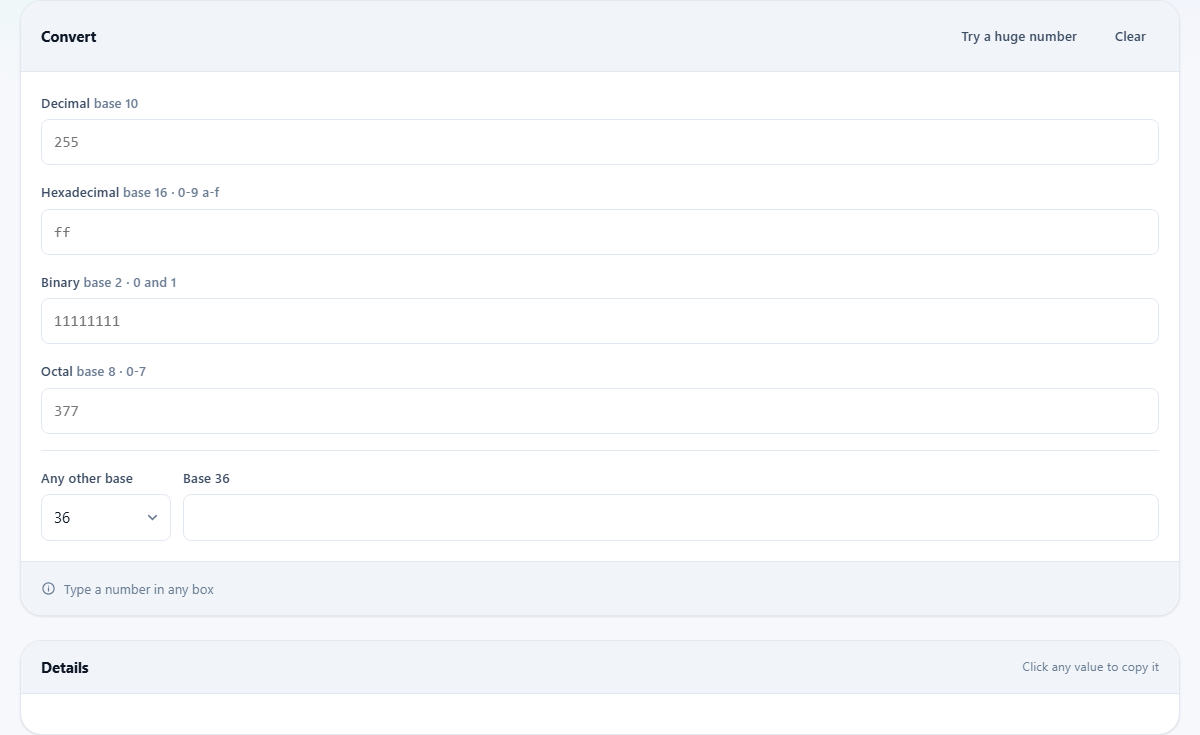
The panel headed Convert holds four input fields, one for each common base. Decimal, labelled base 10, is the everyday one. Hexadecimal, labelled base 16 with digits 0 through 9 and a through f, is the programmer's shorthand. Binary, labelled base 2 with digits 0 and 1, is how the hardware thinks. Octal, labelled base 8 with digits 0 through 7, appears in Unix file permissions and some older systems.
Type into any field and the other three update at once. There is no convert button to press. You can also paste a value with a prefix and it will be understood. Paste 0xFF and the hex field fills with ff while decimal shows 255. Paste 0b1010 and binary fills with 1010 while decimal shows 10. Paste 0o777 and octal fills with 777 while decimal shows 511.
Any other base
Below the four main fields, a separator line leads to a section for less common bases. The dropdown labelled Any other base offers bases 3, 4, 5, 6, 7, 12, 20, 32, and 36. The field next to it updates along with all the others.
Base 36 is the highest base that can be written with just digits and the English alphabet. It uses 0 through 9 and then a through z. The result is very compact. A large decimal number becomes a short string, which is why some systems use base 36 for short identifiers and URLs. Base 32, which stops at the letter v, appears in Crockford encoding and certain file systems. Base 12, called dozenal, turns up in some mathematical puzzles. The label next to the input field changes to show which base is currently selected, so you always know what digits are valid.
The Details panel
Below the converter sits a second panel headed Details. It shows several facts about the current number. The bit count tells you how many binary digits it needs. Two lines report whether the value fits in a 32-bit signed integer and whether it fits in a 64-bit signed integer, which matters when choosing a variable type in code. Going over the limit is what causes overflow bugs.
Grouped binary shows the binary form in clusters of four digits, and grouped hex shows the hex form in pairs. Both are much easier to read than a single long string. If the number maps to a printable character, that character is shown too. Enter 65 in decimal and the details show the letter A. Enter 9731 and you see a snowman.
Click any value in the Details panel to copy it to your clipboard. This is handy when you need a grouped binary string for a document or a report, since typing it by hand invites mistakes.
Why large numbers stay exact here
Most online base converters use ordinary JavaScript numbers, which lose precision above about 9 quadrillion. That is 2 to the power of 53. Anything larger comes back with the last few digits quietly changed. A 64-bit database ID, a large hash, or a cryptographic key can all be longer than that, and a converter that silently corrupts them is worse than no converter at all.
This tool uses BigInt arithmetic throughout. Every digit is correct no matter how long the number is. Press Try a huge number to load a value that breaks most other converters and see it converted without losing a single digit. If you have ever pasted a large ID into another converter and noticed the last few digits turn to zeros, that is the precision limit at work. Here, no matter how many digits the number has, the conversion is exact.
A worked example
You are reading a CSS colour code and want to know what each channel is. The colour is written as 1A8F3C. Type it into the hex field. Decimal fills in with 1740604. Binary fills in with 000110101000111100111100.
The Details panel says the value needs 21 bits and fits comfortably in a 32-bit integer. Grouped hex shows 1A 8F 3C, which makes the three colour channels visible at a glance: red is 1A, which is 26 in decimal. Green is 8F, which is 143. Blue is 3C, which is 60. That tells you the colour is mostly green with a small amount of blue and very little red.
Now suppose you want to check an octal permission value. Type 755 into the octal field. Decimal shows 493. Binary shows 111101101. Grouped binary shows 0001 1110 1101, but the important grouping for permissions is three bits at a time: 111 is read-write-execute for the owner, 101 is read-execute for the group, and 101 is read-execute for everyone else.
Common mistakes
- Typing a letter that does not belong to the base. Hex accepts a through f but not g. Binary accepts only 0 and 1. The field will not accept invalid digits.
- Forgetting that hex letters are not case sensitive. FF, ff, and Ff all mean the same thing. The output uses lower case.
- Expecting fractions. This tool converts whole numbers only. A decimal point will not be accepted. Nearly every programming use involves whole numbers, so this is rarely a real limit.
- Confusing negative numbers with two's complement. A minus sign in front gives you the plain negative value, not the binary pattern a computer stores. Two's complement is a separate representation.
- Using a converter that silently breaks on large numbers. If the answer ends in a run of zeros that you did not expect, the converter lost precision. This one does not.
- Treating base conversion as the same thing as text encoding. Base64 and Base32 are byte-level encodings with padding and fixed alphabets. They solve a different problem. The Number Base Converter works with numeric values, not streams of bytes.
When another tool suits the task better
- For encoding text as Base64, use the Base64 tool instead. Base64 is a text encoding, not a number base.
- For encoding data as Base32 or Base58, use the Base32 and Base58 Converter. Those are byte-level encodings with their own alphabets.
- For converting between units of measurement, use a unit converter. This page converts number representations, not quantities.
- For colour work where you need to move between hex, RGB, and HSL, a colour picker gives you all three at once with a visual preview.
Everything stays in your browser
All the arithmetic runs inside your own browser using its built-in BigInt support. No value is sent to any server. There is no account, no history, and nothing stored after you leave. The page works perfectly well with no internet connection at all, because the conversion is pure arithmetic with no outside dependency.
That matters when you are converting values from a private system, an internal database, or a key that should not appear in a search engine's records. Close the tab and the number is gone.