
How to Change a Voice Recording With Pitch and Filter Effects
This article walks through every setting in the Voice Changer, explains what each of the ten effects does to a recording, and shows you how to get a convincing result rather than a cartoonish one. It also covers saving, format choices, and the honest limits of pitch shifting.
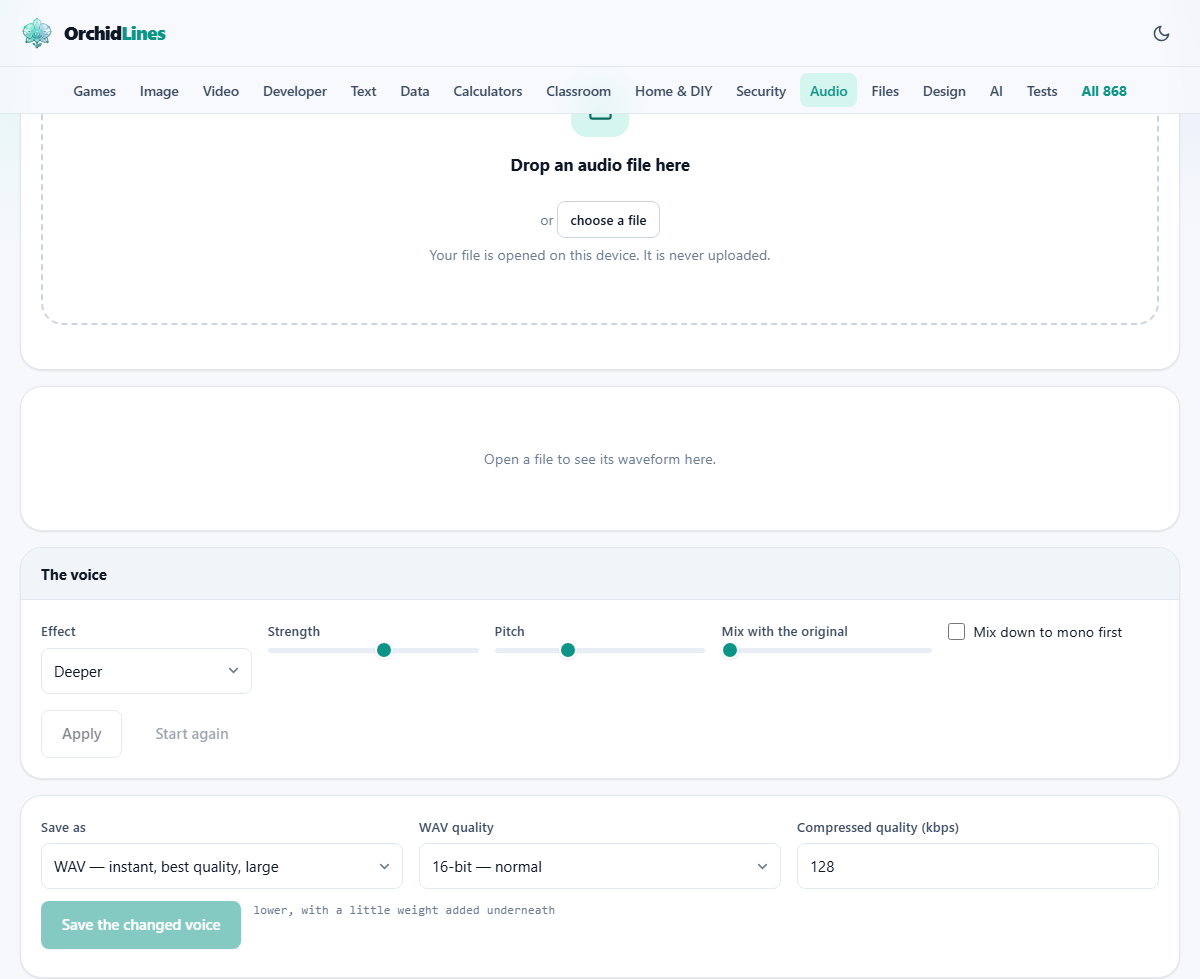
What the tool does to your audio
The Voice Changer shifts the pitch of a recording up or down by a number of semitones, then passes the result through a chain of filters and modulation chosen to match the effect you pick. Each preset sets its own starting pitch and adds the right colour on top. The Deeper effect, for example, drops the pitch a few steps and slightly warms the low end, while Robot adds a ring modulator that gives the voice a metallic buzz.
The result is an effect, not a disguise. Shifting a voice down four semitones does not make it sound like a different person with a naturally deep voice. It makes the original speaker sound slowed down, because the resonances of the mouth and throat move with the pitch. A genuinely convincing voice swap needs a model of the target voice, which is a very different kind of tool.
Who uses a voice changer and for what
Content creators add effects to voice-overs for comedy or character work. Podcasters drop in a changed voice for a dramatic reading or a quote. Teachers record a second character in a story without needing a second speaker. Game streamers layer a robot or alien filter over their microphone recordings before sharing them.
Privacy is another reason. Some people want to share an audio clip but not be recognised. Shifting the pitch a few steps makes the speaker harder to identify. It is not foolproof, but for casual sharing it is often enough. Narrators working on audio books sometimes test different pitch settings to find the right tone for a character before committing to a performance.
The ten effects and what makes each one different
Deeper drops the pitch by a few semitones and leaves the rest alone. It is the most natural sounding option and the one to start with if all you want is a lower voice. Higher does the reverse, raising the pitch without adding any extra processing.
Chipmunk pushes the pitch far up, making the voice fast and squeaky. Giant goes in the other direction, deep and slow, stretching the audio so each word takes longer. Robot adds a metallic ring that sits on top of every syllable, turning speech into something mechanical.
Telephone strips away everything below 300 Hz and above about 3400 Hz. It is a filter, not a pitch change at all. The voice stays at the same pitch but sounds like it is coming through a narrow phone line. Old radio does a similar job with a slightly different cutoff range, adding a crackly feel.
Alien mixes modulation and pitch shifting for an unearthly warble. Crowd layers copies of the voice with slight timing and pitch offsets so it sounds like several people speaking at once. Whisper strips the tonal content and leaves just the breathy noise of the consonants.
The controls and what each one accepts
The Effect dropdown picks one of the ten presets listed above. Each preset sets its own default pitch, so the Pitch slider jumps when you change the selection.
Strength runs from 10 to 100 percent, with 60 as the default. It controls how heavy the processing sounds. At low values the effect is barely there. At 100 it is at full force. For most creative work, somewhere between 50 and 80 hits the sweet spot.
Pitch goes from minus 12 to plus 12 semitones. Minus values make the voice lower, plus values make it higher. Two or three semitones is enough to notice. Twelve semitones is a full octave and will sound like a cartoon. The preset sets a sensible starting point, and you can push it further or pull it back.
Mix with the original blends the untreated voice underneath the changed one. At zero you hear only the effect. At 30 or 40 percent, the original peeks through and keeps the words clear when the processing is heavy. This is especially useful with Robot and Alien, which can make speech hard to follow on their own.
Mix down to mono first merges the two channels of a stereo file before processing. This prevents odd phasing when an effect shifts left and right channels by slightly different amounts. For a simple voice memo recorded in mono already, it makes no difference.
Choosing a format and saving
The Save as list offers M4A, WebM and WAV. MP3 is available. Browsers can play MP3 files but none of them can write one, so this page loads a small open-source encoder the first time you choose it. M4A is the practical choice. It is smaller than MP3 at the same quality, and it plays on every modern phone, tablet and computer.
The Compressed quality field sets the bitrate in kilobits per second, defaulting to 128. For a voice recording that will be shared online or dropped into a video, 128 is fine. If you want to keep every detail for later editing, pick WAV instead.
The WAV quality dropdown gives you 16-bit for normal use, 24-bit for studio work, and 32-bit float for technical editing chains. Most people will never need anything beyond 16-bit for a changed voice clip.
Worked example: a deeper narrator voice
Record a short voice memo on your phone and send it to your computer, or use any audio file that has speech in it. Drop it onto the page. The waveform appears and the file details confirm the format and channel count.
Choose Deeper from the Effect list. The Pitch slider moves to about minus 4 semitones. Leave Strength at 60 percent. Set Mix with the original to 0. Press Apply.
Play the result. The voice sounds lower, but you may notice it also sounds a bit hollow. That hollowness comes from the throat resonances moving down along with the pitch. It is a known limit of the method. To soften it, raise Mix with the original to about 20 percent and press Apply again. A little of the natural voice fills in the gaps.
If you want the pitch even lower, drag the Pitch slider to minus 6 or minus 7. Beyond about minus 8 the speech starts to lose clarity. When it sounds right, pick M4A from Save as, leave the bitrate at 128, and press Save the changed voice.
Common problems and what to do about them
The words become hard to understand. This usually happens with heavy effects like Robot or Alien at high strength. Raise Mix with the original to 20 or 30 percent so the clean voice helps carry the meaning.
The voice sounds sped up or slowed down. Pitch shifting by itself does not change the speed. But the Giant effect deliberately slows the audio to make the voice feel bigger. If you only want a lower pitch without a tempo change, use Deeper instead.
The effect sounds different on different parts of the recording. Some sections of speech have more energy at certain frequencies and respond to the filters in their own way. This is normal. If it bothers you, try a gentler Strength setting or a smaller pitch shift.
The file plays fine but sounds strange in a video editor. Check whether the editor expects a specific sample rate. The tool keeps the original sample rate of your file. If the editor needs 48 kHz and your file is 44.1 kHz, the editor may resample and add its own colouring.
When this tool is not the right fit
The Voice Changer works on files you already have. It cannot process a live microphone feed during a call or a stream. For real-time effects you need a virtual audio driver that sits between your microphone and the calling application.
If the goal is to make one person sound exactly like another specific person, that is voice cloning, not voice changing. Voice cloning requires a model trained on samples of the target speaker, which is far beyond what a pitch slider and a filter can do.
If you need to remove background noise rather than change the voice, this is the wrong place. A noise removal tool works on the frequencies of the noise, not the pitch of the speaker.
Everything stays on your own machine
The recording you load never leaves your browser. All pitch shifting, filtering and encoding happen locally on your device. You can turn off your internet connection after the page loads and the tool keeps working. No server hears your voice, no account is created, and no copy is stored anywhere. That is worth knowing when the recording contains private speech or a voice you would rather not share with a third party.