
Using white noise, rain and other sleep sounds to block out the world
Some people fall asleep in complete silence and some need a steady sound to cover the things that would otherwise wake them. This guide explains every sound and every control on the White Noise and Sleep Sounds page, walks through a real setup from first click to timer fade-out, and covers the practical questions about phone behaviour, volume, and how the binaural beats option works.
What this page does and why the sounds never loop
Every sound on this page is built in real time by your browser. There is no audio file that plays and repeats. The noise is generated fresh each moment, which means it never has a loop point. That matters at two in the morning when a repeating pattern would drag you back to the surface every thirty seconds.
Because the sound is made on the spot, the page downloads nothing after it first loads. An eight-hour session uses zero data. You can even disconnect from the internet once the page is open and the sound keeps going.
The seven sounds and when to pick each one
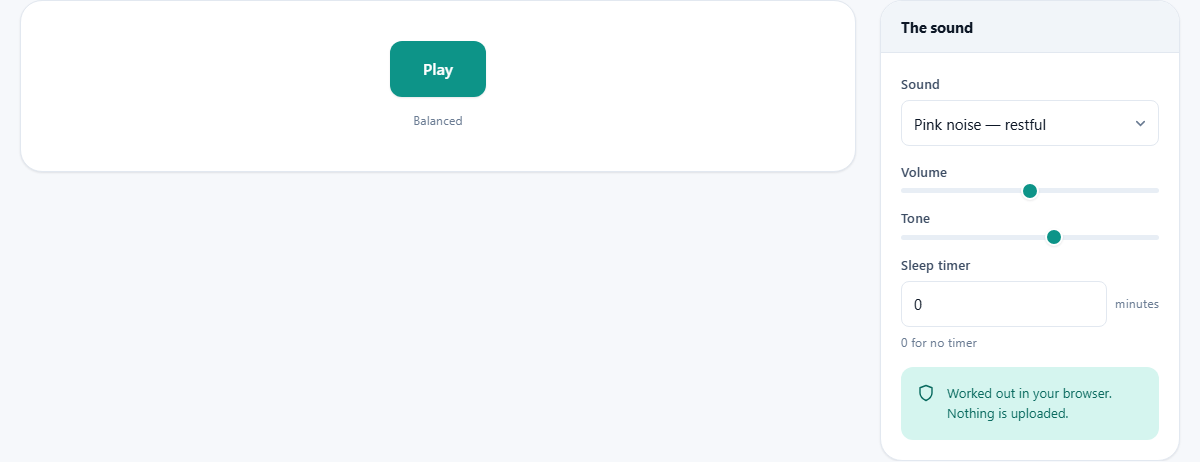
The Sound dropdown lists seven choices. Each one works differently depending on what you are trying to block out.
- Pink noise has equal energy in every octave, which means the low end is as present as the highs. It sounds like steady rainfall and is the most popular choice for sleep.
- White noise puts equal energy at every individual frequency, so the high end is louder in proportion. It has a hiss that some people find grating but is very good at covering conversation and office chatter.
- Brown noise drops off faster than pink, so it sounds deeper and fuller, like a distant waterfall or a low rumble of wind. It is the best choice for masking traffic or a booming neighbour.
- Rain uses a shaped noise model that rises and falls gently, giving it the feel of real weather without ever repeating.
- Ocean waves build a slow swell pattern on top of noise, so there is a natural breathing rhythm to the sound.
- Fan produces a steady, slightly filtered noise that mimics the hum of a mechanical fan.
- Binaural beats play a slightly different tone in each ear, producing a perceived beating at the gap between the two. This one requires headphones to work at all.
Volume, tone and the sleep timer
The Volume slider runs from 0 to 100 percent, with the default at 50. Keep it low. The point is to sit just above whatever you are trying to mask, not to fill the room. Loud sound running all night is not restful and is not good for your ears.
The Tone slider adjusts warmth, running from 0 to 100 with a default of 60. Dragging it down makes any sound darker and more muffled. Dragging it up makes it brighter and hissier. A lower setting is usually easier to fall asleep with because the high frequencies are the ones most likely to keep you alert.
The Sleep timer field takes a number of minutes, from 0 to 480. Set it to 0 for no timer. When a timer is active, the sound fades out gradually over the last half minute rather than stopping abruptly, because a sudden cut to silence is exactly the kind of change that wakes a light sleeper.
Binaural beats and what they actually do
When you select Binaural beats from the Sound list, two extra controls appear. Carrier tone sets the base frequency, from 50 to 500 Hz, with the default at 200. Beat frequency sets the gap between the left and right tones, from 1 to 30 Hz, with a default of 6. A hint below the field says Delta 1-4, theta 4-8, alpha 8-13, referring to brainwave frequency bands.
A warning box also appears, and it is worth reading. The effect depends on each ear hearing a different pitch, so headphones are not optional - speakers mix the two tones together and the beat vanishes. The page is also honest about the science: popular claims that binaural beats can force your brain into a particular state are not well supported by evidence. The sound is offered because some people find it pleasant, not because it is a treatment for anything.
A bedtime setup from start to finish
Open the page on your phone and set the Sound to Pink noise. Drag the Volume down to about 30 percent. Pull the Tone slider to 40 so the hiss is muted. Type 60 into the Sleep timer field so the sound runs for one hour.
Press Play. A quiet wash of pink noise fills your headphones. After 59 minutes and 30 seconds, it begins to fade. By the 60-minute mark, it is gone. There is no alarm, no notification, and no sudden jump back to silence.
If pink noise does not feel right, try Brown noise at the same settings. The deeper character covers low-frequency sounds like traffic much better. If you share a room with someone who talks in their sleep, White noise at a slightly higher volume may be more effective because it masks the full speech range.
Phones, locked screens and background tabs
On most Android devices the sound keeps playing when you lock the screen or switch to another app. The browser treats it as active audio and does not pause it. On iPhones the situation is less reliable. Safari on iOS can suspend audio when the screen locks, which means the sound may stop a few minutes after you put the phone down.
The workaround for iOS is to keep the screen on while the phone is plugged in. Some browsers on iOS handle background audio better than others, so it is worth trying a different one if Safari cuts out. On a laptop or desktop there is no issue at all - the tab keeps playing in the background while you work in other windows or close the lid.
Safety and hearing at night
At a low volume, sleeping with background noise is common and generally considered safe. Many people have done it for years with a physical fan or a radio tuned to static. The concern only arises if the volume is high. Sustained loud sound damages hearing over time, and the risk is higher for children because their ears are more sensitive.
A good test is to hold your phone at arm's length while the noise plays. If you can hear it clearly across the room, it is probably too loud for a pillow speaker. The sound only needs to sit a little above the thing you are masking. If the neighbour's television is faint, the masking sound should be faint too.
Common mistakes and quick fixes
A few things trip people up, and each has a short answer.
- The sound stops when I lock my phone. This is an iOS browser restriction. Keep the screen on or try a different browser.
- I set the timer to 30 but it stopped after 5 minutes. Check that your device is not set to close background tabs aggressively. Some Android power-saving modes will kill a tab that is using audio.
- Binaural beats sound normal, not pulsing. You are probably listening on speakers. The effect only appears in headphones because each ear needs its own tone.
- The tone slider does not seem to change anything. Move it all the way to 0, then all the way to 100. The difference is subtle on some sounds and dramatic on others.
When a different approach makes more sense
If the noise you are trying to block is a single steady tone - a hum or a whine - a noise generator is a broad weapon. A narrow notch filter tuned to that exact frequency would be more precise. If the problem is a snoring partner, earplugs combined with a low level of noise can work, but the noise alone may not be enough to cover the peaks.
And if you find that no background sound helps and the problem is that you cannot fall asleep, that is not an audio problem. It is worth talking to a doctor rather than looking for a louder fan sound on a website.
Everything stays on your device
Nothing on this page requires a server after the initial page load. The sounds are calculated by your own browser, on your own hardware, using your own battery. No audio is sent anywhere, no usage data about how long you listened is collected beyond the normal page-view analytics, and there is no account to create.
That also means the page works offline. Once it has loaded, you could board a plane, turn on flight mode, and play rain sounds for an entire long-haul flight without any connection at all.