
Playing audio backwards and saving the result
Reversing a sound is one of the oldest effects in recording. This article explains what happens when audio is flipped end for end, walks through every control on the Reverse Audio tool, and covers the practical uses, the common traps and the reasons reversed sounds are so strange to the ear.
What reversing actually does to a sound
An audio file is a long list of numbers. Each number describes the position of the speaker cone at a tiny moment in time. Reversing the file puts those numbers in the opposite order, so the last sample becomes the first and the first becomes the last. The numbers themselves do not change. No quality is lost, no detail is blurred and no noise is added. The samples are identical, just read from back to front.
The reason reversed audio sounds so alien is not the samples but the shape of the sounds they carry. Almost every sound in nature starts with a sharp attack and fades out slowly. A hand clap, a footstep, a piano note, a spoken syllable - they all hit hard and then decay. When that shape is reversed, you get a slow swell into a sudden stop, which is the opposite of everything your ear expects. That is why reversed speech barely sounds like speech at all. The consonants that give each syllable its starting edge now sit at the end, where they sound like abrupt cutoffs rather than beginnings.
Loading a file
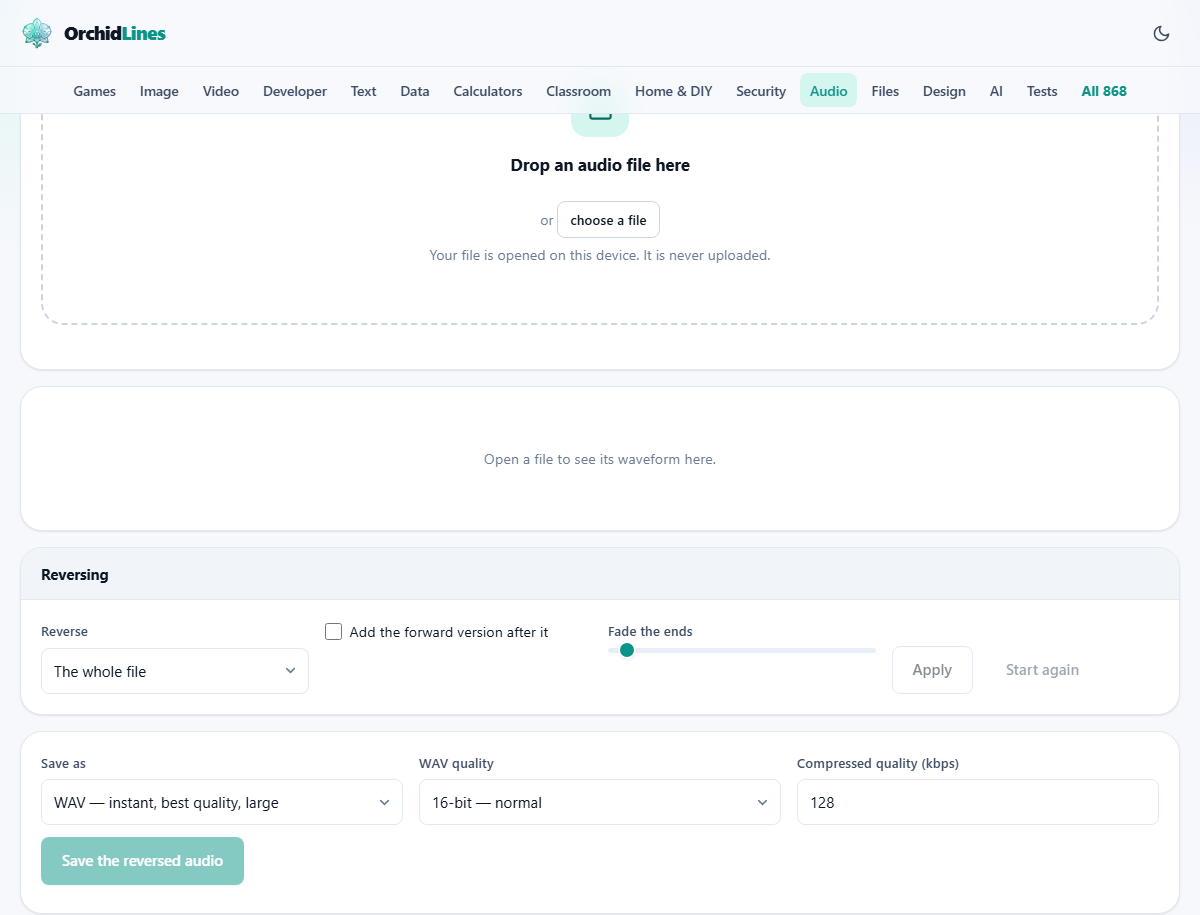
Drag an audio file into the drop zone, or click the button to browse. The tool accepts all the common formats: MP3, WAV, M4A, AAC, OGG, OPUS, FLAC and WebM audio. The file is decoded inside your browser and drawn as a waveform. It never leaves your device.
Once loaded, a set of details appears showing the file name, its length and its sample rate. The waveform fills the panel below. Press Play to hear the original before doing anything to it, which is useful when you want to compare the before and after.
Choosing what to reverse
The Reverse dropdown has two options. The whole file reverses every sample from start to end. Only what I selected on the waveform reverses just the part you have highlighted, leaving the rest untouched.
To select a section, drag across the waveform. The times below update to show the start, end and length of your selection. This partial mode is the interesting one for music production. You can reverse a single word in the middle of a sentence, flip a drum fill while keeping the beat around it, or create a reverse swell into a chorus hit by selecting just the right few seconds.
The extra controls - tail and fade
The checkbox labelled Add the forward version after it takes the reversed section and glues the original forward version right after it. The result is the sound playing backwards and then forwards, which creates a mirror effect. On a cymbal crash, it sounds like a swell into a hit followed by the natural decay. On a vocal, it produces an eerie palindrome.
Fade the ends smooths the very start and finish of the reversed section. The slider runs from 0 to 200 milliseconds. Reversing can leave a sharp edge where the file originally began, especially if the sound was already playing when the recording started. That edge becomes a click in the reversed version. A fade of just 8 milliseconds, the default, is enough to soften it without being audible as a fade. Raise it higher if the click persists, but anything above about 30 milliseconds starts to colour the attack of the reversed sound.
Applying, listening and resetting
Press Apply and the waveform updates to show the reversed audio. On most files, this is instant. The operation is just reordering samples in memory, which is fast even on long recordings. Press Play to hear the result.
If you do not like what you hear, press Start again. The tool resets to the original file exactly as it was when you first loaded it. You can then try a different selection, a different fade, or a different scope and apply again. The original is always available until you close the tab.
Saving the reversed audio
The save panel offers a format dropdown, a WAV quality selector and a bitrate field. WAV keeps the full quality and is the safest choice when the file will go through more processing. M4A gives good compression and works on all modern devices. WebM is another compressed option. The page can produce MP3 files. No browser includes an MP3 encoder, so it loads a small open-source one the first time you ask for it.
WAV quality has three levels. 16-bit is standard. 24-bit is studio grade. 32-bit float preserves the internal precision and is useful only if you plan to do further work in a tool that can read it. For compressed formats, set the bitrate. The default of 128 kilobits per second is fine for most uses. Press Save the reversed audio and the file appears in your downloads.
Practical uses for reversed audio
The reversed cymbal build-up is perhaps the most common trick. Take a cymbal crash, reverse it, and place it just before the beat where you want a dramatic entry. The swell builds tension and the forward hit lands right on time. Producers have used this technique in rock, electronic and film music for decades.
Reversed vocals are used as atmospheric texture. A reversed phrase in the background of a track adds mystery without being intelligible. Sound designers reverse everyday sounds to create alien or otherworldly effects for films and games. Even a reversed door slam or breaking glass becomes something new and unfamiliar.
Outside production, people reverse audio to check for artifacts. A pop or click at the tail of a recording is easy to miss when listening forward, but it stands out when the file is reversed because it moves to the start where your attention is sharpest.
A worked example - making a reverse cymbal swell
Start with a recording of a single cymbal crash. Drop it in. The waveform shows a sharp spike at the start that decays over two or three seconds. Leave the scope set to The whole file. Set the fade to 8 milliseconds. Leave the tail checkbox unticked.
Press Apply. The waveform now shows a slow rise that peaks at the end. Press Play and listen. You hear a whoosh that grows louder and then cuts off. This is the classic build-up sound. If the cutoff at the end is too hard, raise the fade to 20 or 30 milliseconds. When it sounds right, save as WAV and drop it into your music project just before the big downbeat.
Mistakes people make and how to avoid them
A few issues catch people off guard.
- Forgetting to check for clicks. The original file might start or end with a non-zero sample. When reversed, that edge becomes a pop. Use the fade slider to smooth it out.
- Reversing a file twice and thinking something changed. Two reverses bring you back to the original. If the sound is different after a double reverse, something else happened between the two steps.
- Trying to understand reversed speech. Reversed language is not simply backwards words in reversed order. The phonemes themselves are distorted, which is why it sounds like a different language rather than a coded message.
- Selecting too little of the waveform. A reverse of a tiny fraction of a second produces an audible glitch rather than a useful effect. Aim for at least half a second of material when you want something recognisable.
When to use a different tool
Reversing changes the order of the audio but not the speed, the pitch or the volume. If you want to slow a sound down while keeping its pitch, that is time stretching. If you want to shift its pitch without changing the speed, that is pitch shifting. And if you want to play a file from a specific point backwards in real time, that is a DJ-style scratch effect that needs a different kind of interface.
The reverse tool is also not an audio analysis tool. People sometimes reverse speech looking for hidden messages. What they find is almost always their own imagination filling in patterns where there are none. If you need to analyse audio seriously, a spectrogram or waveform editor will tell you far more than listening backwards will.
Your file stays private
The entire process happens inside your browser. The audio is decoded in memory, the samples are reordered, and the result is saved to your device. No data is sent to any server. You can disconnect from the internet after the page loads and everything still works. There is no account, no watermark and no queue. What you load and what you save exist only on your own machine.