
Reading a loudness report before you send a track out
This page measures how loud a finished track really is, in the same way the big platforms measure it, and tells you how far off each target you are. Here is what every number on the screen means, and how to act on it without guessing.
Loud is not the same as big
Turn a wave up on screen and it looks bigger. That size is not the same as loudness. A gentle flute and a harsh buzz can reach the same height on a meter while feeling worlds apart in the ear.
So loudness is measured on its own scale, called LUFS. The letters stand for loudness units relative to full scale. You do not need the full name. Treat it as a single number for how loud a track feels across its whole length. A change in that loudness is counted in LU, or loudness units, which is just the same scale used for a difference.
Why does the number matter? Because the places you send sound to each have a target, and they quietly move your track to meet it.
- A streaming service that turns loud songs down so its library feels even.
- A podcast host that wants speech at a set loudness, so listeners stop reaching for the volume.
- A broadcaster with a loudness limit it is required to meet.
- A film mix that has to sit far quieter than pop music does.
Opening a file and the two settings
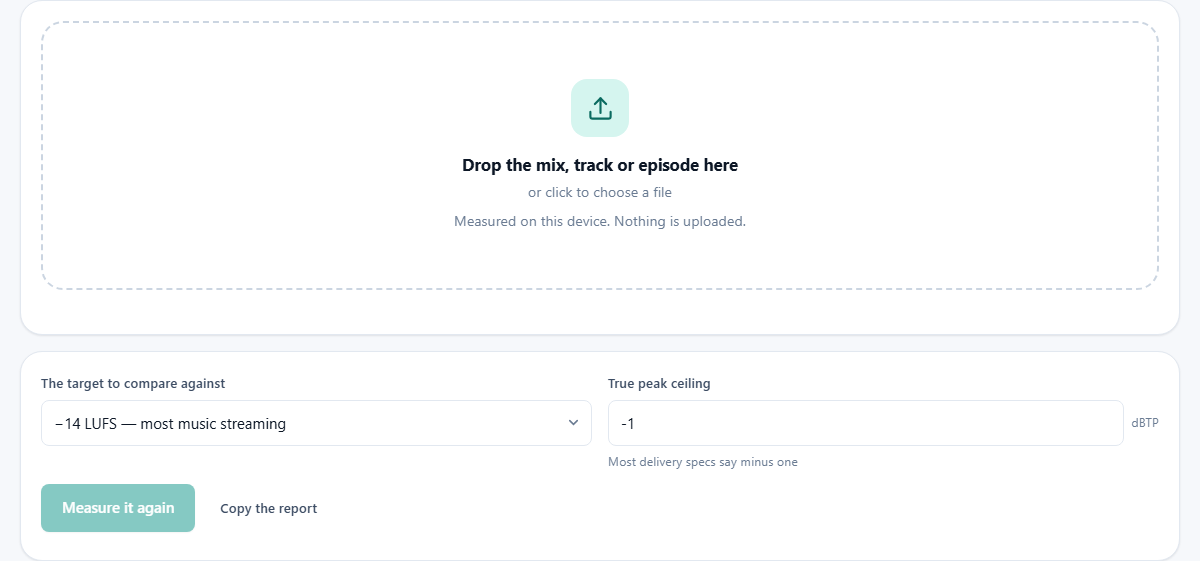
Drop the finished export onto the box. Measure the file you will actually publish, not the session you built it in. The common types open without fuss, and the reading starts on its own as soon as the file is in.
Two settings sit above the button. The target to compare against is a menu of the usual goals. It offers minus 14 for most music streaming, minus 16 for spoken word and podcasts, minus 23 for European broadcast, minus 24 for North American broadcast, and minus 27 for cinema and film. Pick the one you are aiming at.
True peak ceiling is the highest level you will let the loudest instant reach. It is set in dBTP, which means decibels true peak, and it starts at minus 1. Most delivery rules ask for minus 1, so the default is a safe place to begin.
Measure it again re-runs the reading whenever you need it. Copy the report puts a plain text summary on your clipboard.
The headline, and what to do about it
The big number at the top is the integrated loudness. Integrated means the loudness of the whole piece averaged together, so one loud chorus does not stand in for the rest. This is the figure a platform reads and holds up against its own target.
Under it, in plain words, the page tells you what to do. It might say turn it up 3.2 LU to reach minus 14 LUFS, or turn it down, or that you are already on target. If the file is silent, it says that instead.
Acting on that advice is usually one move in your editor: raise or lower the whole track by the amount shown. But check the peak first, which the next part explains.
The detail list, line by line
Below the headline is a list of every measurement, each with a short label. Here is what each one is telling you.
- Integrated loudness is the whole track averaged, the same figure as the headline.
- Loudest moment, 400 ms is the single loudest short burst, taken over a window of four hundred milliseconds.
- Loudest passage, 3 s is the loudest stretch measured over three seconds, a slower view than the moment above.
- Loudness range is the spread between the quiet parts and the loud parts. A small range means the track is squashed flat. A wide range means it breathes.
- True peak is the real highest point the wave reaches, in dBTP. It can sit above any stored point, which is why it earns its own line.
- Highest single sample is the loudest stored point, in dBFS, meaning decibels below full scale, where zero is the ceiling.
- Inter-sample overshoot is simply how far the true peak climbs above that stored point.
- Played from both speakers shows only for a mono file, and notes that it will count louder once two speakers carry it.
Why the true peak gets its own line
Between any two stored points, the wave curves, and that curve can rise higher than either point on its own. A player rebuilds the curve when it plays the file. So a track that looked safe in an editor can push past the ceiling and turn to a nasty edge of distortion.
This page rebuilds the curve too, and reports the real peak it finds. That is why the true peak line can read higher than the highest single sample. The gap between the two is the inter-sample overshoot, and it is the part an ordinary meter misses.
The curve and the targets table
Loudness over time draws the three second loudness as a line across the track, with your chosen target marked as a dashed line. Where the line rides above the dash, the track is louder than the goal at that moment. A clip shorter than three seconds has no line to draw, and the page tells you so.
Against the usual targets is a table that does the sums for every common goal at once. Its columns read where it is going, the target, the change needed, the true peak after that change, and a verdict. The verdict is the part to read. It warns you when turning the track up to hit a target would push the peak past the limit for that same target.
That is the trap the whole page is built to catch. Raising a track by three units raises its loudest peak by three as well. If that breaks the ceiling, a plain volume change is not enough, and the track needs a limiter to hold the peaks down.
A worked example: a master that is too hot
A file called single-master.wav goes in. The target is left on minus 14 for streaming, and the ceiling on minus 1. The reading comes back in a moment.
The headline reads minus 8.0 LUFS, and the advice says turn it down 6.0 LU to reach minus 14 LUFS. The loudness range is 3 LU, which is very tight, a sign the track has already been squashed hard. The true peak sits at minus 0.2 dBTP.
The table shows the streaming row asking for a change of minus 6 dB, and the peak after that change lands well under the ceiling, because turning a track down never raises a peak. So the fix is safe: lower the whole track by six, and it meets the target.
The real lesson is in the loudness range. The platform was going to turn this track down by six anyway. Mastering it that loud bought nothing but a flatter, more tiring sound at the same final volume as a gentler master would have reached.
With the level dropped by six, measure the new export once more to be sure. The headline should now read close to minus 14, the advice should say you are already on target, and the true peak, six units lower, should sit at a comfortable minus 6.2 dBTP. That is a file ready to send.
Common mistakes, and what to do
- Measuring the session instead of the export. Bounce the track first and measure that. The export is what the world hears.
- Treating a number above the target as a rejection. Nothing is refused. The track is simply turned down, with its squashed dynamics left in place.
- Ignoring the true peak because the editor showed no clipping. An editor often shows only the stored points, and the true peak sits higher. Trust the dBTP line here.
- Setting a mono podcast to a stereo target. It will land about three units too loud once two speakers carry it. The mono line warns you of exactly that.
- Chasing loudness for its own sake. Past the target it is thrown away again, and only the flatter sound is left.
When another tool fits the job
- To change the level after reading it, the Volume tool raises or lowers the whole track by the amount shown here.
- To bring a peak back under the ceiling, a limiter or a normalise step caps the loudest points without moving the rest.
- To measure the sound inside a video, take the audio out of the video first, then bring it here.
- To compare two mixes fairly by ear, level them to the same figure first, then listen with the loudness matched.