
Building a beat on a sixteen square grid
This is a drum machine you play by ticking squares. Eight drums down the side, sixteen moments across the top, and three dials to set the feel. This article walks through every square and control, lists exactly what each starting pattern puts on the grid, explains how the eight sounds are built, and shows a beat being made from nothing.
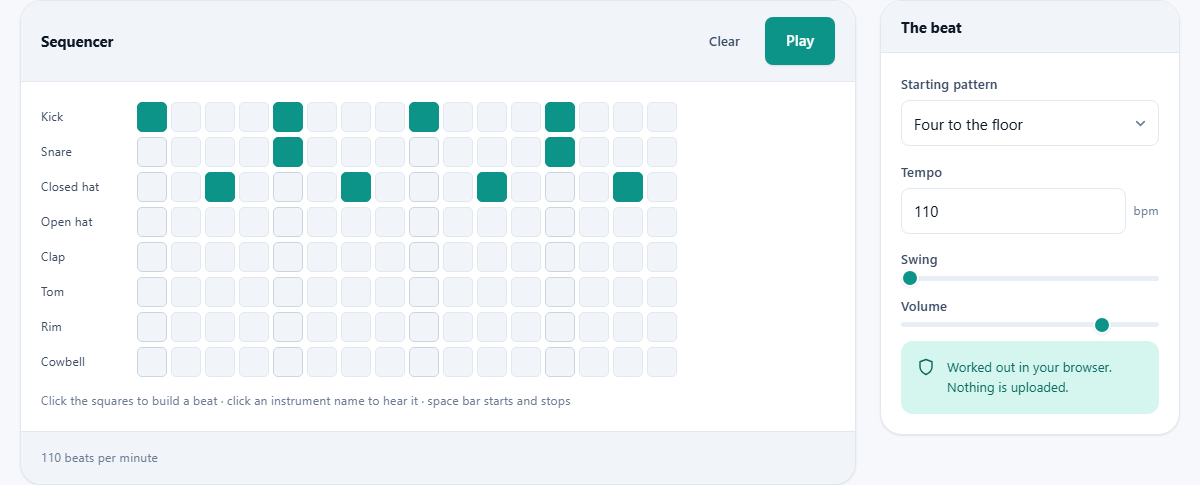
A beat you tick into place
Most drum software wants you to know something before you start. This one does not. The grid is a picture of one bar of music. Left to right is time. Top to bottom is which drum. Tick a square and that drum plays at that moment, over and over, until you stop it.
People reach for it for small, ordinary reasons. A songwriter wants a beat under a phrase to hear whether it works. A guitarist wants something steadier than a click to practise against. A teacher wants a class to see rhythm as a pattern rather than dots on a stave. It opens at once with nothing to download, so a five minute idea costs five minutes.
Reading the grid
There are eight rows, each with the drum name on the left: Kick, Snare, Closed hat, Open hat, Clap, Tom, Rim and Cowbell. Across from each name are sixteen small squares, numbered one to sixteen in your head from left to right.
Those sixteen squares are one bar counted in sixteenths. If you count a bar as one, two, three, four, then square 1 is the one, square 5 is the two, square 9 is the three and square 13 is the four. Those four columns are drawn a little darker so you can find them without counting.
Click any square to switch it on, and click it again to switch it off. Switching one on plays that drum straight away, so you hear what you are placing rather than guessing. Clicking the drum name on the left plays that sound on its own, which is the quickest way to learn which is which.
What each starting pattern actually puts down
The Starting pattern menu holds five choices and opens on the first. Choosing one wipes the grid and lays down its own squares, so treat it as a fresh start rather than an addition. Here is what each one contains, in square numbers.
- Four to the floor: Kick on 1, 5, 9 and 13. Snare on 5 and 13. Closed hat on 3, 7, 11 and 15. A kick on every count, which is the pulse under house and disco.
- Rock: Kick on 1, 7 and 9. Snare on 5 and 13. Closed hat on every odd square, so eight of them. The kick just before the halfway point gives it the push.
- Hip hop: Kick on 1, 4, 9 and 11. Snare on 5 and 13. Closed hat on the same eight odd squares. The kick on square 4 lands between counts and is what makes it lean.
- Breakbeat: Kick on 1 and 11. Snare on 5 and 13. Closed hat on 3, 7 and 15, with an Open hat on 9. Far fewer hits, and the open hat in the middle leaves a gap you can hear.
- Empty: every square off, ready for you to build your own.
Tempo, swing and volume
Three controls sit in the panel beside the grid, and all three can be changed while the beat is playing.
Tempo takes a whole number from 40 to 220 beats per minute and opens on 110. A line under the grid repeats the figure back to you as you type. At 110, one square lasts about 136 thousandths of a second and the whole bar comes round every 2.2 seconds. Slow music sits near 70, most pop lives between 90 and 130, and dance music sits near 128.
Swing is a slider from 0 to 100 per cent in steps of 5, starting at 0. It pushes every second square slightly later, which is what turns a stiff, mechanical pattern into something that leans. At 110 beats a minute and 55 per cent it delays those squares by about 45 thousandths of a second; at 100 per cent, about 82. Small amounts do a lot. Around 20 per cent loosens a straight beat, while 50 to 60 gives that lopsided shuffle.
Volume is a slider from 0 to 100 per cent in fives, starting at 80. It sets the level of the whole machine, not one drum. Leave a little room below the top so a busy pattern does not crackle.
Starting, stopping and clearing
The blue Play button starts the loop and turns into Stop. The space bar does the same thing without moving your hands, as long as you are not typing in the tempo box or the pattern menu at the time. If space seems dead, click on an empty part of the page first.
While it runs, a highlight travels across the columns so you can see where in the bar you are. Ticking and unticking squares while it plays is the normal way to work: add a hat, hear it, take it away again.
Clear switches every square off at once. It does not ask first, and it does not change what the Starting pattern menu is showing. To bring a pattern back after clearing, choose a different one from the menu and then choose the one you wanted.
How the eight sounds are made
Nothing here is a recording of a real drum. Each sound is built out of plain tones and hiss the moment it is needed, which is why the page loads with nothing to wait for. Knowing the recipe helps you use each one well.
The Kick is a single smooth tone that starts at 150 hertz and slides down to 45 in about a tenth of a second. Hertz counts vibrations per second, and low numbers mean deep sounds. That slide is the whole trick: without it you would hear a beep.
The Snare is hiss with everything below 1.4 thousand hertz stripped out, plus a short 190 hertz tone underneath for body. The Closed hat is hiss with everything below 7 thousand hertz removed, gone in about 45 thousandths of a second. The Open hat is the same sound left to ring for about a third of a second.
The Clap is three quick bursts of hiss around 1.2 thousand hertz, about 12 thousandths of a second apart, the last one held longer. Three bursts is what makes it sound like hands. The Tom slides from 220 hertz down to 90. The Rim is a short buzzy tone at 420 hertz. The Cowbell is two buzzy tones at 540 and 800 hertz together.
Making a beat from an empty grid
Choose Empty and set the tempo to 92. Press Play; you get silence and a moving highlight. Now put a Kick on square 1 and a Snare on square 5. Already it is a beat, if a bare one.
Add a Kick on 9 and a Snare on 13. That is the skeleton under an enormous amount of music: kick on counts one and three, snare on two and four. Listen for a few rounds to be sure it feels right.
Now fill in the top. Put Closed hats on all eight odd squares. It will sound busy and stiff. Take out the hats on 5 and 13 so the snare has room to speak, and drag Swing up to 55. The whole thing loosens.
Finally, add character. Put a Kick on square 11, just after the third count, so the second half pushes forward. Add a single Open hat on square 15 as a lift into the repeat. Drop the Volume to 70 if the peaks feel hard. Total time: about three minutes.
There is no file to download
This page is an instrument, not a converter. Nothing is written out and no download appears, so the beat exists only while the tab is open. Your pattern is also not remembered between visits; come back tomorrow and the grid is back to Four to the floor.
There are two sensible ways to keep something. The quickest is to write the squares down, which takes ten seconds: the drum name and the numbers, exactly as the pattern list above is written. The other is to record it, with the Voice Recorder page or with whatever your computer uses to capture its own sound.
Rebuilding from written numbers takes under a minute, because ticking squares is fast. Note the tempo and swing alongside and you can put the beat back exactly.
The mistakes almost everyone makes first
- Filling every square. A pattern with a hit everywhere has no shape at all. Silence is what makes the hits land.
- Stacking Kick and Snare on the same square. They fight for the same moment and the result sounds muddy rather than strong.
- Changing the Starting pattern menu after doing some work. That wipes what you built. Decide on a starting point first.
- Winding Swing to the top. Beyond about 70 per cent the beat starts to lurch rather than groove.
- Judging the Kick on laptop speakers. Most of it sits below 60 hertz, which small speakers cannot make at all. On headphones it appears from nowhere.
- Setting the tempo faster to make a pattern more exciting. Usually the problem is that too many squares are ticked, not that the bar is too long.
When a different page fits better
If you only want a steady count to practise to, the Metronome is simpler and more suitable. If you want to try out a tune or a chord over your beat, open the Virtual Piano in a second tab and leave this one playing. The Chord and Scale Finder is the page for working out which notes belong together.
If you need a finished piece of audio rather than a live loop, this is the wrong end of the site. Record something first, then use the Voiceover and Music Mixer to place a voice over a bed of music, or the Audio Joiner to put pieces one after another.
The sound is made where you are
Every one of these drums is generated by the sound engine built into your own browser, on your own machine. No sample files are fetched, nothing is sent anywhere, and there is no account, no upload and no history of what you played. Once the page has loaded, you can switch the network off and keep working.
One small thing to expect: browsers refuse to make any sound until you have clicked something on the page. That is a rule of the browser, not of this tool. Your first click on a square or on Play wakes the sound up, which is why the very first press can feel a fraction late.