
Chords, scales and moving a song into another key
A tour of the menus on this page, what the keyboard and fretboard pictures are showing, how the progression box handles a real chord sheet, and why the same black key is sometimes called one thing and sometimes another.
The questions it settles in a few seconds
Everything here is built from semitones. A semitone is the smallest ordinary step in western music: one fret on a guitar, or the very next key on a piano counting the black ones.
Count out four semitones from a starting note, then three more, and you have a major chord. That is all a chord is, and once the counting is done for you, a pile of everyday questions answer themselves.
- Which notes are in a chord you have never played before.
- Which chords belong together in one key, so a new song stays tidy.
- How to move a whole chord sheet down for a singer who cannot reach the top notes.
- Where the notes of a scale sit on a guitar neck.
- What a symbol on a lead sheet means when it has numbers and letters after it.
The menus on the right
Show a decides the whole shape of the page: pick Chord and the chord list appears, pick Scale and the scale list takes its place.
Root note holds the twelve pitches, written with flats in the menu itself. Whatever you pick, the display renames the result after its own first note, so choosing G flat with a diminished chord is shown as F sharp diminished. The name follows the music rather than the menu.
Chord type carries twenty four kinds, from the three note staples to the ones with numbers on the end.
Scale carries fourteen, running from the everyday to the unusual.
- Major, Minor, Dominant 7th, Major 7th, Minor 7th, Diminished, Augmented.
- Suspended 2nd, Suspended 4th, Power chord, Major 6th, Minor 6th.
- Half-diminished, Diminished 7th, Minor major 7th, 7sus4.
- Dominant 9th, Major 9th, Minor 9th, Added 9th, Dominant 11th, Dominant 13th, and the two altered ninths.
- On the scale side: Major, Natural minor, Harmonic minor, Melodic minor, the four other church modes plus Locrian, both pentatonics, Blues, Whole tone and Chromatic.
What appears as you choose
The panel heading counts the notes and lists them, in the shape of 4 notes followed by the names. Below it the chord or scale is named in full.
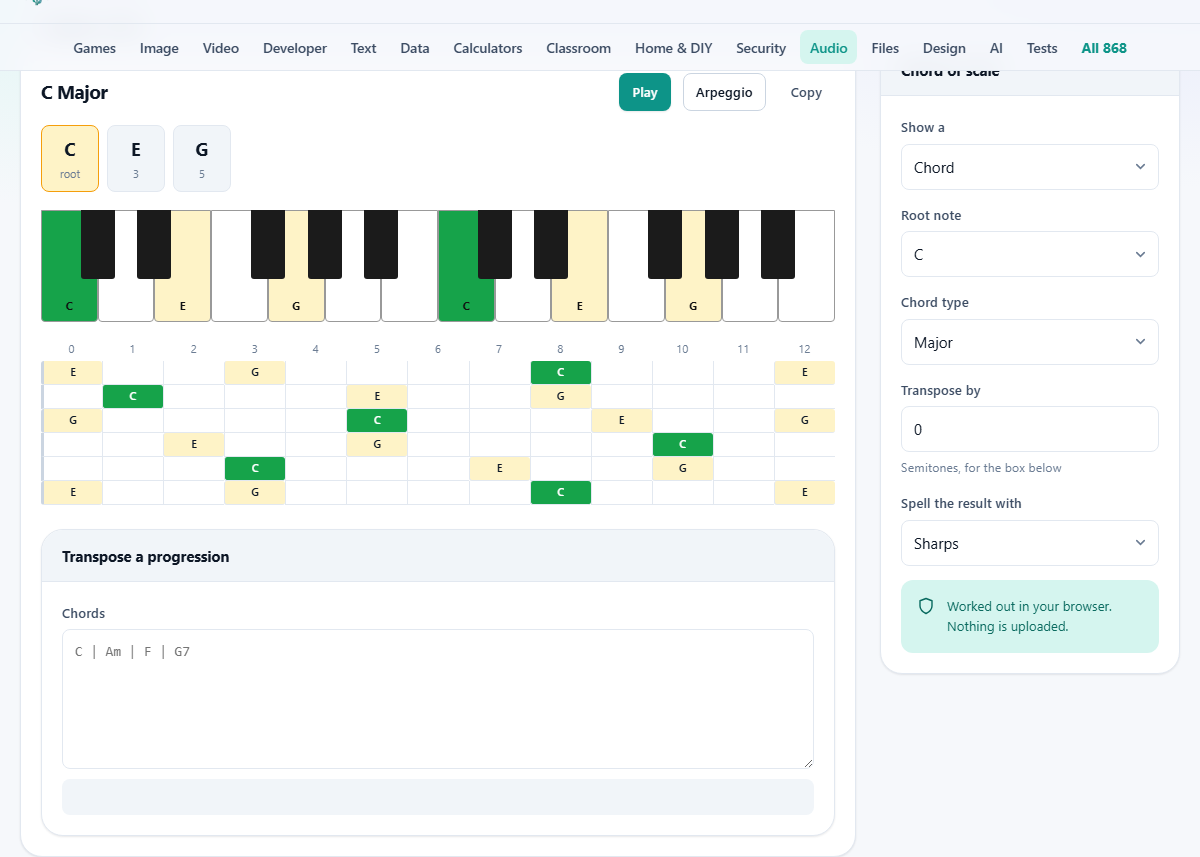
Then come the notes themselves as small tiles. Each tile carries the note name and, underneath it, what that note is doing: root, third, fifth, flat seventh and so on. That second line is the useful half. It turns a list of letters into a shape you can move to any other key.
Click a single tile and you hear that one note. Play sounds them all together and lets them ring. Arpeggio rolls through them one at a time, which is how you check by ear that a stack of five notes really is what you meant.
Copy puts the name and the notes on your clipboard as plain text, ready to drop into a lesson plan, a chat message or the notes field of a project.
The two diagrams
Under the tiles sits a keyboard two octaves wide, drawn with the black keys in their real positions rather than spaced evenly. The keys belonging to your chord or scale are lit, the root is marked differently from the rest, and the lit white keys carry their names.
Below that is a guitar neck in standard tuning, low string at the bottom, from the open string up to the twelfth fret. Every place a note of the chord or scale falls is marked and labelled, with the root again picked out.
Read the neck picture as a map, not as a fingering. It shows where the right notes live; which of them you hold down is a choice about your hand.
One thing to expect on the keyboard: a ninth or an eleventh lights the same key as the second or fourth, because two octaves is all the room there is. The tile above still names it correctly, and the sound puts it in the higher place.
The chords that belong to a key
Switch Show a to Scale and choose Major or Natural minor, and an extra block appears titled Chords in this key. It holds seven buttons, one built on each note of the scale.
Each button shows the chord name and, under it, a Roman numeral. Capital numerals are major chords, small ones are minor, and a small circle marks the diminished one. Those numerals are the part worth memorising, because a numeral pattern works in every key while chord names do not.
Press any of the seven and the page loads that chord and plays it, so you can hear how the family sounds before you write anything down.
The block only appears for those two scales. The modes, the pentatonics, the blues and the rest do not get a numbered chord family here, so the page stays quiet about them rather than guessing.
Moving a whole progression
The lower panel holds a box marked Chords. Type or paste your sheet in, and the moved version appears underneath as you type.
How far it moves comes from Transpose by, a whole number of semitones from minus twenty four to plus twenty four. A small label beside the panel heading confirms the direction in words, reading up three semitones, down two semitones, or unchanged.
Spell the result with chooses sharps or flats for the output. It applies to this box only, not to the diagram above it.
The layout you paste in survives. Bar lines, commas, spaces and line breaks come out where you put them, and anything that is not a chord is passed through untouched, so a sheet with the odd word of lyric in it still works.
Chord endings are kept as they are, so m7, sus4, add9 and the rest ride along with their roots. A slash chord moves in both halves, which matters, because moving the chord and leaving the bass note behind would quietly break the bass line.
Setting the number to zero leaves your text exactly as you typed it, even if you have changed the spelling menu. If you want the same key spelled the other way, transpose by twelve: same pitches, an octave apart, fresh spelling.
A song dropped for the singer
A chorus is written in B and the singer keeps running out of voice at the top. G is comfortable for them. From B down to G is four semitones, so Transpose by goes to minus four.
Paste in B | G#m | E | F# and the box below fills in with G | Em | C | D. Every chord kept its flavour, the minor stayed minor, and the sheet is now in a key most guitarists can play without thinking.
Now a harder one. Paste D | A/C# | Bm | G and set Transpose by to plus three. With the spelling on sharps the result reads F | C/E | Dm | A#. Correct, but A# is not how anyone writes that chord.
Switch Spell the result with to Flats and the same line reads F | C/E | Dm | Bb, which is what a reader expects in that key. Notice the slash chord moved both parts, so the bass note still walks down the way the original did.
This is also the fastest capo calculator there is. A capo on the second fret raises everything by two semitones, so to play a song in E while fingering the shapes for D, put the sheet in and transpose by minus two.
Why one key gets two names
There are twelve pitches on a keyboard but more than twelve names for them, and the choice between them is not decoration.
A scale is meant to use each letter from A to G once, so it sits neatly on the lines and spaces of written music. That rule decides the accidentals. In G flat major the fourth note has to be a kind of C, so it is written C flat, even though it is the key everyone else calls B.
The page follows that convention for seven note scales, giving you one of each letter in order. Shorter scales, such as the pentatonics, the blues scale and the whole tone scale, use the plain twelve name list instead.
Chords use that plain list too. It is right for everything you meet in practice, with one honest exception: a strict diminished seventh needs a double flat, and here you will see the simpler letter for that note. It sounds identical and is far easier to read.
What the sound is, and what it is not
The notes are made by the browser as you ask for them, using a plain synthesized tone tuned to the usual A at 440 cycles a second. It is deliberately simple. This is a reference tone for checking yourself, not an instrument.
Notes are voiced upwards, each placed above the last, so a five note chord sounds like a chord rather than a cluster fighting in the middle of the keyboard. It rings for about a second and a half and fades out rather than stopping dead, because a hard cut sounds like a fault.
Nothing here records, and nothing here listens. If you want the chords of a song you have on file, that is a different task, and this page will not attempt it.
When you want a different page
- To try a voicing under your hands rather than read it, the Virtual Piano gives you a keyboard to press.
- To get an instrument in tune before any of this helps, the Instrument Tuner listens to a string and tells you where it is.
- To practise a progression in time, the Metronome and the Drum Machine give you something to play against.
- To slow a recording down while you work a part out by ear, the Speed and Pitch Changer is the one to reach for.
There is nothing to upload here
This page never asks for a file. It counts semitones, draws two pictures and makes a few tones, and all of that happens inside the tab you have open.
Your progression is no different. The text you paste into the Chords box is transposed in the page in front of you and shown straight back. It is not sent anywhere, it is not stored, and closing the tab is the end of it.
That also means the page keeps working with the network off. Once it has loaded, a rehearsal room with no signal or a basement studio makes no difference to any of it.