
Finding every hidden word before the clock runs out
Word Search hides a list of themed words inside a grid of random letters. Your job is to find and select every word by dragging across it before the timer reaches zero. The game offers five themes, three difficulty levels with different grid sizes and direction rules, and a ticking clock that makes every scan count. This guide covers the controls, the direction rules at each level, and the search habits that clear the grid with time to spare.
How the board is built
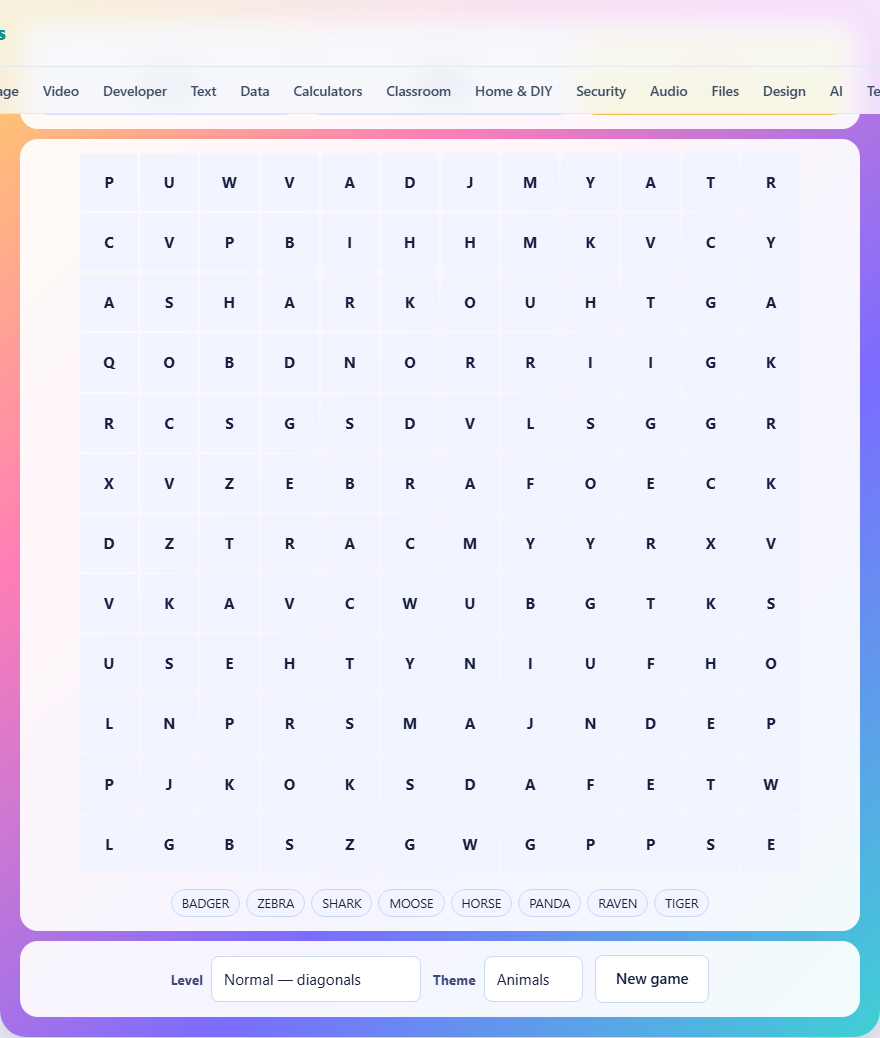
Each game generates a fresh grid. The size depends on the difficulty level: Easy uses a ten-by-ten grid, Normal uses twelve-by-twelve, and Hard uses fourteen-by-fourteen. Words from the chosen theme are placed into the grid first, longest words before shortest, and the game actively looks for positions where words cross over each other. Any cells left empty after all words are placed are filled with random letters.
The word list sits below the grid. It shows every word you need to find. As you find each one, it is crossed off and the matching cells in the grid are highlighted in a unique colour. When every word on the list is crossed off, you win.
How to select a word
Press on the first letter of the word you have spotted, drag your finger or mouse to the last letter, and release. The selection must follow a straight line: horizontal, vertical, or diagonal, depending on the difficulty level. If your drag does not follow a straight line, nothing happens. If the line you drew matches a word on the list, the cells light up and the word is crossed off.
You can drag from either end of the word. If you spot the last letter first, start there and drag to the first letter. On the Hard level where words can run backwards, this flexibility is especially handy because a word placed right-to-left can be selected by dragging in either direction.
What each difficulty level allows
Easy hides six words in a ten-by-ten grid. Words run only across and down. There are no diagonals and nothing runs backwards. The timer gives you four minutes. This is a good level for learning the drag controls and building scanning habits without time pressure.
Normal raises the word count to eight in a twelve-by-twelve grid and adds diagonal placement. Words can now run at forty-five-degree angles in addition to horizontal and vertical, which roughly doubles the number of directions you need to check for each letter. The timer stays at four minutes.
Hard uses ten words in a fourteen-by-fourteen grid and allows every direction, including backwards. A word placed left-to-right on Easy could appear right-to-left or bottom-to-top on Hard. The timer extends to five minutes to account for the much larger search space.
Five themes and how they affect play
The Theme dropdown offers Animals, Food, Nature, Space, and Sport. Each theme draws from a fixed list of ten words, and the game picks a subset based on the difficulty level. The theme changes the vocabulary but not the mechanics.
Some themes are easier to scan for than others. Space includes words like NEBULA and COSMOS that contain rare letter combinations, making them stand out in the filler. Animals has more common letter patterns, so words like HORSE and MOOSE blend into the random letters more easily. If you want a relaxed round, pick a theme with unusual letters. If you want a challenge, pick one with common ones.
Hunt for letters, not whole words
Reading the grid word by word, left to right and top to bottom, is the slowest possible approach. A much faster method is to pick a word from the list, note its first letter, and then scan the entire grid for that letter. Each time you find it, check the eight directions around it for the second letter of your word. If the second letter is there, check the third, and so on.
This scan-by-letter method works because each letter appears only a handful of times in the grid, while the grid has hundreds of cells. Checking five or six instances of the letter T is far quicker than reading every row hoping to stumble across TIGER.
Start with the rarest letters and the longest words
Words containing J, Q, X, or Z are the easiest to spot because those letters almost never appear in the random filler. If your list includes a word with one of these letters, find it first. You will clear it in seconds and narrow the remaining list.
Long words are also easier than short ones, for a different reason. A seven-letter word has very few positions where it can physically fit in the grid. A four-letter word can go almost anywhere. Finding the long words first removes large swaths of the grid from consideration and often reveals short words that were hidden underneath the highlighted cells of a longer one.
Using overlaps to your advantage
The grid builder deliberately overlaps words wherever possible. Two words might share a letter at the point where they cross. Once you find one of those words, its highlighted cells contain a letter that belongs to another word. Check every highlighted cell and ask whether it could be the start, middle, or end of a word you have not found yet.
On the Normal and Hard levels where diagonals are allowed, overlaps become more common because there are more directions for words to cross. A horizontal word might share an O with a diagonal word passing through the same cell. Keeping an eye on these crossing points turns a found word into a clue for the next one.
Managing the clock
Easy and Normal give you four minutes. Hard gives you five. The clock starts as soon as the game begins, and when it reaches zero, any words you missed are highlighted in grey so you can see where they were. Your score for a winning round is the time remaining on the clock, so finishing fast earns a better result.
If you notice the clock is past the halfway mark and you still have several words left, shift your strategy. Stop scanning methodically and start looking for the shortest remaining word, because short words can be found and selected quickly. Each find narrows the list and makes the next scan easier. Clearing two short words in thirty seconds is more productive than spending those thirty seconds searching for a long one.
Handling backwards words on Hard
On the Hard level, any word can be placed in reverse. A word like TIGER might appear as REGIT reading right to left, or bottom to top, or along a diagonal going from lower-right to upper-left. This doubles the number of directions every scan must cover.
The best way to deal with backwards placement is to memorise the last two letters of each word on your list. When scanning the grid, look for those trailing letters in addition to the leading ones. If TIGER can run backwards, the sequence R-E at the start of a line could be the beginning of REGIT. Once you spot a possible reversed start, read the line forward and check for the rest of the word.
Another tactic is to look for the rarest letter in the word regardless of position. The letter G in TIGER is less common than T, I, E, or R. Find every G in the grid, and for each one check all eight directions for the remaining letters in either order. You will find the word faster than scanning for T or R, which appear everywhere.
Common mistakes that cost time
The most common mistake is scanning the whole grid for each word from scratch. If you checked column three while looking for TIGER, there is no reason to check it again for SHARK. Keep a mental note of which area you have already covered and start your next scan from a fresh zone.
Another mistake is dragging too quickly and missing the target letter. The game reads your start and end cells, so landing one cell off means selecting the wrong span. If the game does not accept your drag, slow down and make sure your finger or cursor is squarely on the letter before you release.
Finally, some players spend too long on one stubborn word. If you cannot find a word after fifteen seconds of focused scanning, move to a different one. Finding an easier word first clears cells that may have been hiding the stubborn one behind overlapping filler.
Privacy and how the game runs
Everything runs inside your browser. No data leaves your device, there is no account, and your best time is stored in this browser's local storage on this device only. Once the page has loaded, the game works offline.