
Testing your reaction time with a fair and honest method
Wait for the screen to turn green, then click as fast as you can. Five rounds give you an average that actually means something. One round on its own is mostly luck.
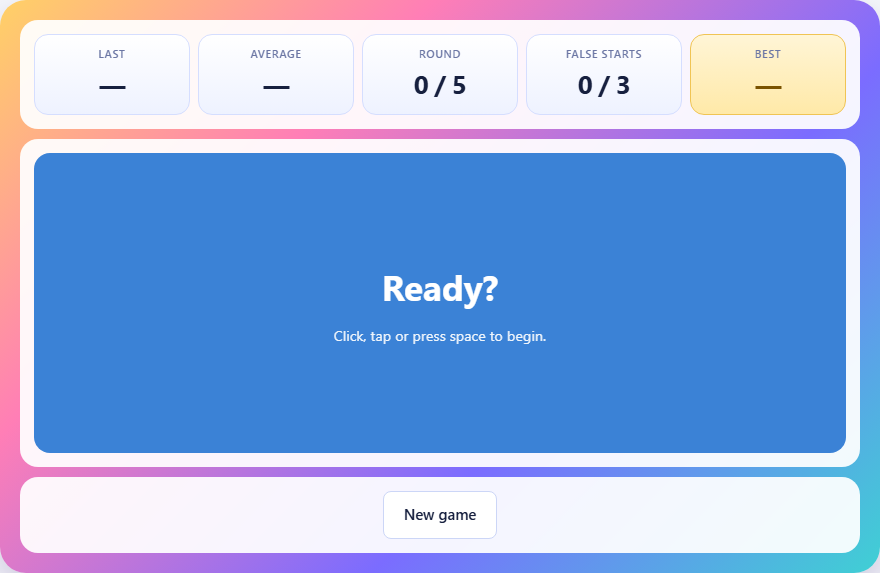
How the test works
A large panel sits in the middle of the page. Click it, tap it, or press the space bar to begin. The panel turns red and a random wait begins. You do not know how long the wait will be. At some point between one and four and a half seconds later, the panel turns green.
The instant it turns green, click again. The page measures the gap between the colour change and your click, in milliseconds. That number is your reaction time for that round.
The test runs five rounds. After all five, the page shows your average. That average is far more reliable than any single round because it smooths out the luck of a blink or a moment of distraction.
Controls and inputs
You can interact with the panel in three ways: click with a mouse, tap on a touchscreen, or press the space bar on a keyboard. All three trigger the same measurement.
There is no difficulty selector for this test. Every round uses the same random delay range, the same scoring, and the same pass mark. The only control is the New game button, which resets your round count and lets you try again.
Scoring and the pass mark
The stats bar shows your last round time, your running average, the current round number out of five, and how many false starts you have made. After five rounds, the page displays a verdict based on your average.
The pass mark is three hundred and fifty milliseconds. That is well above the typical reaction time for a healthy adult, so it catches inattention rather than testing your physical limits. If your average is under the pass mark, the test counts as passed.
Your best average is saved on this device. The game tracks the lowest average you have achieved, and you can try to beat it by pressing New game.
Why the wait is random
If the delay before the green flash were always the same length, you could learn the rhythm and pre-empt it. Your click would land at the moment you expect the change, not the moment you see it. That measures anticipation, not reaction.
The random delay forces genuine surprise. You cannot count down. You cannot feel the rhythm. You have to wait for the visual signal and respond to it. This is what separates a real reaction time measurement from a timing exercise.
The range of one to four and a half seconds is long enough to prevent guessing but short enough that waiting is not boring. Most rounds the change comes within two or three seconds.
What happens when you click too early
If you click while the panel is still red, the round is discarded. The panel turns a warning colour and tells you that you jumped the gun. That round does not count toward your average and you must click again to retry it.
Three false starts end the entire run. This rule exists to stop the strategy of hammering the button repeatedly and waiting for one click to land by chance right after the colour changes. Without this rule, the fastest score on record would belong to a guess, not a reflex.
False starts are tracked on the stats bar so you always know how many you have left. If you find yourself clicking early often, slow down and focus on watching the panel rather than predicting when the change will come.
What counts as a good result
Most adults land between two hundred and three hundred milliseconds. That range covers the vast majority of healthy people testing in normal conditions. Under two hundred milliseconds is genuinely fast and approaches the physical floor of human reaction, which is set by how long the signal takes to travel from the eye to the brain to the finger.
Under one hundred and fifty milliseconds usually means a lucky guess rather than a real reflex. The neural pathway simply does not transmit that fast for a visual stimulus in most people.
Above four hundred milliseconds suggests tiredness, distraction, or unfamiliarity with the test. Trying again after a break often produces a noticeably better number.
How your equipment affects the result
The test measures from the moment the page changes the colour to the moment your input arrives. But between those two events, real hardware introduces delays. A sixty-hertz screen refreshes once every seventeen milliseconds, so the green may be on the panel for up to seventeen milliseconds before you can see it.
A wireless mouse or a touchscreen adds a few more milliseconds of latency between your finger and the browser. A busy computer whose processor is working hard may delay the event handling slightly.
None of this makes the test useless, but it means you should compare your scores against your own past results rather than against someone using a different setup. A person on a fast gaming monitor with a wired mouse will consistently score lower than someone on a slow laptop screen, even if their reflexes are identical.
Tips for getting a better average
Focus only on the panel. Do not look at the stats bar or the rest of the page while waiting. Your peripheral vision is slower than your central vision, so keep your eyes right on the coloured area.
Rest your finger lightly on the mouse button or on the screen so there is no extra travel time. The goal is to reduce every delay between seeing green and registering the click.
Try the test at different times of day. Reaction time is one of the clearest indicators of how alert you are. Morning results and late-night results often differ by fifty milliseconds or more.
- Keep your eyes fixed on the centre of the panel during the red wait.
- Rest your clicking finger lightly on the button so it is ready to fire.
- Do not try to predict the delay. Let the green surprise you.
- Take a break between attempts if your scores are climbing.
- Try the test on different devices to see how much hardware matters.
Common mistakes that inflate your score
The most common mistake is looking away during the wait. The red phase can last up to four and a half seconds, and your attention drifts. By the time the green appears, you are looking at something else and need to shift your gaze back. That adds dozens of milliseconds.
Another mistake is tensing up. A rigid hand is slower than a relaxed one. If you grip the mouse hard and hold your finger stiff, the click takes longer to fire than if your hand is loose and your finger is just resting on the button.
A third mistake is trying the test when you are tired or have been staring at a screen for hours. Reaction time slows measurably with fatigue. If you want your best score, test when you are fresh.
Why five rounds and not one
A single round tells you almost nothing. You might have blinked at the exact wrong moment, or you might have been unusually alert by chance. The difference between your best and worst round in a set of five is often forty to sixty milliseconds.
Averaging five rounds smooths out that noise. The result is stable enough that if you test twice in a row under similar conditions, the two averages will usually be within twenty milliseconds of each other. That is what makes the number useful for tracking changes over time.
This is not a medical test
Reaction time varies with age, tiredness, screen quality, and input device. A web page cannot control any of those factors. If you are genuinely concerned about your reflexes or coordination, speak to a doctor rather than relying on a browser-based test.
The test is a bit of fun and a rough comparison tool. It is good for settling arguments about who is quicker, for noticing how much tiredness slows you down, and for seeing the difference between devices. It is not a diagnosis.
Everything stays on your device
The timing runs entirely inside your browser using a high-resolution clock. No data is sent to any server. Your best average is stored on this device only, in the browser's local storage. There is no account, no login, and no way for anyone else to see your scores. Once the page has loaded, the test works without an internet connection.