
Typing under pressure in the word shooting game
Word Blaster turns typing practice into an arcade game. Words drift down the screen towards a small city, and the only way to stop them is to type them before they land. Each word that reaches the bottom destroys a building, and when every building is gone the game ends. Reach twelve hundred points to win. This guide covers the locking system, the difficulty curve, and the habits that keep the city standing.
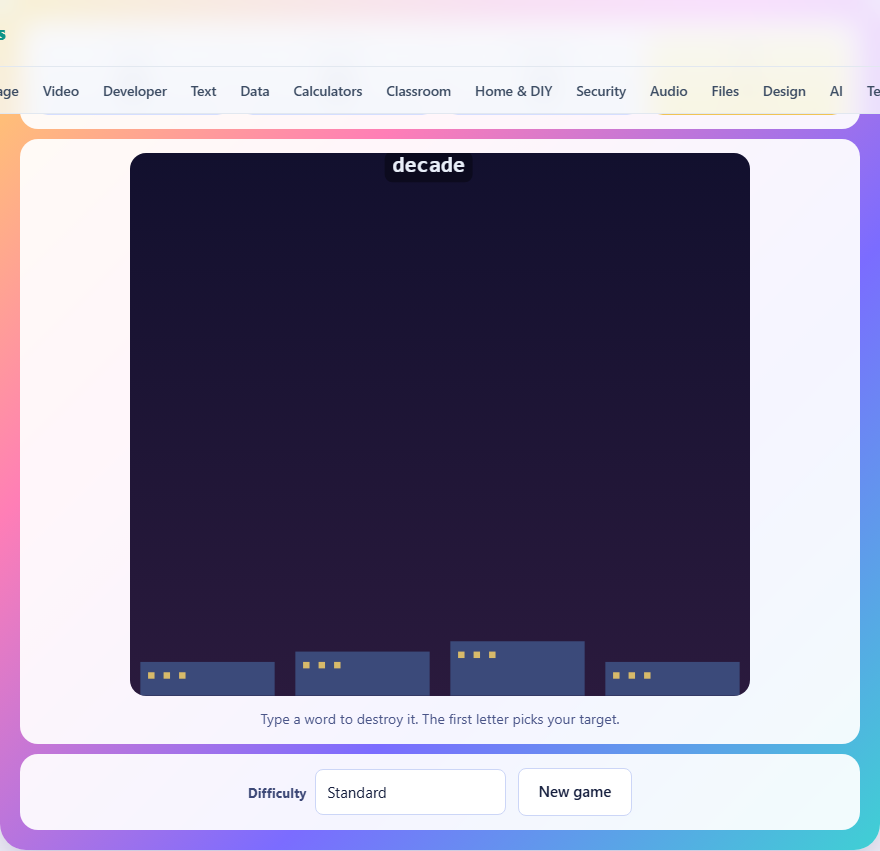
How the game starts and what the screen shows
When you press New game or load the page, a dark skyline appears at the bottom of the canvas. Each building represents one life. The number of buildings depends on the difficulty level. Words begin spawning near the top and drifting downward at a steady pace. Your score, the number of words you have destroyed, and the number of buildings still standing are shown in the stats bar above the game area.
On a desktop, just start typing. On a phone or tablet, tap the game area first so the keyboard opens, and then type normally. There is a hidden text input behind the canvas that captures your keystrokes, so you do not need to click any particular spot.
The locking system explained
The first letter you press picks your target. The game finds the lowest word on screen that starts with that letter and locks onto it. While locked, the letters you have typed so far turn green on the falling word, and every correct next letter extends the green. When the last letter is typed, the word explodes in a burst of sparks and you earn points.
If you press a wrong letter at any point during the lock, the lock breaks immediately. The word keeps falling, and the letters you had typed are cleared. You can start the same word again by pressing its first letter, but you have lost time, and the word is now closer to the ground. This is why accuracy matters more than raw speed.
The first-letter rule and why it works
The game never puts two words on screen that start with the same letter. This is a deliberate design choice that removes all guesswork about which word you are aiming at. When you press the letter S, the only word on screen starting with S is your target. There is no ambiguity, no accidental switch, and no silent miss.
This also means that if no word on screen starts with the letter you press, nothing happens. The keystroke is treated as a miss, the lock stays empty, and you can try a different letter. Watching the screen before you start typing is always worthwhile.
Scoring and the win condition
Every destroyed word earns points equal to its length multiplied by ten. A five-letter word is worth fifty points, and a seven-letter word is worth seventy. The target to win is twelve hundred points. Reaching that total before the last building falls clears the round.
As your score climbs, the game gets harder. Words spawn more often and fall faster, so a good run builds its own pressure. The speed increase is tied to your score rather than to a timer, which means a struggling player faces the same manageable pace while a strong player is always being pushed. This adaptive curve keeps the game tight no matter your skill level.
Difficulty settings and what they change
The Difficulty dropdown offers three levels. Gentle gives you short words of three to five letters, a slow fall speed, a long gap between spawns, and five buildings. Standard uses words of four to seven letters, a faster fall speed, tighter spawning, and four buildings. Fast uses words of five to nine letters, the fastest fall rate, the shortest spawn gap, and only three buildings.
Longer words are worth more points because of the length-times-ten scoring, but they take more keystrokes and leave more room for a mistake. On the Fast setting, a single mistype on a nine-letter word can cost you a building if the word was already near the bottom.
Always type the lowest word first
When several words are falling at once, the natural instinct is to go after the shortest or the one you can spell fastest. The better rule is to always take the word closest to the ground. The lock system already enforces this. When two words share no first letter, you choose freely. But when a choice exists, the word nearest the skyline is the one that will land soonest, and a landed word costs a building regardless of length.
After you clear the lowest word, glance at what is still falling before you start the next one. A brief pause to pick the right target is faster in the long run than finishing a high word while a low one crashes into a building behind your back.
Building accuracy habits
Speed matters, but a mistyped letter costs more than a slow letter ever could. When you mistype, you lose the entire lock, the word keeps falling, and you have to re-type every letter from scratch. Slowing down by even a fraction of a second per keystroke can double the number of words you clear in a round, because you stop losing time to fumbled re-starts.
One way to build accuracy is to read the whole word before you begin typing. Glance at it, register the spelling in your mind, and then type it as a complete unit. This is faster than reading one letter at a time, because your fingers can work ahead of your eyes once the pattern is loaded.
Pay attention to uncommon letter sequences. Words like PHEASANT or RHYTHM trip up typists who rely on muscle memory for everyday words. When you see an unusual spelling, slow down for that word specifically. The few extra tenths of a second cost far less than a broken lock and a full retype.
Using the backspace key
If you press the wrong letter, the lock breaks and you have to start over from the first letter. But if you catch a mistake before the next keystroke, pressing Backspace can help. Backspace removes the last typed letter from your current lock. If you delete all the way back to an empty input, the lock itself is released. This gives you a narrow window to correct a slip without losing the full lock, as long as the wrong key has not already been registered as a mismatch.
On mobile, the same logic applies through the on-screen keyboard's delete key. Tap it quickly after a wrong letter and you may save the lock. In practice, most mistyped letters register as a mismatch before you can react, but knowing about Backspace helps in the rare cases where your finger hovered rather than committed.
Handling the late-game pressure
As your score passes eight hundred or so, words arrive quickly and fall fast. The screen can have four or five words at once. Panic is the enemy here. If you try to type faster than your hands can manage, you will break locks and lose buildings. Instead, keep your rhythm steady and accept that some words will get close to the ground.
When a word is about to land and you are mid-lock on a different one, you have a choice. You can deliberately mistype to break the lock, then race to type the endangered word. This sacrifice play works if the endangered word is short. If it is long, finishing your current lock first is usually safer, because switching costs you at least two keystrokes of overhead.
Common mistakes and how to fix them
The most common mistake is typing a letter before checking what is on screen. If no word starts with that letter, the keystroke is wasted and you have lost a moment of reaction time. A glance at the board before every word saves more time than it costs.
Another frequent error is trying to switch targets mid-word. The lock system does not allow it. Once you are locked onto a word, you must either finish it or mistype to break free. Trying to jump to another word by typing its first letter will count as a wrong letter on your current lock, breaking it and wasting the progress you had made.
Finally, some players ignore the building count. With only one building left, every word that lands ends the game. At that point, it is worth slowing down even further to guarantee each word is typed correctly rather than risking a mistype that costs the last building.
Privacy and how the game runs
The entire game runs inside your browser. No keystrokes or scores are sent to a server. There is no account, and your best score is saved in your browser's local storage on this device only. Once the page has loaded, it works without an internet connection.