
Measuring Your Typing Speed the Right Way
This guide covers what the typing test measures, how the score is worked out, and what you can do to raise your words per minute over the coming weeks.
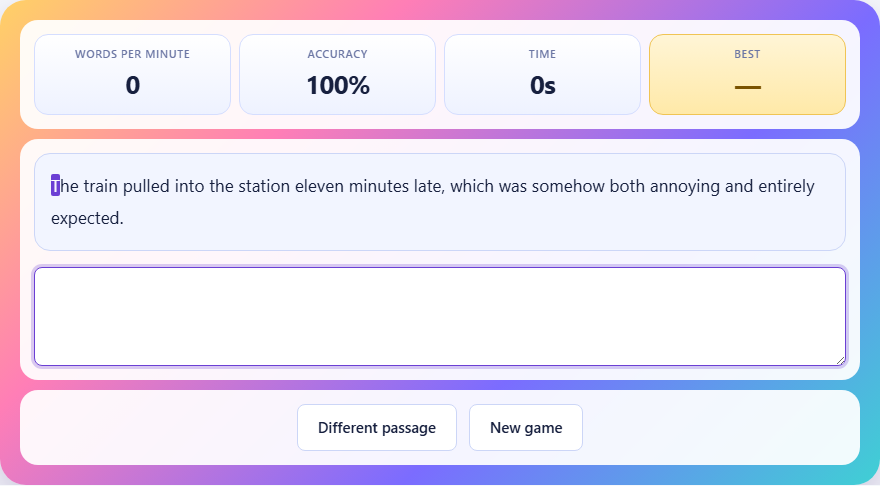
What the test asks you to do
A short passage of ordinary English appears at the top. You click into the box below it, read the words, and start typing. The clock starts the moment you press the first key, not when the page loads. That matters because reading the passage first is free. Nobody is timing how long you spend looking at the words before your fingers move.
Each letter you type is compared to the passage in real time. A correct letter turns green, a wrong one turns red, and the very next character you need is always highlighted. You can press backspace to fix a mistake. Fixing it puts the accuracy back up but costs time, so there is a real trade-off. When you reach the last character of the passage, the test ends on its own. You cannot type past it.
How the score is calculated
Words per minute uses a standard measure that every typing test shares. It does not count real words. Instead, it divides the number of correct characters by five, then divides that by the minutes you spent. Five characters equal one word. That rule exists because counting actual words would reward anyone given short words and penalise anyone given long ones.
The accuracy percentage is simpler. It is the number of correct characters divided by the total characters you typed, shown as a whole number. Both figures update every quarter of a second while you type, so you can see your speed change as you go.
Controls and buttons
There are only two buttons. Different passage gives you a new passage without clearing your best score. New game does the same thing. The passages are short everyday sentences with common words, so they test finger speed rather than vocabulary. There is no way to pick a passage or set your own text. Pasting is blocked and so is dropping text into the box. If either were allowed, a single paste would produce a four-figure speed and write it over your real best, making the saved number useless from that point on.
The Tab key is also caught inside the box. Normally Tab moves focus to the next element on the page, which would pull you out of the test mid-sentence. Here it does nothing, so an accidental press costs you at most a moment of confusion.
The passages and why they use simple words
Every passage is a short everyday sentence built from common vocabulary. You will not find technical jargon, unusual names, or unfamiliar spellings. The reason is that a typing test should measure how fast your fingers move, not how well you can read. A passage full of rare words turns the test into a reading test, because your fingers stall while your eyes work out what comes next.
Each time you press Different passage or start a new game, one passage is chosen at random from a fixed pool. The pool is small enough that you will see repeats after a few rounds. That is deliberate. Repeating a passage lets you compare your speed on the same text across different sessions, which is a cleaner measure of improvement than comparing two runs on different sentences.
What the speed brackets mean
The test gives a brief verdict when you finish. Under thirty words a minute usually means you are still looking at the keyboard between letters. Around twenty-five is about average for someone who has not learned to touch-type. Forty is a solid everyday speed, comfortable enough for email and notes without feeling slow. Sixty is genuinely fast. Above eighty and you are in professional-typist territory, the kind of speed a court reporter or live captioner needs.
The pass mark is forty words a minute with at least ninety percent accuracy. Reaching both earns a green result. Falling short on either one counts as a miss, which matters only for the personal record saved on your device.
Strategy: accuracy before speed
Almost everyone scores higher by slowing down a little. A wrong letter costs you in two ways. It lowers accuracy, which feeds directly into the score, and it forces a choice between pressing on with a red mark or spending time on backspace. Either path loses more than the fraction of a second you would have saved by typing carefully.
If you are below forty, do not chase speed. Type each word at whatever pace lets you hit every letter cleanly, and the speed climbs on its own once your fingers stop pausing to check. The gain from fewer errors is bigger than the gain from faster movement at this stage.
Strategy: stop looking at your hands
This single change does more for typing speed than any other habit. For the first week your speed drops and it feels wrong. By the end of the second week the eyes-on-screen version is already faster than the eyes-on-keyboard one ever was. The reason is simple: when you look down, you lose your place in the passage. Finding it again takes hundreds of milliseconds every time, and those add up to seconds across a full paragraph.
A useful drill is to cover your hands with a cloth while you type here. You will make more mistakes for a few days, but the fingers learn the positions faster when the eyes are not available as a backup.
Strategy: short daily sessions
Typing speed comes from muscle memory. Muscle memory builds through repetition spread across many days, not from one long session. Ten minutes a day for two weeks moves the needle far more than an hour spent all at once. Each short session lays down a thin layer of habit, and the layers stack.
Press Different passage after each run and try three or four passages in a row. That takes roughly five minutes. Do it in the morning before anything else that involves the keyboard, and the rest of the day reinforces what the practice session started.
A worked example from start to finish
Suppose the passage reads: She opened the window and let the cool evening air fill the small room before sitting back down to write. You read it once, notice the capital S at the start and the full stop at the end, and click into the box. Your first keystroke starts the timer. You type steadily, reaching the word evening without a mistake. On the i in air you hit a instead, turning it red. You tap backspace, retype the i correctly, and continue. The slip added about a second.
You finish the passage in fifty-two seconds. The passage has one hundred and three characters. You got one hundred and two correct. The score is one hundred and two divided by five, which is about twenty, divided by fifty-two sixtieths of a minute, which gives roughly twenty-three words per minute. Accuracy is ninety-nine percent. The pass mark needs both forty words per minute and ninety percent accuracy, so the speed fell short but the accuracy was fine. Next time, try to keep the same care but let the fingers flow a little faster.
Common beginner mistakes
Skipping capital letters is the most frequent slip. The passage includes capitals at the start of sentences and proper nouns. Missing one turns the character red and lowers accuracy. Get into the habit of glancing one or two words ahead so the shift key is ready before you reach the capital.
Ignoring punctuation is the second. Commas, full stops, and apostrophes are all part of the passage and must be typed exactly. Leaving them out or putting a space where a comma should be counts as a wrong character each time.
Rushing the last few words is the third. Your speed is an average over the whole passage, so a burst at the end with three errors does not help. A steady pace from start to finish always beats a sprint that falls apart.
Privacy and saved data
The test runs entirely inside your browser. Nothing you type is sent to a server. The only thing stored on your device is your best words-per-minute figure, kept in the browser's local storage so it survives a page refresh. No account, no login, and no data leaves your machine.