
Solving rotating tile puzzles where some joints must disagree
How Tessera works, why barred joints change everything, how the three mosaic sizes differ, and the thinking habits that turn blind tapping into deliberate solving.
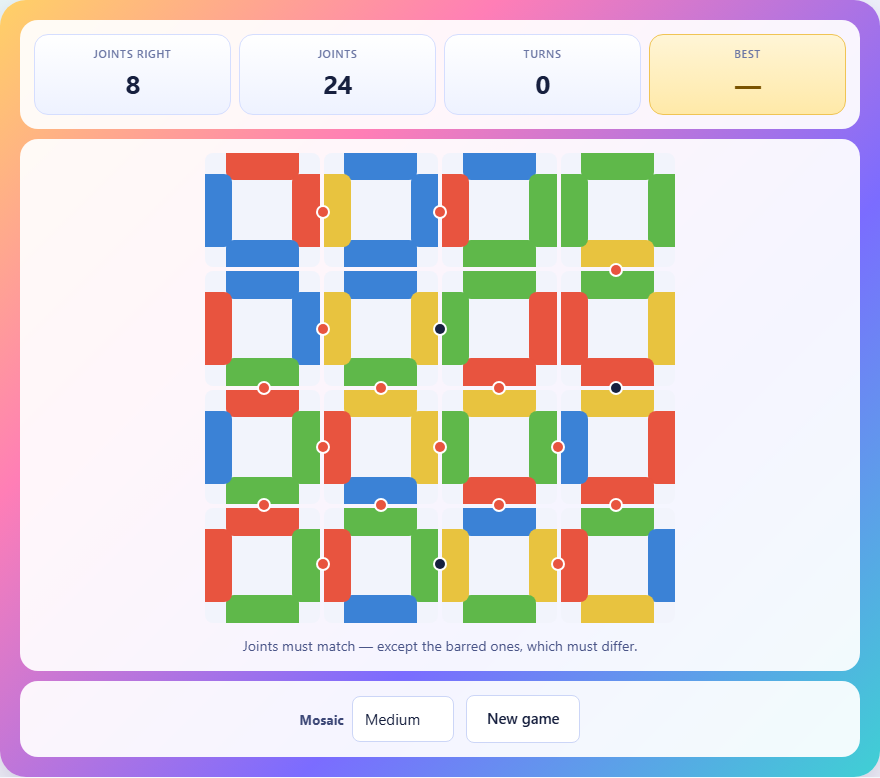
What the mosaic asks of you
Tessera presents a grid of square tiles. Each tile is painted on all four edges using a handful of colours. Where two tiles sit next to each other, the edges they show each other form a joint. Most joints are normal: the two edges must be the same colour. A few joints are barred, marked with a dark dot, and those must be different colours instead.
You cannot move a tile to another square. You can only turn it. Tapping a tile rotates it a quarter turn clockwise. Because all four edges move together, fixing one joint always disturbs the other three. The puzzle is finished when every joint is satisfied and no red dots remain on the board.
Reading the dots
Two kinds of marker sit between tiles. A dark dot means the joint is barred. A red dot means the joint is currently wrong, no matter which kind it is. A normal joint that shows two different colours is wrong. A barred joint that shows two matching colours is also wrong. Both appear as red dots.
When a joint is right, there is no red marker at all. Your goal is a board with zero red dots. The dark dots for barred joints remain visible throughout so you always know which joints need to disagree.
The three mosaic sizes
The Mosaic dropdown offers Small, Medium and Large. Small is a three-by-three grid with two barred joints. Medium is four-by-four with three barred joints. Large is five-by-five with five barred joints.
Small and Medium puzzles are checked during generation to make sure exactly one arrangement of rotations solves them. That means there is no guessing: every piece of information on the board points toward a single answer. The Large board has over a million possible arrangements, so it is guaranteed to be solvable but may have more than one valid solution.
Changing the dropdown or tapping New game creates a fresh puzzle. The stat bar above the board tracks how many joints are currently right, how many joints exist in total, and how many turns you have made.
Controls on any device
Tap or click any tile to rotate it one quarter turn clockwise. There are four possible positions for each tile, and tapping cycles through all four, so nothing is ever out of reach. A short beep confirms each tap. There is no undo button, but since tapping the same tile four times brings it back to where it started, you can always reverse a move.
On a phone, the tiles are large enough to tap with a thumb. On a wider screen, the board fills more space but the interaction stays the same. The outside edges of the mosaic do not matter. Only edges where two tiles meet are judged.
Start from the corners and work inward
A corner tile has only two joints. That means it has the fewest things that can go wrong. An edge tile has three joints and an interior tile has four. By starting at a corner, you face only two constraints instead of four, and you can often lock the corner tile into its correct position with confidence.
Once a corner is settled, move along the edge. Each new tile on the edge shares one joint with the tile you just fixed, so you already know what one of its edges must show. That leaves fewer unknowns. Work along the edges first and then move inward toward the middle of the board, where the tiles are most constrained.
Using barred joints to narrow your choices
A barred joint tells you something very specific: the two edges meeting there must be different. If you know the colour on one side, the other side cannot be that colour. On a board with four hues, that still leaves three options, but combined with the normal joints on the same tile it often leaves only one.
Think of barred joints as forced breaks in a run. A long stretch of tiles that share the same colour along a row wants to agree all the way through. The bar says exactly where the run must stop. If a tile sits between a barred joint and a normal joint, the bar tells you what the tile cannot show on one edge, and the normal joint tells you what it must show on the other. Together they may pin the tile to a single rotation.
When you get stuck, look at the tiles next to barred joints before anything else. They carry the most information.
Tiles with repeated colours are more flexible
A tile whose four edges are all different colours has four genuinely different positions. But a tile with two edges painted the same colour has fewer distinct positions. Rotating it by two quarter turns might produce the same pattern of edges. Those tiles are easier to place because some rotations are interchangeable.
When you identify a tile with repeated colours, notice which rotations produce the same outward appearance. If two positions look the same to neighbouring tiles, you only need to decide between two effective options instead of four. That cuts the work in half for that tile.
Fix the constrained tile, not the settled one
A common trap is to find a wrong joint and immediately turn one of the two tiles sharing it. The question is which one to turn. If one tile already has three of its four joints right, turning it wrecks all that progress. The better choice is to turn the tile that has fewer joints already satisfied.
Before you tap, count the red dots around each of the two tiles at the problem joint. The tile with more red dots is the less settled one. Turning it costs you less because it has less correct work to lose. This habit alone saves many wasted moves.
Common mistakes that cost extra turns
- Tapping tiles at random until the board looks right. Each tap changes four constraints at once, so random turning creates as many new problems as it solves.
- Starting in the middle of the board. Interior tiles have four joints each, making them the hardest to pin down. Start at the corners or edges where constraints are fewer.
- Ignoring the barred joints. The dark dots are easy to overlook if you focus only on red markers. A joint with a dark dot and no red dot is already satisfied. One with both a dark dot and a red dot means the two edges match when they should not.
- Turning a tile that was almost right to fix one remaining joint. Check whether the other tile at that joint is a better candidate to rotate.
- Forgetting that outside edges do not matter. The top edge of a tile in the top row is not checked against anything, so do not waste time trying to match it.
How the puzzle is built behind the scenes
The generator does not scatter random tiles and hope for the best. It lays a finished mosaic first by deciding on a colour for every joint, and then reads each tile off its four surrounding joints. That construction guarantees the mosaic is consistent from the start.
Next, a few joints are marked as barred. For each bar, one of the two tiles at that joint has its edge repainted so the bar is already satisfied in the answer. The tiles are then scrambled by rotating each one a random number of times. If the scramble happens to produce the solved state, the generator re-scrambles. On the smaller boards it also counts solutions and rejects any puzzle with more than one.
Scoring and your best result
The stat bar tracks turns, meaning total taps. Fewer turns is better. When you finish a puzzle, the game records the number of turns and shows your personal best for each mosaic size. A skilled solver on the Small mosaic can finish in under ten turns. The Medium mosaic typically takes between fifteen and thirty, and the Large mosaic varies widely because of its extra barred joints.
There is no time limit and no penalty for pausing. The only measure is turns, so you are rewarded for thinking before tapping rather than tapping to think.
Everything stays on your device
The puzzle generation, the joint checking, and all the board logic run in your browser. Nothing is sent to a server. The page works even with the internet disconnected, and closing the tab is the only cleanup you need.