
Timing, precision and the shrinking tower
How Tower Stack works under the surface, what the perfect-drop window actually forgives, why the first five floors decide everything, and how to push past fifteen when the blocks are flying.
The idea in one sentence
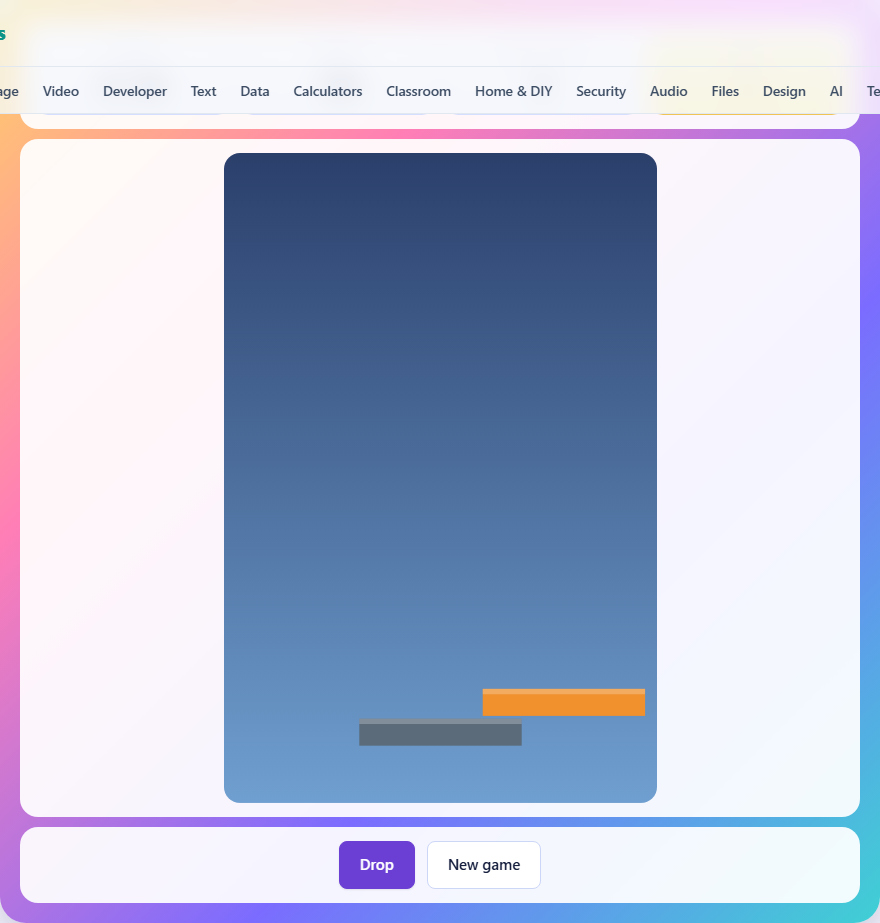
A block slides left and right above a tower. You tap or press space to drop it. Whatever lands on the block below stays; whatever hangs over the edge is sliced off and gone. The tower can only get narrower, never wider, and you need to reach twenty floors before the width runs out.
That single rule, that width can only shrink, is what makes the game self-limiting. A sloppy player burns through the available width in six or seven drops. A careful one can hold it together for all twenty. There is no timer and no life bar because the narrowing tower is both.
Controls and how the drop works
There are three ways to drop: tap or click the canvas, press the space bar, or press the Drop button below the board. All three do the same thing at the same instant, so pick whichever feels most natural. On a phone the canvas fills most of the screen, making a tap the obvious choice. On a keyboard the space bar keeps your hands out of the way of the picture.
When you drop, the game measures the overlap between the moving block and the top of the tower. If the moving block is to the left, the right side is sliced off. If it is to the right, the left side goes. The new block that joins the tower has only the overlapping width, and the next moving block will be exactly that wide. A dotted guide line drops from the left edge of the moving block, which is the landmark to line up against the tower.
The perfect-drop window
If you land within about three pixels of dead centre, the game counts it as perfect. The overhang is forgiven entirely, the tower keeps its full width, and the perfect drops counter ticks up. Without that small tolerance the game would be decided by pixel luck rather than timing, and a clean run of twenty would be almost impossible.
You can hear the difference. A perfect drop plays a high triangle-wave tone. A normal drop plays a lower, shorter sound. A miss, where the block does not overlap at all, plays a harsh buzz and ends the game. Listening for the tone is a surprisingly good way to tell how you are doing without looking at the width counter.
Speed and how it climbs
The block starts at a gentle speed, a little over two pixels per frame. Every floor you add pushes the speed up by a fraction, and by the fifteenth floor the block is moving nearly three times as fast as it started. The cap is six pixels per frame, which is fast enough that the block crosses the full board in well under a second.
The speed increase is the second pressure besides the narrowing width. In the early floors, the block glides slowly enough that lining up the guide line is almost leisurely. By the later floors it whips across the screen, and the time you have to react after it passes the right spot shrinks to a sliver. The two pressures compound: a narrow tower at high speed is vastly harder than a narrow tower at the starting pace.
Strategy for the first five floors
The opening floors are where the game is won or lost. The block starts at 120 pixels wide. Every pixel lost in the first five drops is a pixel you will never have again, and a narrower tower makes every later drop harder because the margin for error shrinks with it.
Focus entirely on perfect drops for floors one through five. The block is moving slowly and the target is wide, so there is no excuse for sloppiness here. Even one careless drop that chops twenty pixels off leaves you with a tower of 100, and from there the gap between a good drop and a miss is already noticeably tighter.
The guide line is your main tool. Watch it, not the block. It shows the left edge falling against the left edge of the tower below, and lining up one line against another is far easier for your eye than judging the full width of two rectangles.
Strategy in the middle and late game
By floor ten the block is moving at roughly double its starting pace. At this point, trying to track the guide line across the whole width and timing a single moment is harder than using a rhythm.
Watch the block bounce off one side and start travelling back. Count the rhythm of the bounce, and drop at a consistent delay after the turn. The block always starts from the edge, so the timing from the wall to the centre is predictable even as the speed changes, because your eye picks up the tempo without thinking about it.
In the last five floors, the block may be thin enough that a single imperfect drop ends the game. A block that has shrunk below twelve pixels is declared too narrow to build on, and the game stops. This means that from about floor sixteen onward you need every drop to either be perfect or only shave off a pixel or two. If you have kept the tower at eighty or ninety pixels wide through careful early play, this is achievable. If you let it slip to forty, the odds are against you.
How scoring and best scores work
Your score is the number of floors you reach, out of twenty. Reaching twenty is a win, and the game reports the width of your top block along with how many perfect drops you managed. Falling short reports how many floors you reached before the tower ran out of width or the block missed entirely.
The best score is saved in your browser on this device and shown the next time you play. It is never sent anywhere and will not follow you to a different browser or computer. Clearing your browser data resets it.
Common mistakes that end a run early
Watching the block instead of the guide line is the most common one. The block is a fat rectangle and your brain tries to centre it, but the edge is what matters, and the guide line shows it.
Dropping too late after the block has passed the sweet spot is more common than dropping too early. Most people wait until they are sure and then tap, but by that point the block has moved several pixels. If anything, err slightly early.
Ignoring the speed increase catches new players off guard around floor eight or nine. They have been dropping at a comfortable pace and suddenly the block is moving faster than they expected. The fix is to watch the first couple of bounces on each new floor before committing, so your eye adjusts to the new tempo.
Tapping the Drop button on a phone instead of the canvas costs a fraction of a second while your thumb travels down to the button. On a phone, tap the canvas directly. The whole playing area responds to a touch, so there is no need to aim for a particular spot.
Reading the board and the stats bar
Three figures sit above the board. Floors shows your progress as a count out of twenty. Width shows the current pixel width of the top of your tower, starting at 120. Perfect drops counts how many times you landed inside the three-pixel tolerance. Together they tell you everything you need to decide whether the current run is in good shape or heading for trouble.
The board itself scrolls downward as the tower grows, keeping the top of the stack in view. You never need to worry about the picture running off the top of the screen. The sky gradient behind the tower shifts from a light blue at the bottom to a dark blue at the top, so the visual context changes as you climb and you can feel the height without counting.
What happens on your device and nowhere else
The entire game runs inside the page. There is no server call when you drop a block, no upload of your score, and no account to sign into. The canvas draws its frames locally, the sound plays locally, and the best-score figure lives in your browser storage. Load the page, disconnect from the network, and everything still works exactly the same way. For a quick break between tasks, closing the tab is all the cleanup there is.