
Write the whole program first and then watch it go wrong
Why you cannot steer the robot once it starts, how the four instructions work, what the three grid sizes change, and the thinking habits that light every tile without wasting a run.
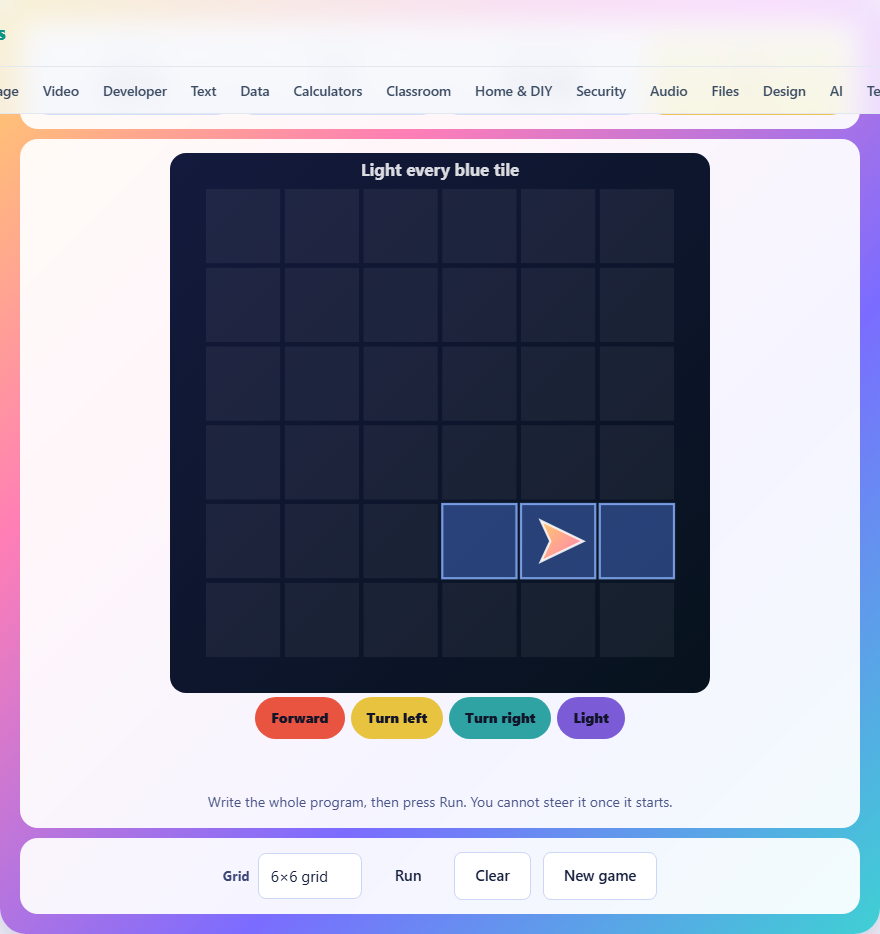
What the game asks you to do
A grid of tiles appears with some of them marked in blue. A robot sits on one tile, facing one direction. Your job is to write a list of instructions that will make the robot walk over every blue tile and light it. The catch is that you cannot steer the robot while it moves. You write the whole program first, press Run, and watch it carry out your instructions from start to finish with no way to step in.
If the robot lights every blue tile in a single run, you win. If it misses any, walks off the edge, or you run out of attempts, the game is over.
The four instructions
You have exactly four commands to work with. Forward moves the robot one square in the direction it is facing. Turn left rotates the robot ninety degrees to its left without moving it. Turn right rotates it ninety degrees to its right. Light marks the tile the robot is currently standing on.
Tap an instruction button to add it to the end of your program. The instructions appear as a strip of chips below the grid. Tap any chip in the strip to remove that instruction. The Clear button wipes the whole program. You build the list step by step, and you can edit it freely before you press Run.
There is a limit on how many instructions you can write in a single program. The limit depends on the grid size. You do not need to use all the slots, and your program does not need to be the shortest possible solution. Any sequence that lights every blue tile wins.
Controls and interface
The game is entirely tap or click based. Tap the instruction buttons to build your program. Tap a chip in the strip to delete it. Press Run to start the robot. Press Clear to erase the strip. Press New Game to generate a fresh puzzle. There is no keyboard shortcut for the instructions because the game is about planning, not speed.
While the robot is running, each instruction is highlighted in the strip as it executes. The robot animates across the grid so you can see exactly where it goes and where it turns. A counter at the top of the grid shows which instruction is being carried out. Watching the replay carefully is how you debug a failed attempt.
Three grid sizes
A dropdown next to the game area lets you pick between three sizes. The five-by-five grid offers twelve instruction slots and five runs. The six-by-six grid gives you sixteen slots and five runs. The seven-by-seven grid allows twenty-two slots but only four runs.
Larger grids have more blue tiles to visit and longer paths to plan. The extra instruction slots match the longer routes, but the paths twist more and the chances for a wrong turn multiply. The seven-by-seven grid cutting you down to four runs means each failed attempt costs more.
Changing the grid size starts a new puzzle. Each puzzle is generated fresh by running a random program on an empty grid and recording which tiles it lights. That means every puzzle has at least one solution by design.
Why left and right cause trouble
The most common mistake is confusing your left and right with the robot's left and right. When the robot is facing away from you, its left matches yours. When it is facing towards you, they are swapped. When it is facing sideways, left becomes up or down depending on the direction.
This confusion is where most runs are wasted. A single wrong turn early in the program throws off every instruction that follows. The robot ends up on a completely different path, misses tiles, and eventually walks off the edge or lights the wrong squares.
The fix is to think from the robot's point of view rather than your own. Imagine you are standing on the grid facing the same direction the robot faces. Point with your finger in the direction it is heading, then decide which way to turn. Building this habit takes a few puzzles, but it eliminates the most expensive class of errors.
Walk the route before you write it
The single best practice is to trace the entire route with your finger before you tap a single instruction. Start at the robot's position. Move your finger forward along the path you want, and at each turn say out loud whether the robot needs to go left or right. Count the forward steps between each turn.
After you have traced the route, writing the instructions is a matter of entering the moves you already know. Forward three, turn right, forward two, light, forward one, turn left, and so on. This approach takes longer at the start but almost always produces a correct program on the first or second run.
Skipping the trace and guessing at the instructions is how runs get burned. A guess that is wrong by one forward step means every instruction after it lands in the wrong place.
Choosing which tiles to visit first
You do not have to visit the blue tiles in any particular order. The puzzle only cares that all of them end up lit at the end of the run. This gives you freedom to pick a route that minimises turns and retracing.
Look for tiles that sit in a line. A row of three blue tiles along a column can be lit with three forwards and three lights, using no turns at all. Clusters near the edges are riskier because a single extra forward step sends the robot off the grid.
When two groups of tiles are separated by empty space, plan the transition carefully. Count the empty squares between them and note which direction the robot will be facing when it arrives. A group that looks close on the grid can be far away in instruction count if reaching it requires several turns.
Common mistakes and how to avoid them
- Confusing left and right when the robot faces you. Always think from the robot's perspective.
- Miscounting forward steps. One step too many walks off the grid and ends the run.
- Forgetting to insert a Light instruction. The robot walks over a blue tile but you never told it to light it.
- Editing the middle of the program without checking the rest. Removing one instruction shifts everything after it.
- Using all your runs on small fixes instead of tracing the whole route from the start.
Using your runs wisely
Your first run is the most important. Trace the route carefully and try to get it right. If the first run fails, watch the replay closely. Note which instruction went wrong by looking at the highlighted chip. The robot's actual path shows you exactly where the program stopped matching your plan.
After a failed run, do not scrap the whole program. Often only one or two instructions need changing. Remove the wrong one, insert the correction, and run again. Small edits are faster and less error-prone than rebuilding from scratch.
On the seven-by-seven grid you only get four runs. Treat the first run as your serious attempt and keep at least two runs in reserve for fixes.
Scoring
When you solve the puzzle, the game reports how many instructions your program used and how many runs you had left. Fewer instructions and more remaining runs are both good signs, but any solution that lights every tile counts as a win.
Your best result is saved in your browser on your device. It is never sent anywhere and does not follow you to another machine or browser. There is no leaderboard and no global ranking.
No data leaves your device
The grid, the robot, the program execution and the puzzle generator all run inside this page. Nothing is uploaded, there is no account, and once the page has loaded the game works without an internet connection. Your best score is stored in your browser's local storage on your own device. You can verify this by loading the page and then disconnecting.