
How to master Beat Tap and clear the track
Beat Tap is a rhythm game stripped down to its essentials. Notes fall down four lanes, you hit each one as it crosses the line, and the game grades your timing. Land forty notes before you miss ten and the track is cleared. There is no music to memorize, no complex patterns to decode, just your reflexes against a stream of beats at whatever speed you choose. This guide covers every rule, the controls, how scoring and grades work, and the practice habits that turn misses into a reliable run.
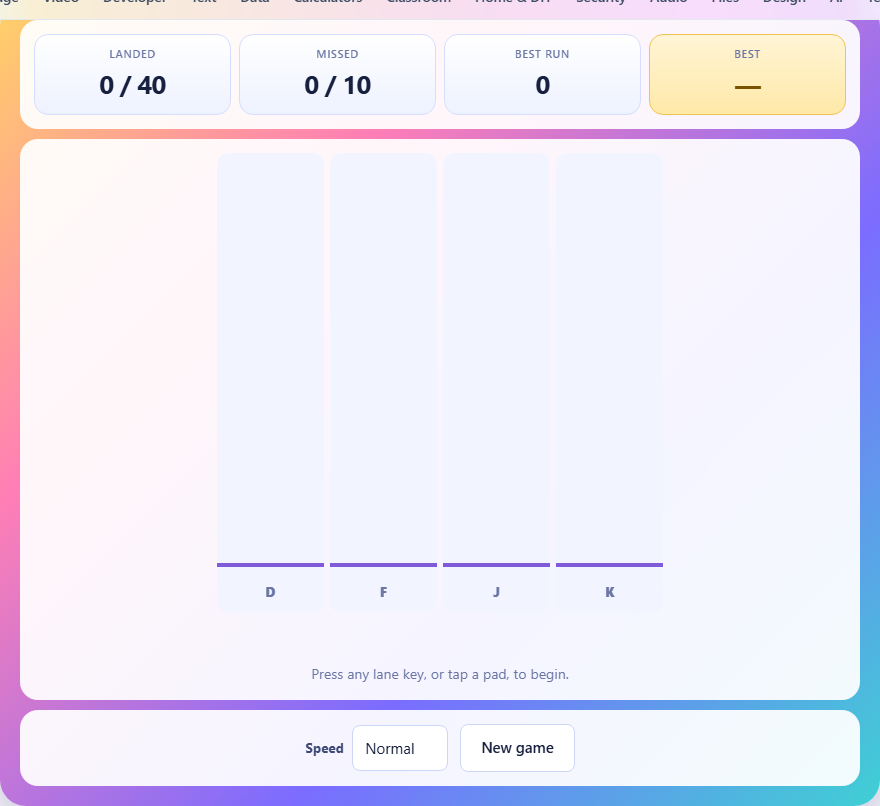
The four lanes and how notes arrive
The play area is divided into four vertical lanes. Notes appear at the top and fall toward a line near the bottom. Each note belongs to one lane and arrives on a fixed schedule measured from the moment you start. The schedule is tied to the clock rather than to the screen's refresh rate, so a slow frame or a brief stutter never shifts the chart out of time.
On the Easy setting, a new note spawns every seven hundred milliseconds. Normal shortens the gap to five hundred and twenty. Hard brings it down to three hundred and eighty, which means notes come nearly twice as fast as on Easy. The lane each note falls into is random, so there is no fixed pattern to memorize. Every round is a fresh test of reaction time.
Notes take about one and a half seconds to fall from the top of the lane to the hit line. That fall time is the same across all speeds. What changes between levels is only how often a new note appears. On Hard, a second note is already partway down the screen before you have finished pressing for the first one, which is what makes it feel relentless.
Controls on keyboard and touchscreen
On a keyboard, the four lane keys are D, F, J, and K, reading left to right. These keys sit naturally under your index and middle fingers when your hands rest on the home row, so no reaching is needed. On a phone or tablet, tap the lane pad directly. Each pad is wide enough to hit comfortably with a thumb.
The game does not begin until you press any lane key or tap a pad. This gives you time to settle your fingers and read the instructions before the first note starts falling. Once you press, the clock starts and notes begin spawning immediately.
Timing grades and what decides them
Every note you hit is graded by how close your press was to the moment the note crossed the line. If the gap is under about fifty-five milliseconds, you get a Perfect. Under a hundred and ten milliseconds earns a Good. Anything up to a hundred and ninety is an OK. Beyond that, the note counts as missed.
Each grade plays a different pitch so you can hear your accuracy without watching the text. A Perfect plays a high note, a Good plays a middle note, and an OK plays a lower tone. After a few rounds, your ears learn to tell you when your timing drifts before your eyes do. This audio feedback is one of the fastest ways to improve.
Runs, misses, and the win condition
Your run is the number of notes you have hit in a row without a miss. Hitting an empty lane or letting a note pass the line both break the run and reset it to zero. The best run you reach during the round is tracked in the stats bar and used as your score if you win.
You need to land a total of forty notes to clear the track. If you miss ten before reaching forty, the game ends. A miss happens either when a note passes the line without being hit, or when you press a lane that has no note near the line. Both cost you one of your ten allowed misses and break your current run.
The game spawns enough notes so that both outcomes are possible. If you hit every note perfectly without a single miss, the round ends quickly with a perfect run of forty. If you miss some and hit others, the chart keeps spawning new notes until either your hit count reaches forty or your miss count reaches ten, whichever comes first.
Keeping your fingers still
The single biggest improvement most players can make is to stop moving their hands. D, F, J, and K are already under your fingers if you sit on the home row. Lifting a finger to reach a key and then returning it takes more time than the gap between two notes on Hard. Players who move their hands between lanes miss more because the travel time eats into the timing window.
Rest your fingers lightly on all four keys at once and press down only the one you need. The motion is a tap, not a reach. Keeping the other three fingers in contact with their keys means the next press is always instant, no matter which lane the next note falls into.
Reading ahead without rushing
New players tend to fixate on the note that is about to cross the line. This works at slow speeds but breaks down on Normal and Hard, where the next note is already halfway down the screen by the time you press. A better habit is to let your eyes sit a little above the hit line so you see what is coming one note ahead.
Reading ahead does not mean pressing early. The timing window is centered on the moment the note reaches the line, so an early press outside the window counts as hitting an empty lane and breaks your run. Read ahead with your eyes and wait with your fingers. The goal is to know which finger to press before the note arrives, not to press it before it gets there.
Why mashing all keys does not work
It might seem clever to press all four keys whenever a note appears, guaranteeing a hit on the right lane. The game counters this by treating a press on an empty lane as a miss of your run. If a note is in lane two and you press all four, you hit lane two but also hit three empty lanes, which resets your run to zero.
Since the best run is your score, mashing destroys your score even if you land every note. The game rewards precision, not coverage. One clean press on the right lane builds a run of forty and wins the game with the highest possible score.
There is also a subtler cost. Pressing an empty lane does not count as a miss toward your ten, but it does reset your run counter. If you had built a run of thirty-five and then mashed once, all thirty-five are gone from your best-run score. The note itself still counts as landed, but the run that made it valuable is broken.
Common mistakes and how to fix them
The most common mistake is watching the judgement text instead of the notes. When Perfect or Good flashes on screen, your eyes jump to it and you lose sight of the next note. Train yourself to ignore the text and listen to the pitch instead. The sound tells you everything the text does without pulling your gaze away from the lanes.
Another mistake is starting on Hard before you are comfortable on Normal. The gap between notes on Hard is about three hundred and eighty milliseconds, which is barely enough time to process one lane and move to the next. If you cannot clear Normal with a run of fifteen or more, stay there until the timing feels automatic. Speed is built on clean habits, not on rushing.
A third error is tensing your hands. Tight muscles slow your reaction time and tire your fingers. Keep your hands relaxed, your wrists flat, and your presses light. You only need enough force to trigger the key, not to hammer it.
On a phone, the equivalent mistake is holding the device too tight. A firm grip tenses the thumbs and slows them down. Hold the phone loosely and tap the pads gently. The touch target is wide enough that you do not need to aim carefully, so the lighter and faster your taps are, the more notes you will catch on time.
Privacy and how the game runs
The whole game runs inside your browser on your own device. Nothing is uploaded, there is no account to create, and your best run is stored in local storage on this device only. It will not follow you to another browser or computer. Once the page has loaded, you can turn off your internet connection and the game will keep working without any difference.